editor
即富文本编辑器,可以对图片、文字进行编辑。
编辑器导出内容支持带标签的 html和纯文本的 text,编辑器内部采用 delta 格式进行存储。
通过setContents接口设置内容时,解析插入的 html 可能会由于一些非法标签导致解析错误,建议开发者在小程序内使用时通过 delta 进行插入。
富文本组件内部引入了一些基本的样式使得内容可以正确的展示,开发时可以进行覆盖。需要注意的是,在其它组件或环境中使用富文本组件导出的html时,需要额外引入这段样式,并维护的结构。
图片控件仅初始化时设置有效。
相关属性: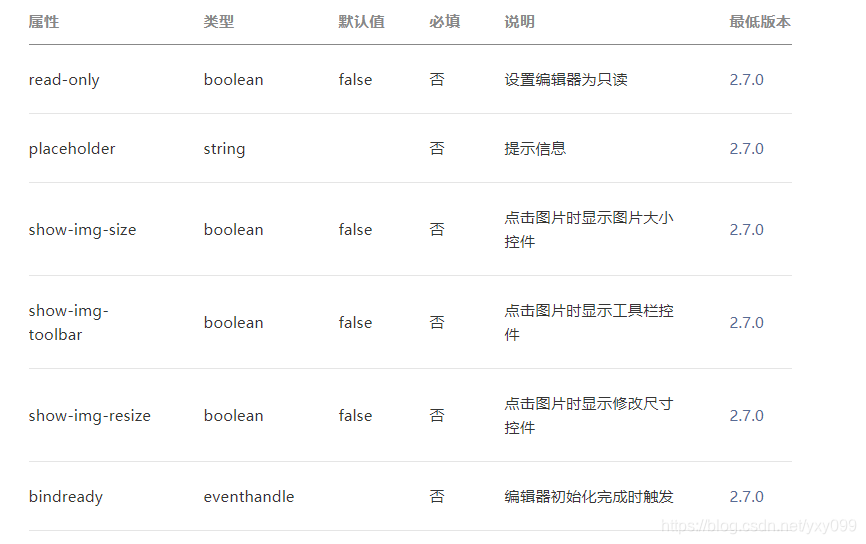
支持的标签: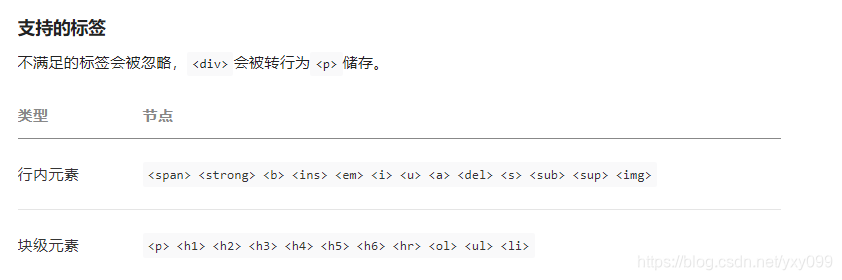
支持的内连样式: 学习代码如下:
editor.js
Page({
data: {
formats: {},
readOnly: false,
placeholder: ‘开始输入…’,
editorHeight: 300,
keyboardHeight: 0,
isIOS: false
},
readOnlyChange() {
this.setData({
readOnly: !this.data.readOnly
})
},
onLoad() {
const platform = wx.getSystemInfoSync().platform
const isIOS = platform === ‘ios’
this.setData({ isIOS})
const that = this
this.updatePosition(0)
let keyboardHeight = 0
wx.onKeyboardHeightChange(res = {
if (res.height === keyboardHeight) return
const duration = res.height 0 ? res.duration * 1000 : 0
keyboardHeight = res.height
setTimeout(() = {
wx.pageScrollTo({
scrollTop: 0,
success() {
that.updatePosition(keyboardHeight)
that.editorCtx.scrollIntoView()
}
})
}, duration)
})},
updatePosition(keyboardHeight) {
const toolbarHeight = 50
const { windowHeight, platform } = wx.getSystemInfoSync()
let editorHeight = keyboardHeight 0 ? (windowHeight - keyboardHeight - toolbarHeight) : windowHeight
this.setData({ editorHeight, keyboardHeight })
},
calNavigationBarAndStatusBar() {
const systemInfo = wx.getSystemInfoSync()
const { statusBarHeight, platform } = systemInfo
const isIOS = platform === ‘ios’
const navigationBarHeight = isIOS ? 44 : 48
return statusBarHeight + navigationBarHeight
},
onEditorReady() {
const that = this
wx.createSelectorQuery().select(’#editor’).context(function (res) {
that.editorCtx = res.context
}).exec()
},
blur() {
this.editorCtx.blur()
},
format(e) {
let { name, value } = e.target.dataset
if (!name) return
// console.log(‘format’, name, value)
this.editorCtx.format(name, value)
},
onStatusChange(e) {
const formats = e.detail
this.setData({ formats })
},
insertDivider() {
this.editorCtx.insertDivider({
success: function () {
console.log(‘insert divider success’)
}
})
},
clear() {
this.editorCtx.clear({
success: function (res) {
console.log(“clear success”)
}
})
},
removeFormat() {
this.editorCtx.removeFormat()
},
insertDate() {
const date = new Date()
const formatDate = ${date.getFullYear()}/${date.getMonth() + 1}/${date.getDate()}
this.editorCtx.insertText({
text: formatDate
})
},
insertImage() {
const that = this
wx.chooseImage({
count: 1,
success: function (res) {
that.editorCtx.insertImage({
src: res.tempFilePaths[0],
data: {
id: ‘abcd’,
role: ‘god’
},
width: ‘80%’,
success: function () {
console.log(‘insert image success’)
}
})
}
})
}
})
editor.json
{
“navigationBarTitleText”: “发表文章”,
“disableScroll”: true
}
**editor.wxml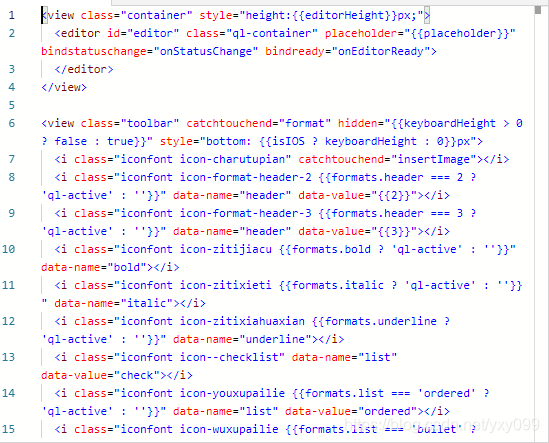
editor.wxss
@import “…/common/lib/weui.wxss”;
@import “./assets/iconfont.wxss”
.container {
position: absolute;
top: 0;
left: 0;
width: 100%;
}
.ql-container {
box-sizing: border-box;
width: 100%;
height: 100%;
font-size: 16px;
line-height: 1.5;
overflow: auto;
padding: 10px 10px 20px 10px;
border: 1px solid #ECECEC;
}
.ql-active {
color: #22C704;
}
.iconfont {
display: inline-block;
width: 30px;
height: 30px;
cursor: pointer;
font-size: 20px;
}
.toolbar {
box-sizing: border-box;
padding: 0 10px;
height: 50px;
width: 100%;
position: fixed;
left: 0;
right: 100%;
bottom: 0;
display: flex;
align-items: center;
justify-content: space-between;
border: 1px solid #ECECEC;
border-left: none;
border-right: none;
}
foot.wxml

head.wxml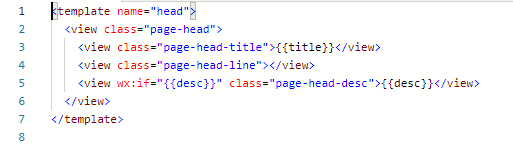
index.wxml
.index-hd {
padding: 80rpx;
text-align: center;
}
.index-bd {
padding: 0 30rpx 40rpx;
}
.index-ft {
padding-bottom: 20rpx;
text-align: center;
}
.index-logo {
width: 86rpx;
height: 86rpx;
}
.index-desc {
margin-top: 20rpx;
color: #888888;
font-size: 28rpx;
}
.navigator-box {
opacity: 0;
position: relative;
background-color: #FFFFFF;
line-height: 1.41176471;
font-size: 34rpx;
transform: translateY(-50%);
transition: .3s;
}
.navigator-box-show {
opacity: 1;
transform: translateY(0);
}
.navigator {
padding: 20rpx 30rpx;
position: relative;
display: flex;
align-items: center;
}
.navigator:before {
content: " ";
position: absolute;
left: 30rpx;
top: 0;
right: 30rpx;
height: 1px;
border-top: 1rpx solid #D8D8D8;
color: #D8D8D8;
}
.navigator:first-child:before {
display: none;
}
.navigator-text {
flex: 1;
}
.navigator-arrow {
padding-right: 26rpx;
position: relative;
}
.navigator-arrow:after {
content: " ";
display: inline-block;
height: 18rpx;
width: 18rpx;
border-width: 2rpx 2rpx 0 0;
border-color: #888888;
border-style: solid;
transform: matrix(0.71, 0.71, -0.71, 0.71, 0, 0);
position: absolute;
top: 50%;
margin-top: -8rpx;
right: 28rpx;
}
.kind-list-item {
margin: 20rpx 0;
background-color: #FFFFFF;
border-radius: 4rpx;
overflow: hidden;
}
.kind-list-item:first-child {
margin-top: 0;
}
.kind-list-text{
flex: 1;
}
.kind-list-img {
width: 60rpx;
height: 60rpx;
}
.kind-list-item-hd {
padding: 30rpx;
display: flex;
align-items: center;
transition: opacity .3s;
}
.kind-list-item-hd-show {
opacity: .2;
}
.kind-list-item-bd {
height: 0;
overflow: hidden;
}
.kind-list-item-bd-show {
height: auto;
}
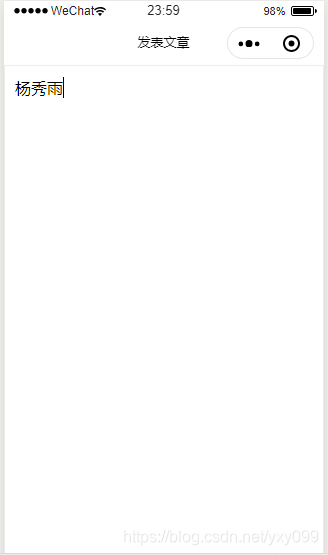
编译后如图: 可以输入文本: