


先上图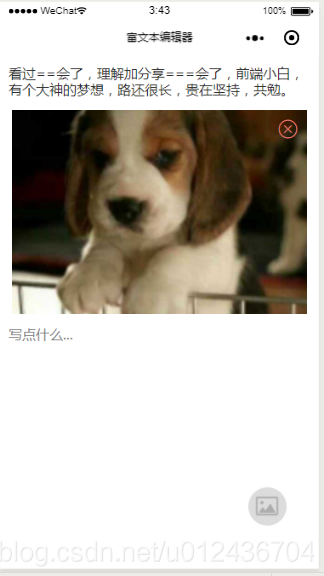
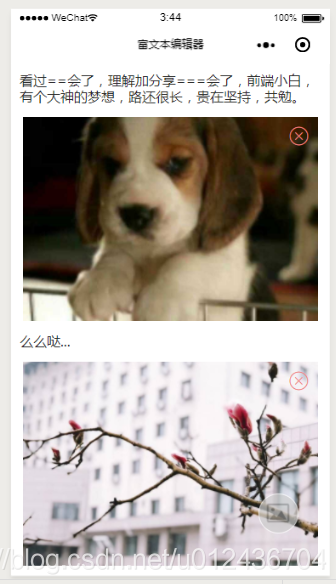
主要实现以下功能:
**1. 富文本编辑,图文混排
- 图片添加原则上可以无限,demo做了限制,最多四张
- 删除图片,图片上下文字合并**
先分析原理,小程序中需要的并不是复杂的图文编辑器,来编辑负责的文字样式,只需要实现图文混排的编辑和展示即可,所以结构如下图: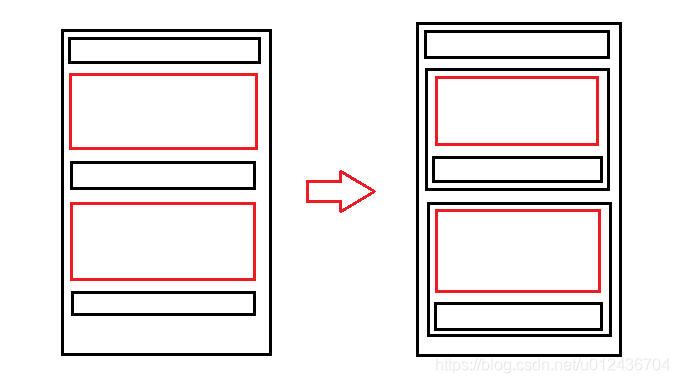
- 黑色的最外框代表编辑区域
- 黑色的小格子代表文本区域
- 红色格子代表图片
- 右边是对左边进行的一个合并,根据规律,每个图片下面都会跟着一个文本编辑区域(当没有文字时为不可见),所以文本编辑器变成了最上面一个文本编辑框,后面动态的跟着图文组合。
这就是整个的结构,下面来进行实现:
richtest.xwml
view class='toWrite' bindtap='addImg' image src='../image/album.png' style='width:60rpx;height:60rpx;margin-left:15rpx;margin-top:15rpx;' //viewview textarea class='input_view' maxlength='-1' auto-height='true' bindinput='inputCon' style='width:{{width-20}}px;' value='{{firstCon}}' placeholder='写点什么...' bindblur="outBlur" id='0' / view wx:for="{{dataList}}" style='background-color:white;' view class='img_view' style='width:{{width-28}}px;max-height:{{width-28}}px;' image style='width:{{width-28}}px;max-height:{{width-28}}px;' src='{{item.pic}}' mode='aspectFill' / view icon type='cancel' bindtap='deletedImg' data-index='{{index}}' size='25' color='#ef8383' style='width:25px;height:25px;margin-left:-35px;margin-top:10px;'/icon /view /view textarea class='input_view' maxlength='-1' auto-height='true' bindinput='inputCon' style='width:{{width-20}}px;' value='{{item.value}}' placeholder='写点什么...' bindblur="outBlur" id='{{index+1}}' / /view view style='height:45px;width:100%;'/view/viewrichtext.js
var Utils = require('../../utils/util.js')var app = getApp()var list = []Page({ data: { content: '', height: 500, width: 320, imgIndex: 0, imageLength: 0, firstCon: '', dataList: [], }, onLoad: function (options) { let that = this }, onShow: function (e) { var that = this; //动态获取屏幕尺寸 wx.getSystemInfo({ success: function (res) { that.setData({ height: res.windowHeight, width: res.windowWidth, }) }, fail: function (res) { }, complete: function (res) { }, }) }, /** * 输入监听 */ inputCon: function (e) { let that = this; if (0 === e.currentTarget.id - 0) {//第一个文本框的输入监听 that.data.firstCon = e.detail.value; } else { that.data.dataList[e.currentTarget.id - 1].value = e.detail.value; } }, /** * 失去焦点监听 * 根据失去监听的input的位置来判断图片的插入位置 */ outBlur: function (e) { let that = this; that.data.imgIndex = e.currentTarget.id - 0; }, /** * 添加图片 */ addImg: function () { var that = this; //这里考虑到性能,对于图片张数做了限制 if (that.data.dataList.length = 4) {//超过四张 wx.showModal({ title: '提示', content: '最多只能添加四张图片哦', confirmText: "我知道了", confirmColor: "#ef8383", showCancel: false, success: function (res) { if (res.confirm) { } else if (res.cancel) { } } }) } else {//添加图片 wx.showActionSheet({ itemList: ['从相册选择', '拍照'], itemColor: '#ef8383', success: function (res) { var choseType = res.tapIndex == 0 ? "album" : res.tapIndex == 1 ? "camera":""; if (choseType != "") { wx.chooseImage({ sizeType: ['original'],//原图 sourceType: [choseType], count: 1,//每次添加一张 success: function (res) { var info = { pic: res.tempFilePaths[0],//存储本地地址 temp: true,//标记是否是临时图片 value: '',//存储图片下方相邻的输入框的内容 } that.data.dataList.splice(that.data.imgIndex,0,info);//方法自行百度 that.setData({ dataList: that.data.dataList, }) } }) } }, fail: function (res) { console.log(res.errMsg) } }) } }, /** * 删除图片 */ deletedImg: function (e) { let that = this; let index = e.currentTarget.dataset.index; wx.showActionSheet({ itemList: ['删除图片'], success: function (res) { if (res.tapIndex === 0) {//点击删除图片 if (index === 0 && that.data.dataList[index].value != null) {//删除第一张,要与最上方的textarea合并 that.data.firstCon = that.data.firstCon + that.data.dataList[index].value; } else if (index 0 && that.data.dataList[index].value != null) { that.data.dataList[index - 1].value = that.data.dataList[index - 1].value + that.data.dataList[index].value; } that.data.dataList.splice(index, 1); that.setData({ firstCon: that.data.firstCon, dataList: that.data.dataList }) } }, fail: function (res) { console.log(res.errMsg) } }) }, //失败警告 do_fail: function (a) { wx.showToast({ title: a, icon: 'none', duration: 1000 }) },})比较简单,有问题可以留言讨论呀
欢迎体验小程序,私密日记,情书、投稿均使用富文本
附上demo
小程序交流群人数到了上线,只能邀请入群了,进群的话,加我微信吧
有兴趣交流小程序相关技术和项目的可以进群哦













