


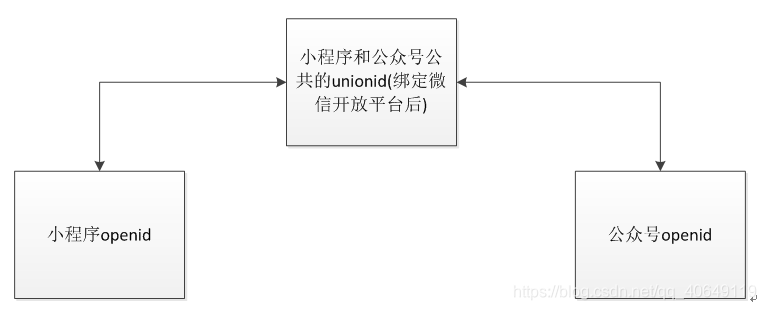
准备工作完毕。讲一下公众号和小程序推送之间需要用到的id(们)。微信在小程序和公众号之间绑了多个id.(具体的话还是自己查看微信官方API对各个id做出的解释比较好。下面我只是简单解释一下。openid:在小程序,公众号中的身份证,每个用户在同一个小程序,公众号中的openid是绝对不同的,公众号和小程序绑定关联也不会相同。unionid:在绑定微信开发平台之后,小程序和公众号共通的id(这个就是公众号推送的关键,所以一定要绑定开发平台。formid:小程序推送用的id,有时长等条件限制,一般是你cue它一下,它改变值推送一下,无法长久有效推送。推送原理。公众号的推送是根据openid的推送的。但公众号id获取被微信卡死了,规则为:必须要先获取openid,然后根据openid获取unionid.当用户在小程序中操作的时候,可以根据小程序的openid找到小程序和公众号公共的unionid,然后再去找公众号的openid进行推送。关系示例图如下:
推送步骤。1、获取小程序用户openid和unionid.2、获取公众号用户openid和unionid.3、进行推送。-----------------------------------------------虽然推送过程看起来很简单但其实中间有一点坑所以还是贴了代码-------------------------------1、获取小程序openid和unionid。【坑预警!!!!】小程序的openid和unionid获取有两种方法。①是直接从后台通过微信校验接口:Stringurl=""+APPID+"&secret="+SECRET+"&js_code="+wechatCode+"&grant_type=authorization_code";获取。好处是直接一次性就能获取openid,unionid和sessionkey.然后这种获取方式用户必须关注了公众号后使用小程序才能拿到unionid。否则unionid为空接口主要方法如下:
@ResponseBody@RequestMapping(value="/checkWechatUser.do")publicLayUIResultcheckWechatUser(HttpServletRequestrequest){LayUIResultresult=newLayUIResult();try{StringAPPID=“自己的小程序appid”;StringSECRET="自己的小程序密码";StringwechatCode=“自己的小程序wechatCode”;if(ObjectUtil.isNull(wechatCode)){result.setCode(1);result.setStatus(1);result.setMsg("微信凭证不能为空");returnresult;}//System.out.println("微信请求了服务");//请求腾讯微信校验接口Stringurl="https://api.weixin.qq.com/sns/jscode2session?appid="+APPID+"&secret="+SECRET+"&js_code="+wechatCode+"&grant_type=authorization_code";RestTemplaterestTemplate=newRestTemplate();//进行网络请求,访问url接口ResponseEntityStringresponseEntity=restTemplate.exchange(url,HttpMethod.GET,null,String.class);//根据返回值进行后续操作if(responseEntity!=null&&responseEntity.getStatusCode()==HttpStatus.OK){StringsessionData=responseEntity.getBody();//System.out.println("调用了微信平台接口");Gsongson=newGson();//解析从微信服务器获得的openid和session_key;WeChatSessionweChatSession=gson.fromJson(sessionData,WeChatSession.class);result.setData(weChatSession);Stringunionid=weChatSession.getUnionid();//获取用户的唯一标识StringopenId=weChatSession.getOpenid();//System.out.println("openID:"+openId);//获取会话秘钥StringsessionKey=weChatSession.getSession_key();//System.out.println("sessionKey:"+sessionKey);//调用service层校验数据result.setCode(0);//result=userService.checkOpenId(openId,sessionKey);returnresult;}else{result.setCode(1);result.setStatus(1);result.setMsg("校验失败");returnresult;}}catch(Exceptione){e.printStackTrace();result.setCode(1);result.setStatus(1);result.setMsg("校验异常");returnresult;}}这个方法拿完openid和unionid以及sessionkey之后怎么存数据库就是()自己的事情了。那……如果该用户没有关注公众号,我要如何获取该用户的unionid呢。②前台获取加密后的字符串进行解密。(这里微信给了解密教程,点击超链接可以自己进去看,但没有java……只好自己搞一个。
/解密(non-Javadoc)@seecom.yspro.service.PubUserService#decryptionUserInfo(java.lang.String,java.lang.String,java.lang.String)/@OverridepublicLayUIResultdecryptionUserInfo(StringencryptedData,StringsessionKey,Stringiv)throwsException{LayUIResultresult=newLayUIResult();//被加密的数据byte[]dataByte=Base64.decode(encryptedData);//加密秘钥byte[]keyByte=Base64.decode(sessionKey);//偏移量byte[]ivByte=Base64.decode(iv);//如果密钥不足16位,那么就补足.这个if中的内容很重要intbase=16;if(keyByte.length%base!=0){intgroups=keyByte.length/base+(keyByte.length%base!=0?1:0);byte[]temp=newbyte[groupsbase];Arrays.fill(temp,(byte)0);System.arraycopy(keyByte,0,temp,0,keyByte.length);keyByte=temp;}//初始化Security.addProvider(newBouncyCastleProvider());Ciphercipher=Cipher.getInstance("AES/CBC/PKCS7Padding","BC");SecretKeySpecspec=newSecretKeySpec(keyByte,"AES");AlgorithmParametersparameters=AlgorithmParameters.getInstance("AES");parameters.init(newIvParameterSpec(ivByte));cipher.init(Cipher.DECRYPT_MODE,spec,parameters);//初始化byte[]resultByte=cipher.doFinal(dataByte);if(null!=resultByte&&resultByte.length0){Stringresult2=newString(resultByte,"UTF-8");System.out.println(result2);//JSONArrayja=JSONArray.parseArray(result2);JSONObjectjo=JSONObject.fromObject(result2);Stringopenid=jo.getString("openId");Stringunionid=jo.getString("unionId");MapString,Stringunionid2=newHashMap();booleanflag=false;unionid2=userDao.checkUnionid(openid);if(unionid2.size()==0||unionid2==null){//为空System.out.println("未能根据openid查找到unionid");}else{if(!(YSUtils.checkIsNullOrEmpty(unionid2.get("stf_sta_unionid")))){//为空,插入unionidintinsertId=userDao.setUnionId(openid,unionid);if(insertId!=0){flag=true;}}}}returnresult;}这里用到了一个base64解密的jar包。下载地址:链接:;
提取码:92kl
到这里,获取小程序的openid和unionid就结束了。2、获取公众号的openid和unionid.【坑预警!!!!!】获取公众号的openid和unionid需要获取一个AccessToken,这个token的有效期一次为7200s,一天最多获取200次(也有人说2000次我忘记api里写了多少了)。所以你是把它存数据库还是存全局变量缓存随便你。但:如果重复获取的话前一个token的有效时间就会变成五分钟。获取的时候两者会有一段时间并行有效。accesstoken微信api:①获取accesstoken的方法:
/获取accesstoken(non-Javadoc)@seecom.yspro.service.PubUserService#getAccessToken()/publicStringgetAccessToken()throwsException{StringaccessToken="";Stringurl="https://api.weixin.qq.com/cgi-bin/token?grant_type=client_credential&appid="+“公众号appid”+"&secret="+"公众号secret";JSONObjectjsonResult=CommonUtil.httpsRequest(url,"POST","");//请求外网if(jsonResult!=null){accessToken=jsonResult.getString("access_token");Stringexpires_in=jsonResult.getString("expires_in");LongtimeStamp=System.currentTimeMillis();Stringtime=String.valueOf((timeStamp/1000+7200));intinsertId=pubUserDao.insertAccessToken(accessToken,time,expires_in);System.out.println("accessToken的值为:"+accessToken);}returnaccessToken;}//请求外网publicstaticJSONObjecthttpsRequest(StringrequestUrl,StringrequestMethod,StringoutputStr){JSONObjectjsonObject=null;StringBufferbuffer=newStringBuffer();try{//创建SSLContext对象,并使用我们指定的信任管理器初始化TrustManager[]tm={newMyX509TrustManager()};SSLContextsslContext=SSLContext.getInstance("SSL","SunJSSE");sslContext.init(null,tm,newjava.security.SecureRandom());//从上述SSLContext对象中得到SSLSocketFactory对象SSLSocketFactoryssf=sslContext.getSocketFactory();URLurl=newURL(requestUrl);HttpsURLConnectionhttpUrlConn=(HttpsURLConnection)url.openConnection();httpUrlConn.setSSLSocketFactory(ssf);httpUrlConn.setDoOutput(true);httpUrlConn.setDoInput(true);httpUrlConn.setUseCaches(false);//设置请求方式(GET/POST)httpUrlConn.setRequestMethod(requestMethod);if("GET".equalsIgnoreCase(requestMethod)){httpUrlConn.connect();}//当有数据需要提交时if(null!=outputStr){OutputStreamoutputStream=httpUrlConn.getOutputStream();//注意编码格式,防止中文乱码outputStream.write(outputStr.getBytes("UTF-8"));outputStream.close();}//将返回的输入流转换成字符串InputStreaminputStream=httpUrlConn.getInputStream();InputStreamReaderinputStreamReader=newInputStreamReader(inputStream,"utf-8");BufferedReaderbufferedReader=newBufferedReader(inputStreamReader);Stringstr=null;while((str=bufferedReader.readLine())!=null){buffer.append(str);}bufferedReader.close();inputStreamReader.close();//释放资源inputStream.close();inputStream=null;httpUrlConn.disconnect();jsonObject=JSONObject.fromObject(buffer.toString());}catch(ConnectExceptionce){ce.printStackTrace();}catch(Exceptione){e.printStackTrace();}returnjsonObject;}//拉取公众号openid,然后根据openid获取公众号unionid//获取api:https://mp.weixin.qq.com/wiki?t=resource/res_main&id=mp1421140839@SuppressWarnings("unchecked")@OverridepublicLayUIResultgetUserOpenIdList(StringnextOpenid,StringaccessToken)throwsException{LayUIResultresult=newLayUIResult();//用户openid列表信息WechatUseropenIdListInfo=null;synchronized(this){try{//查询是否有accessToken(我存在了数据库了,所以从数据库里查了ListMapString,ObjectaccessTokenList=pubUserDao.queryAccessToken();accessToken=String.valueOf(accessTokenList.get(0).get("pro_act_code"));do{//微信公众号获取用户列表信息接口地址StringrequestUrl=null;if(StringUtils.isBlank(nextOpenid)){requestUrl=newStringBuffer().append("https://api.weixin.qq.com/cgi-bin/user/get?access_token=").append(accessToken).toString();}else{requestUrl=newStringBuffer().append("https://api.weixin.qq.com/cgi-bin/user/get?access_token=").append(accessToken).append("&next_openid=").append(nextOpenid).toString();}//后台请求RestTemplaterestTemplate=newRestTemplate();openIdListInfo=restTemplate.getForObject(requestUrl,WechatUser.class);System.out.println("openIdListInfo的值为:"+openIdListInfo);if(openIdListInfo!=null&&openIdListInfo.getErrcode()==0){//获取用户openid列表对象WechatOpenidInfowxOpenidInfo=openIdListInfo.getData();System.out.println("wxOpenidInfo的值为:"+wxOpenidInfo);if(wxOpenidInfo!=null){ListStringopenids=wxOpenidInfo.getOpenid();if(openids!=null&&openids.size()0){//获取openid和unionidListMapString,ObjectuserInfoList=newArrayList();ListJSONObjectuser_list=newArrayList();for(Stringopenid:openids){JSONObjectmap=newJSONObject();map.put("openid",openid);map.put("lang","zh_CN");user_list.add(map);}JSONObjectjo=newJSONObject();jo.put("user_list",user_list);//根据公众号openid获取公众号unionidStringrequestUrl2=null;requestUrl2=newStringBuffer().append("https://api.weixin.qq.com/cgi-bin/user/info/batchget?access_token=").append(accessToken).toString();RestTemplaterestTemplate2=newRestTemplate();//json转换成mapJSONObjectstrArr=restTemplate2.postForObject(requestUrl2,jo,JSONObject.class);userInfoList=(ListMapString,Object)strArr.get("user_info_list");//插入数据库ListPubUserlist=newArrayList();for(MapString,Objectmap1:userInfoList){if(String.valueOf(map1.get("subscribe")).equals("1")){PubUserpubUser=newPubUser();pubUser.setPro_pu_openid(String.valueOf(map1.get("openid")));pubUser.setPro_pu_unionid(String.valueOf(map1.get("unionid")));pubUser.setPro_pu_valid("1");list.add(pubUser);}}//插入数据库intinsertId=0;//删除数据库内容,重新插入pubUserDao.deletePubUserInfo();insertId=pubUserDao.insertPubUserInfo(list);if(insertId==0){result.setCode(1);result.setMsg("获取用户列表失败");System.out.println("插入数据表失败"+result);returnresult;}}//拉取列表的最后一个用户的OPENIDnextOpenid=openIdListInfo.getNext_openid();result.setCode(0);result.setMsg("获取用户列表成功");System.out.println(result);returnresult;}}else{openIdListInfo.setErrcode(40000);openIdListInfo.setErrmsg("获取关注用户列表失败");result.setData(openIdListInfo);returnresult;}}while(openIdListInfo.getCount()==10000);}catch(Exceptione){//LOG.error("获取用户列表失败",e);openIdListInfo.setErrcode(40000);openIdListInfo.setErrmsg("获取用户列表失败");e.printStackTrace();result.setData(openIdListInfo);returnresult;}}result.setData(openIdListInfo);returnresult;}--------------------------------------------------------------到这里获取就全部结束了-----------------------------------------------
消息推送这里首先要去微信公众平台模板哪儿创建模板
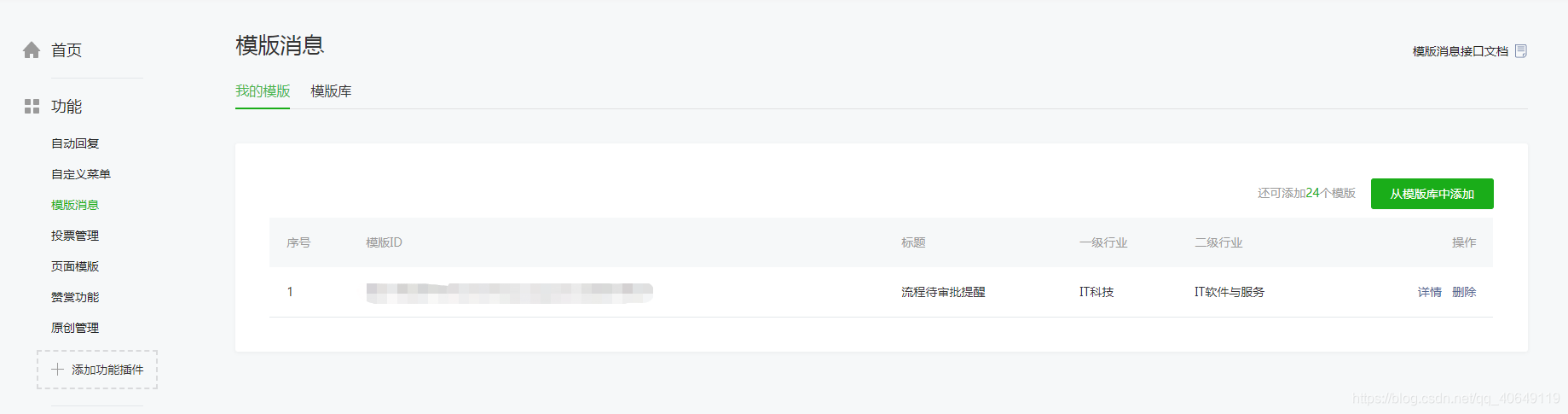
模板消息官方api:
//这里建议用多线程来做,否则容易卡。/@Description@param@parampro_ota_id@param@paramflag@param@return@throws@authorMomo@date2019年5月8日/@OverridepublicLayUIResultsendMessage(Stringpro_ota_id,Stringflag)throwsException{LayUIResultresult2=newLayUIResult();ListMapString,ObjectaccessTokenList=newArrayList();accessTokenList=pubUserDao.queryAccessToken();StringaccessToken=String.valueOf(accessTokenList.get(0).get("pro_act_code"));Stringtmpurl="https://api.weixin.qq.com/cgi-bin/message/template/send?access_token="+accessToken;JSONObjectjson=newJSONObject();ListMapString,ObjectinfoList=newArrayList();//根据出差申请id获取要推送的审批人union-再根据审批人的union找到审批人的公众号openid,进行推送infoList=pushDao.getOpenId(pro_ota_id,flag);for(inti=0;iinfoList.size();i++){//循环推送json.put("touser",infoList.get(i).get("openid"));//所要发送的用户openIdjson.put("template_id","模板id");json.put("page","pages/index/index");//点击模板可以跳转到小程序的具体界面//json.put("form_id",formId);//用户的fromId或者预订单IdJSONObjectjo=newJSONObject();jo.put("appid","公众号appid");jo.put("pagepath","pages/me/me");json.put("miniprogram",jo);json.put("topcolor","#173177");json.put("data",JsonMsg(infoList.get(i)));//这个data可以直接调用上文的JsonMsg方法生成所需要发送给用户的信息Stringresult=httpsRequest(tmpurl,"GET",json.toString());//注意推送需要是get模式JSONObjectresultJson=JSON.parseObject(result);System.out.println("模板消息返回数据:"+resultJson);Stringerrmsg=(String)resultJson.get("errmsg");if(!"ok".equals(errmsg)){//如果为errmsg为ok,则代表发送成功,公众号推送信息给用户了。result2.setCode(1);result2.setMsg("error");}}result2.setCode(0);result2.setMsg("success");returnresult2;}/@parammap@methodpackJsonmsg@参数@paramfirst头部@参数@paramremark说明@参数@return@返回类型:JSONObject/publicJSONObjectJsonMsg(MapString,Objectmap){JSONObjectjson=newJSONObject();try{JSONObjectjsonFirst=newJSONObject();if(String.valueOf(map.get("pro_apv_ptype")).equals("pro_apv_ptype_001")){jsonFirst.put("value",map.get("name")+"向您提交了一个"+map.get("typename")+"申请");}else{jsonFirst.put("value",map.get("name")+"向您抄送了一个"+map.get("typename")+"申请");}jsonFirst.put("color","#173177");json.put("first",jsonFirst);/信息部分JSON/JSONObjectk1=newJSONObject();k1.put("value",map.get("typename"));k1.put("color","#173177");json.put("keyword1",k1);JSONObjectk2=newJSONObject();k2.put("value",map.get("name"));k2.put("color","#173177");json.put("keyword2",k2);JSONObjectk3=newJSONObject();k3.put("value",map.get("time"));k3.put("color","#173177");json.put("keyword3",k3);JSONObjectk4=newJSONObject();k4.put("value",map.get("content"));k4.put("color","#173177");json.put("keyword4",k4);//具体模板消息有几个参数就写几个可查看小程序后台模板消息JSONObjectjsonRemark=newJSONObject();jsonRemark.put("value","请进入小程序进行审批");jsonRemark.put("color","#173177");json.put("remark",jsonRemark);}catch(JSONExceptione){e.printStackTrace();}returnjson;}/http请求方法@paramrequestUrl@paramrequestMethod@paramoutputStr@return/publicStringhttpsRequest(StringrequestUrl,StringrequestMethod,StringoutputStr){try{URLurl=newURL(requestUrl);HttpsURLConnectionconn=(HttpsURLConnection)url.openConnection();conn.setDoOutput(true);conn.setDoInput(true);conn.setUseCaches(false);//设置请求方式(GET/POST)conn.setRequestMethod(requestMethod);conn.setRequestProperty("content-type","application/x-www-form-urlencoded");//当outputStr不为null时向输出流写数据if(null!=outputStr){OutputStreamoutputStream=conn.getOutputStream();//注意编码格式outputStream.write(outputStr.getBytes("UTF-8"));outputStream.close();}//从输入流读取返回内容InputStreaminputStream=conn.getInputStream();InputStreamReaderinputStreamReader=newInputStreamReader(inputStream,"utf-8");BufferedReaderbufferedReader=newBufferedReader(inputStreamReader);Stringstr=null;StringBufferbuffer=newStringBuffer();while((str=bufferedReader.readLine())!=null){buffer.append(str);}//释放资源bufferedReader.close();inputStreamReader.close();inputStream.close();inputStream=null;conn.disconnect();returnbuffer.toString();}catch(ConnectExceptionce){System.out.println("连接超时:{}");}catch(Exceptione){System.out.println("https请求异常:{}");}returnnull;}-------------------------------------------------------------------------------------------------------------------------------------------
公众号推送到这里就结束了(吐魂













