


环境搭建
先说一下搭建以下环境的原因,开发流程如图。
- Win10下开发Qt程序,需要Qt5与Qt Creator
- 虚拟机下安装Ubuntu16(高版本如18不行),安装Qt5交叉编译链
- 将编译后的ARM环境下的可执行程序通过FTP或SFTP上传至嵌入式Linux生产环境,运行可执行程序。
ARM生产环境
实验设备为 FriendlyARM 的 CortexA9 Smart4418 实验箱。配套资源网址 为:http://wiki.friendlyarm.com/wiki/index.php/Smart4418/zh
OS:FriendlyCore,是一个没有 X-windows 环境,基于 Ubuntucore 构建的系统,使用 Qt-Embedded 作为图形界面的轻量级系统,兼容 Ubuntu 系统软件源,非常适合于企业用户用作产品的基础 OS。
PC开发环境
开发在虚拟机下的Ubuntu16系统,安装了Qt5、Qt Creator以及Qt5交叉编译链工具。
Qt5安装
sudo apt-get install qt5Qt Creator安装
Windows上安装Qt Creator,编写运行成功后,传至Linux上进行交叉编译,将目标程序放ARM上直接与运行。
Qt5交叉编译链
FriendlyARM交叉编译链arm-linux-gcc下载地址:https://github.com/friendlyarm/prebuilts
如何交叉编译(以编译QtE-Demo项目为例):
mkdir build && cd build/usr/local/Trolltech/Qt-5.10.0-nexell32-sdk/bin/qmake ../QtE-Demo.promake在ARM机上运行,如提示:EGL library doesn't support Emulator extensions
输入如下命令解决:
export QT_QPA_EGLFS_INTEGRATION=noneARM网络设置
ARM连接电脑热点
查看Wifi设备
nmcli dev开启Wifi设备
nmcli r wifi on扫描附近Wifi热点
nmcli dev wifi连接到指定Wifi热点
nmcli dev wifi connect "SSID" password "PASSWORD" ifname wlan0查看IP地址
ifconfig第一次连接后,以后每次开机,ARM都会自动连接之前的Wifi。
通过Win10网络设置也可以看到已连接设备的IP。
SSH远程访问ARM
拿到设备IP后,使用SSH协议远程访问ARM,使用SFTP协议上传下载程序。
工具:MobaXterm
ARM串口读写
GPIO引脚控制LED
linux下对/sys/class/gpio中的gpio的控制 (转)
- 配置GPIO
- 设置GPIO的方向
- 设置GPIO的输出电平
配置GPIO43与GPIO44,其分别控制两个LED灯的亮灭。
cd /sys/class/gpioecho 43 > exportecho 44 > exportcd gpio43echo high > directionecho low > directionecho 1 > valueecho 0 > valuecd gpio44...测试Demo:
//初始化引脚int fd;char buf[5];char gpioExportPath[30] = "/sys/class/gpio/export";//配置GPIOfd = open(gpioExportPath, O_WRONLY);if (fd < 0) { printf("gpioExportPath:%stopen failed", gpioExportPath); exit(1);}sprintf(buf, "%2d",this->ledNo);write(fd, buf, 2);close(fd);//设置GPIO方向char gpioDirPath[40];sprintf(gpioDirPath, "/sys/class/gpio/gpio%d/direction", this->ledNo);fd = open(gpioDirPath, O_WRONLY);if (fd < 0) { printf("gpioDirPath:%stopen failed", gpioDirPath); exit(1);}sprintf(buf, "high");write(fd, buf, 3);close(fd);//控制亮灭void updateLedStatus(int ledNo){ int fd; char buf[2]; char path[30]; sprintf(path, "/sys/class/gpio/gpio%d/value" , ledNo); fd = open(path, O_WRONLY); if (fd < 0) { printf("updateLedStatus failed"); exit(1); } if (ledStatus) { buf[0] = '1'; } else { buf[0] = '0'; } write(fd, buf, 1); close(fd);}AD读取
测试Demo
#include <stdio.h>#include <stdlib.h>#include <fcntl.h>#include <unistd.h>void delay(){int i,j;for (i = 0; i < 200; i++)for (j = 0; j < 100; j++);}int main(){int fd, len, i;char buf[20];for (i = 0; i < 5; i++){fd = open("/sys/devices/platform/c0000000.soc/c0053000.adc/iio:device0/in_voltage7_raw", 0);if (fd < 0) exit(1);len = read(fd, buf, sizeof buf - 1);if (len > 0){buf[len] = '';printf("%s", buf);}delay();}close(fd);return 0;}蜂鸣器
http://wiki.friendlyarm.com/wiki/index.php/Matrix_-_Buzzer/zh
https://www.eefocus.com/toradex/blog/17-05/420816_04520.html
cd /sys/class/pwm/pwmchip0echo 0 > exportcd pwm0echo 400000000 > period #周期,单位nsecho 100000000 > duty_cycle #设置占空比25%echo 1 > enable #开启echo 0 > enable #关闭需求建模
用例图
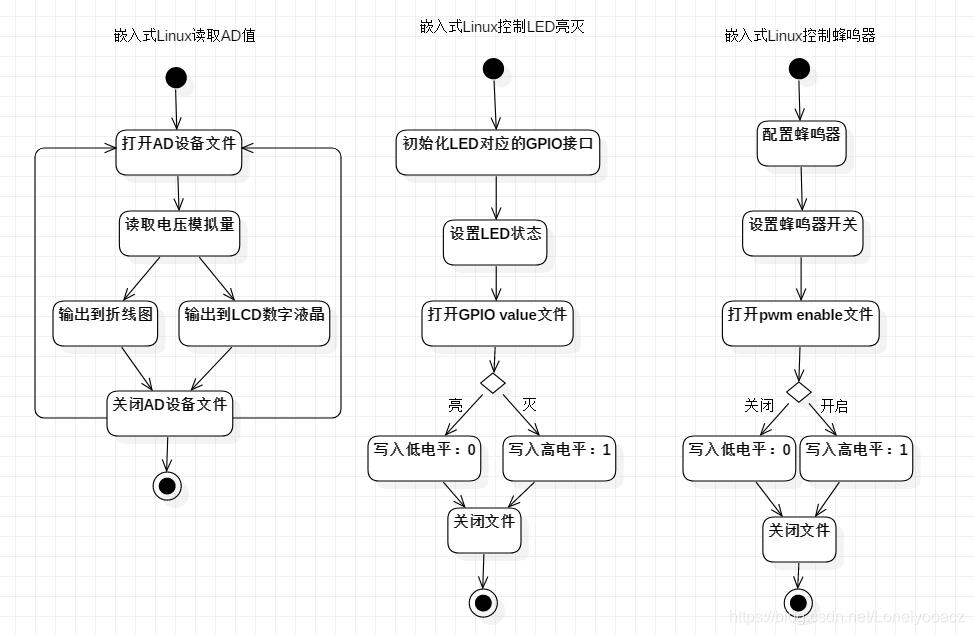
活动图
程序编码
服务端打算用Qt编写,开发流程是:1. 在Win10上使用IDE开发 2. 在虚拟机Linux上交叉编译 3. 在嵌入式Linux上运行程序查看效果。
界面设计
根据详细设计的功能,规划界面内容。
界面上展示的包括:LED控制、色谱图模块、LCD数值显示模块、网络连接展示模块。
后端隐含的功能模块包括:网络连接模块、网络传输模块、网络数据解析模块、GPIO读写模块、AD读取模块、蜂鸣器控制模块。
LED控制模块
先来实现LED控制功能。
设计一个LED控制类。
ledcontrol.h
#ifndef LEDCONTROL_H#define LEDCONTROL_H/** * @brief LED控制类 */class LEDControl{public: LEDControl(int no); void initGPIO(); //初始化GPIO引脚 void setLedStatus(bool status); //设置LED状态private: void updateLedStatus(); //更新GPIO引脚状态,控制LED亮灭public: int ledNo; //LED编号 bool ledStatus; //LED状态};#endif // LEDCONTROL_Hledcontrol.cpp
#include "ledcontrol.h"#include <stdio.h>#include <stdlib.h>#include <unistd.h>#include <sys/types.h>#include <sys/stat.h>#include <fcntl.h>#include <QDebug>/** * @brief LED控制类 */LEDControl::LEDControl(int no){ this->ledNo = no; initGPIO(); //初始化LED对应的GPIO引脚 this->setLedStatus(true); //默认高电平,灭}/** * @brief 初始化LED对应的GPIO引脚 */void LEDControl::initGPIO(){ int fd; char buf[5]; char gpioExportPath[30] = "/sys/class/gpio/export"; //配置GPIO fd = open(gpioExportPath, O_WRONLY); if (fd < 0) { printf("gpioExportPath:%stopen failed", gpioExportPath); exit(1); } sprintf(buf, "%2d",this->ledNo); write(fd, buf, 2); close(fd); //设置GPIO方向 char gpioDirPath[40]; sprintf(gpioDirPath, "/sys/class/gpio/gpio%d/direction", this->ledNo); fd = open(gpioDirPath, O_WRONLY); if (fd < 0) { printf("gpioDirPath:%stopen failed", gpioDirPath); exit(1); } sprintf(buf, "high"); write(fd, buf, 3); close(fd);}/** * @brief 设置LED状态 false亮, true灭 */void LEDControl::setLedStatus(bool status){ this->ledStatus = status; updateLedStatus(); qDebug() << "led" << this->ledNo << "t status:" << this->ledStatus;}/** * @brief 更新LED状态 */void LEDControl::updateLedStatus(){ int fd; char buf[2]; char path[30]; sprintf(path, "/sys/class/gpio/gpio%d/value" , this->ledNo); fd = open(path, O_WRONLY); if (fd < 0) { printf("updateLedStatus failed"); exit(1); } if (this->ledStatus) { buf[0] = '1'; } else { buf[0] = '0'; } write(fd, buf, 1); close(fd);}AD读取模块
adreader.h
#ifndef ADREADER_H#define ADREADER_H/** * @brief AD读取类 * 读取电压模拟量 */class ADReader{public: ADReader(); int readVol(); //电压模拟量读取private: char buf[20]; //AD读取缓冲区 int readLen; //当次读取数据长度 int adFileDesc; //AD设备文件描述符};#endif // ADREADER_Hadreader.cpp
#include "adreader.h"#include <stdlib.h>#include <stdio.h>#include <fcntl.h>#include <unistd.h>/** * @brief AD读取类 * 读取电压模拟量 */ADReader::ADReader(){}/** * @brief 读取电压模拟量 * @return */int ADReader::readVol(){ //Win环境下测试用 //if (true) //{ // return 800; //} //打开AD设备文件 this->adFileDesc = open("/sys/devices/platform/c0000000.soc/c0053000.adc/iio:device0/in_voltage7_raw", 0); if (this->adFileDesc < 0) { printf("adFile open failed"); exit(1); } //读取电压模拟量到buf this->readLen = read(this->adFileDesc, this->buf, sizeof this->buf - 1); if (this->readLen > 0) { this->buf[this->readLen] = ''; } close(this->adFileDesc); return atoi(buf); //转化为int返回}蜂鸣器控制模块
对于服务端,如果读取的AD值超出安全范围,则控制蜂鸣器发出警报,同时告诉客户端警报开启。
buzzer.h
#ifndef BUZZER_H#define BUZZER_H/** * @brief 蜂鸣器 */class Buzzer{public: Buzzer(); void setEnable(int enable_);private: void initPWM(); void updateEnable(); int enable; //1开启,0关闭};#endif // BUZZER_Hbuzzer.cpp
#include "buzzer.h"#include <stdio.h>#include <stdlib.h>#include <unistd.h>#include <sys/types.h>#include <sys/stat.h>#include <fcntl.h>#include <QDebug>/** * @brief 蜂鸣器 */Buzzer::Buzzer(){ initPWM();}/** * @brief 初始化PWM */void Buzzer::initPWM(){ int fd; char buf[15]; char exportPath[35] = "/sys/class/pwm/pwmchip0/export"; //配置PWM fd = open(exportPath, O_WRONLY); if (fd < 0) { printf("pwmExportPath:%stopen failed", exportPath); exit(1); } buf[0] = '0'; write(fd, buf, 1); close(fd); //设置PWM周期 char periodPath[45] = "/sys/class/pwm/pwmchip0/pwm0/period"; fd = open(periodPath, O_WRONLY); if (fd < 0) { printf("pwmPeriodPath:%stopen failed", periodPath); exit(1); } sprintf(buf, "400000000"); write(fd, buf, 9); close(fd); //设置PWM占空比 char dutyCyclePath[55] = "/sys/class/pwm/pwmchip0/pwm0/duty_cycle"; fd = open(dutyCyclePath, O_WRONLY); if (fd < 0) { printf("pwmDutyCyclePath:%stopen failed", dutyCyclePath); exit(1); } sprintf(buf, "100000000"); write(fd, buf, 9); close(fd);}/** * @brief 更新蜂鸣器状态 */void Buzzer::updateEnable(){ int fd; char buf[2]; char path[45] = "/sys/class/pwm/pwmchip0/pwm0/enable"; fd = open(path, O_WRONLY); if (fd < 0) { printf("updatePWMEnable failed"); exit(1); } buf[0] = '0' + this->enable; write(fd, buf, 1); close(fd);}/** * @brief 设置蜂鸣器开关状态 * @param enable */void Buzzer::setEnable(int enable_){ if(this->enable == enable_) return; //防止重复写 this->enable = enable_; updateEnable(); qDebug() << "PWM: " << this->enable;}网络模块
基于TCPSocket进行网络通讯。
设计流程:
- 实现TCP服务端
- 使用TCP网络调试助手,测试服务端发送接收消息功能无误
- 制定通讯协议
- 实现TCP客户端
服务端网络模块
使用QT封装的TCP网络通讯类:QTcpServer与QTcpSocket。
使用Qt建立一个TCP服务端分为以下几步:
- 设置监听端口
- 绑定newConnection信号与处理该信号的槽函数
Sample:
//设置监听端口tcpserver->listen(QHostAddress::Any, this->serverPort.toInt());//新客户端连接connect(tcpserver, &QTcpServer::newConnection, this, &MainWidget::newConnect);在newConnect槽函数处理TCP客户端的连接请求。
处理流程:
- 获取客户端Socket
- 绑定readyRead信号与处理该信号的槽函数
- 绑定disconnected信号与处理该信号的槽函数
- 获取当前客户端的IP与端口,界面展示用
- 将当前客户端Socket添加到List统一管理
/** * @brief 新客户端连接 */void MainWidget::newConnect(){ clientSocket = tcpserver->nextPendingConnection(); qDebug() << "新客户端连接:" << QHostAddress(clientSocket->peerAddress().toIPv4Address()).toString(); //有可读消息 connect(clientSocket,SIGNAL(readyRead()), this,SLOT(readMessage())); //断开连接 connect(clientSocket,SIGNAL(disconnected()), this,SLOT(lostConnect())); //地址 QString currentIP = QHostAddress(clientSocket->peerAddress().toIPv4Address()).toString(); quint16 currentPort = clientSocket->peerPort(); //添加到显示面板 client_list->push_back(currentIP + ":" + QString::number(currentPort)); ui->tb_clients->clear(); for (int i = 0; i < client_list->length(); i++) { ui->tb_clients->append(client_list->at(i)); } //添加到列表 socket_list->push_back(clientSocket);}/** * @brief 接收消息 */void MainWidget::readMessage(){ //遍历客户端列表,所有客户端 for (int i = 0; i < socket_list->length(); i++) { read_message = socket_list->at(i)->readAll(); if(!(read_message.isEmpty())) { qDebug() << "读取消息 [ClientIP:" << QHostAddress(socket_list->at(i)->peerAddress().toIPv4Address()).toString() << "]"; qDebug() << "[ClientMsg]:" << read_message; //回传同样的消息 sendMessage(read_message); //解析消息 analyzeMessage(read_message, socket_list->at(i)); break; } }}/** * @brief 发送消息 * @param infomation */void MainWidget::sendMessage(QString infomation){ QByteArray b = infomation.toLatin1(); char* msg = b.data(); for(int i = 0; i < socket_list->length(); i++){ socket_list->at(i)->write(msg); qDebug() << "Send:"<< msg; }}测试TCP服务端
确定接收与发送功能无误。
通讯协议制定
制定TCP服务端与客户端之间的通讯协议。
数据首部:#
- 客户端要读取AD通道0的采样值
- 发送 #R1 开启读取
- 发送 #R0 关闭读取
- 服务端返回采样值
- 发送 #B00800,表示800mV,有效数据长度为5。
- 客户端要控制LED的亮灭,或者服务端通知客户端当前更新后的LED状态
- 发送 #L11 两个LED都灭
- 发送 #L00 两个LED都亮
- 发送 #L01 LED1灭,LED2亮
- 发送 #L10 LED1亮,LED2灭
- 服务端返回报警信号:
- 发送 #W1 报警提示
客户端网络模块
客户端创建一个TCP连接的流程:
- 初始化操作,就是绑定一下需要处理的信号。
- 绑定readRead信号与处理该信号的槽函数
- 连接建立
- 调用connectToHost,指定服务端IP与端口,建立TCP连接
- 调用waitForConnected等待连接成功
- 连接断开
- 调用disconnectFromHost,断开与服务端的连接
Sample:
//init TCP Serverthis->tcpClient = new QTcpSocket(this); //实例化tcpClientthis->tcpClient->abort(); //取消原有连接connect(tcpClient, SIGNAL(readyRead()), this, SLOT(ReadData()));/** * @brief 连接按钮点击事件 */void MainWidget::on_btn_conn_clicked(){ if(ui->btn_conn->text()=="连接") { tcpClient->connectToHost(ui->edit_ip->text(), ui->edit_port->text().toInt()); if (tcpClient->waitForConnected(1000)) // 连接成功则进入if{} { ui->btn_conn->setText("断开"); ui->btn_send->setEnabled(true); ui->btn_led1->setEnabled(true); ui->btn_led2->setEnabled(true); } } else { tcpClient->disconnectFromHost(); if (tcpClient->state() == QAbstractSocket::UnconnectedState || tcpClient->waitForDisconnected(1000)) //已断开连接则进入if{} { ui->btn_conn->setText("连接"); ui->btn_send->setEnabled(false); } }}消息解析模块
消息解析流程:
- 将接收到的msg根据#分割(可能一次发多条消息?一次只会发送接收一条消息的话,不加消息头不分割也是可以的)。
- 判断消息类型,获取消息携带的数据,执行不同的功能。
离子色谱图绘制模块
QCustomPlot:https://www.qcustomplot.com/
使用的QCustomPlot绘图窗口部件。
优点是没有过多的依赖库,使用方便,将头文件与源文件添加至项目工程即可。
//init PlotSendTimeInterval = 500; //发送时间间隔//开始绘制setupRealtimeDataDemo(ui->plot);ui->plot->replot();初始化Plot
流程:
- 添加一条数据线,设置颜色与数据名。
- 配置横坐标,数据类型、数据格式、间隔等。
- 纵坐标默认配置即可。
- 定义一个QTimer定时器,绑定timeout信号与处理该信号的槽函数。
- 在槽函数中获取数据并刷新Plot。
/** * @brief QCustomPlot初始化 * @param customPlot */void MainWidget::setupRealtimeDataDemo(QCustomPlot *customPlot){ customPlot->addGraph(); customPlot->graph(0)->setPen(QPen(Qt::red)); customPlot->graph(0)->setName("Vol"); //横坐标 customPlot->xAxis->setTickLabelType(QCPAxis::ltDateTime); customPlot->xAxis->setDateTimeFormat("hh:mm:ss"); customPlot->xAxis->setAutoTickStep(false); customPlot->xAxis->setTickStep(2); customPlot->axisRect()->setupFullAxesBox(); customPlot->legend->setVisible(true);//右上角小图标 //通过QTimer定时获取数据并刷新Plot connect(&dataTimer, SIGNAL(timeout()), this, SLOT(realtimeDataSlot())); dataTimer.start(SendTimeInterval);}/** * @brief 绘制折线 */void MainWidget::realtimeDataSlot(){ //横轴:key 时间 单位s double key = QDateTime::currentDateTime().toMSecsSinceEpoch()/1000.0; //纵轴:value 电压模拟量 int value = this->adReader->readVol(); ui->lcd_vol->setDigitCount(4); ui->lcd_vol->setMode(QLCDNumber::Dec); ui->lcd_vol->display(QString::number(value)); //发送给客户端 if (adSendSwitch) { QString msg = QString("#B%1").arg(value,5,10,QLatin1Char('0')); sendMessage(msg); } //添加数据到曲线0 ui->plot->graph(0)->addData(key, value); //删除8秒之前的数据 ui->plot->graph(0)->removeDataBefore(key-8); //设定graph曲线y轴的范围 ui->plot->yAxis->setRange(500, 7000); ui->plot->xAxis->setRange(key+0.25, 8, Qt::AlignRight);//设定x轴的范围 ui->plot->replot();}远程报警模块
对于服务端,如果读取的AD值超出安全范围,则控制蜂鸣器发出警报,同时告诉客户端警报开启。
客户端实现报警就是播放一段音频。
在QT项目中添加一个资源文件,存放warning.wav报警音频文件。
在项目pro文件,添加multimedia多媒体配置
版权声明
即速应用倡导尊重与保护知识产权。如发现本站文章存在版权问题,烦请提供版权疑问、身份证明、版权证明、联系方式等发邮件至197452366@qq.com ,我们将及时处理。本站文章仅作分享交流用途,作者观点不等同于即速应用观点。用户与作者的任何交易与本站无关,请知悉。












