


1、效果图如下:
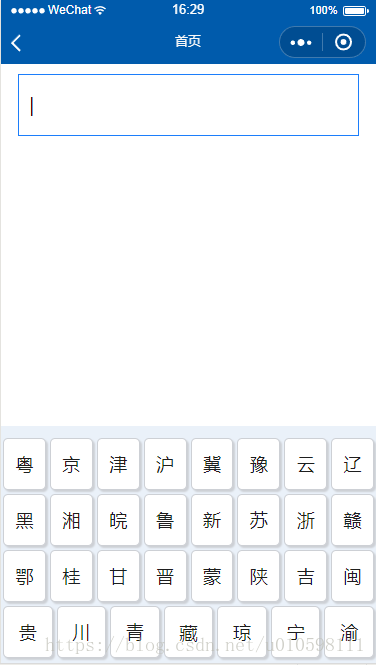
2、啥都别说了,直接上代码
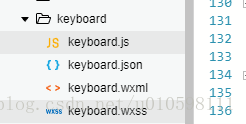
js文件下的代码
var app = getApp()Page({ /** * 页面的初始数据 * keyboard1:首页键盘,显示省的简称 * keyboard2:第二页键盘,显示数字和大写字母 */ data: { isKeyboard: true,//是否显示键盘 specialBtn: false, tapNum: false,//数字键盘是否可以点击 parkingData: false,//是否展示剩余车位按钮 isFocus: true,//输入框聚焦 flag: false,//防止多次点击的阀门 keyboardNumber: '1234567890', keyboardAlph: 'QWERTYUIOPASDFGHJKL巛ZXCVBNM', keyboard1: '粤京津沪冀豫云辽黑湘皖鲁新苏浙赣鄂桂甘晋蒙陕吉闽贵川青藏琼宁渝', keyboard2: '', keyboard2For: ['完成'], keyboardValue: '', textArr: [], textValue: '粤B', placeholder: '输入或拍照录入车牌' }, onLoad: function (options) { //生命周期函数--监听页面加载 var that = this; var userInfo = wx.getStorageSync('userInfo'); var carno = userInfo.carno; if (carno != 'null' && carno != '' && carno != null) { that.setData({ textValue: carno }); } }, tapSpecBtn: function (e) { // 特殊键盘事件(删除和完成) var that = this; if (that.data.flag) { return false } var btnIndex = e.target.dataset.index; if (btnIndex == 0) { //说明是完成事件 var carreg = /^(([u4e00-u9fa5][a-zA-Z]|[u4e00-u9fa5]{2}d{2}|[u4e00-u9fa5]{2}[a-zA-Z])[-]?|([wW][Jj][u4e00-u9fa5]{1}[-]?)|([a-zA-Z]{2}))([A-Za-z0-9]{5}|[DdFf][A-HJ-NP-Za-hj-np-z0-9][0-9]{4}|[0-9]{5}[DdFf])$/; if (!carreg.test(that.data.textValue)) { wx.showToast({ title: '车牌号不正确', icon: 'success', mask: true, image: '../../images/home/icon_error.png', duration: 2000 }) } else { that.setData({ flag: true }); var userInfo = wx.getStorageSync('userInfo'); userInfo.carno = that.data.textValue; //存储userInfo wx.setStorageSync('userInfo', userInfo); //跳转首页 wx.navigateBack({ delta: 1 }); } } }, showKeyboard: function () { //输入框显示键盘状态 var that = this; that.setData({ isFocus: true, isKeyboard: true, }) }, hideKeyboard: function () { //点击页面隐藏键盘事件 var that = this; if (that.data.isKeyboard) { //说明键盘是显示的,再次点击要隐藏键盘 if (that.data.textValue) { that.setData({ isKeyboard: false }) } else { that.setData({ isKeyboard: false, isFocus: false }) } } }, tapKeyboard: function (e) { //键盘事件 var that = this; //获取键盘点击的内容,并将内容赋值到textarea框中 var tapIndex = e.target.dataset.index; var tapVal = e.target.dataset.val; var keyboardValue; var specialBtn; var tapNum; if (tapVal == "巛") { //说明是删除 that.data.textArr.pop(); if (that.data.textArr.length == 0) { //说明没有数据了,返回到省份选择键盘 this.specialBtn = false; this.tapNum = false; this.keyboardValue = that.data.keyboard1; } else if (that.data.textArr.length == 1) { //只能输入字母 this.tapNum = false; this.specialBtn = true; this.keyboardValue = that.data.keyboard2; } else { this.specialBtn = true; this.tapNum = true; this.keyboardValue = that.data.keyboard2; } that.data.textValue = that.data.textArr.join(""); that.setData({ textValue: that.data.textValue, keyboardValue: this.keyboardValue, specialBtn: this.specialBtn, tapNum: this.tapNum, }) return false } if (that.data.textArr.length >= 8) { return false; } that.data.textArr.push(tapVal); that.data.textValue = that.data.textArr.join(""); that.setData({ textValue: that.data.textValue, keyboardValue: that.data.keyboard2, specialBtn: true, }) if (that.data.textArr.length > 1) { //展示数字键盘 that.setData({ tapNum: true }) } }, onReady: function () { // 生命周期函数--监听页面初次渲染完成 var that = this; //将keyboard1和keyboard2中的所有字符串拆分成一个一个字组成的数组 that.data.keyboard1 = that.data.keyboard1.split('') that.data.keyboard2 = that.data.keyboard2.split('') wx.getStorage({ key: 'userInfo', success: function (res) { var userInfo = res.data; that.setData({ userInfo: userInfo }); var carno = userInfo.carno; if (carno != 'null' && carno != '' && carno != null) { that.setData({ textValue: carno }); } } }) }, onShow: function () { //生命周期函数--监听页面显示 var that = this; that.setData({ flag: false }) var carno = that.data.textValue; if (carno.length <9) { that.setData({ keyboardValue: that.data.keyboard2, specialBtn: true, tapNum: true, textArr: carno.split("") }) }else{ that.setData({ keyboardValue: that.data.keyboard1 }); } }})wxml页面代码
<view class="page"> <!--输入框默认样式--> <block wx:if="{{!isFocus}}"> <view class="text text_con" bindtap="showKeyboard"> <image src="../../images/home/icon_search.png" mode="aspectFit" class="search_icon"></image> <text class="placeholder">{{placeholder}}</text> </view> </block> <!--输入框打开键盘样式--> <block wx:else="{{isFocus}}"> <view class="text text_con_focus" bindtap="bindFocus" > {{textValue}} <view animation="{{animationData}}">|</view> </view> </block> <!--键盘--> <block wx:if="{{isKeyboard}}"> <view class="keyboard"> <!--省份简写键盘--> <view class="td td_nor" wx:for="{{keyboardValue}}" wx:for-index="idx" wx:for-item="itemName" bindtap="tapKeyboard" wx:key="keyboardValue" data-index="{{idx}}" data-val="{{itemName}}" hover-class="board_bg" hover-start-time="0" hover-stay-time="80"> {{itemName}} </view> <!--数字键盘不可点击--> <view wx:if="{{specialBtn && !tapNum}}" class="td td_num board_bg" wx:for="{{keyboardNumber}}" wx:for-index="idx" wx:for-item="itemName" wx:key="keyboardNumber"> {{itemName}} </view> <!--数字键盘可点击--> <view wx:if="{{specialBtn && tapNum}}" class="td td_num" wx:for="{{keyboardNumber}}" wx:for-index="idx" wx:for-item="itemName" bindtap="tapKeyboard" data-index="{{idx}}" data-val="{{itemName}}" hover-class="board_bg" hover-start-time="0" hover-stay-time="80" wx:key="keyboardNumber"> {{itemName}} </view> <!--字母键盘--> <view wx:if="{{specialBtn}}" class="td td_num" wx:for="{{keyboardAlph}}" wx:for-index="idx" wx:for-item="itemName" wx:key="itemName" hover-class="board_bg" hover-start-time="0" hover-stay-time="80"> <view class="del_icon" wx:if="{{idx == 19}}" bindtap="tapKeyboard" data-index="{{idx}}" data-val="{{itemName}}"> <image src="../../images/plan/delete.png" mode="aspectFit" data-val="{{itemName}}" class="delect_img"></image> </view> <view wx:elif="{{idx != 19}}" bindtap="tapKeyboard" data-index="{{idx}}" data-val="{{itemName}}"> {{itemName}} </view> </view> <!--完成按钮 start--> <view class="td td_spec_fin" wx:for="{{keyboard2For}}" wx:key="itemName" wx:for-index="idx" wx:for-item="itemName" bindtap="tapSpecBtn" data-index="{{idx}}" data-val="{{itemName}}" wx:if="{{specialBtn}}" hover-class="board_bg_spec" hover-start-time="0" hover-stay-time="80"> {{itemName}} </view> <!--完成按钮 end--> </view> </block></view>css页面代码
/* keyboard.wxss */.page { position: absolute; width: 100%; height: 100%; background-color:white ; background-size: 100% 100%;}.title { width: 100%; height: 340rpx; line-height: 340rpx; text-align: center;}.title-img { margin: 180rpx 60rpx auto; text-align: center; width: 420rpx; height: 120rpx;}.text { display: -webkit-flex; display: flex; flex-direction: row; align-items: center; width: 90%; height: 120rpx; line-height: 100rpx; margin: 20rpx auto; color: #000; background-color: #fff; font-size: 36rpx;}.text_con { border: 1rpx solid #eee;}.text_con_focus { width: 85%; padding: 0 20rpx; border: 1rpx solid #1c7efb;}.search_icon { width: 50rpx; height: 50rpx; margin: 0 20rpx;}.photo_icon{ position: absolute; top:400rpx; right: 50rpx; width: 50rpx; height: 50rpx; margin: 0 20rpx;}.del_icon { width: 100%; height: 100%; background-size: 100% 100%;}.delect_img { width: 100%; height: 100%; background-size: 100% 100%;}.placeholder { color: #bdc3c7;}.keyboard { z-index: 9999; position: fixed; bottom: 0; left: 0; width: 100%; height: auto; background: #eaf1f9; display: -webkit-flex; display: flex; flex-wrap: wrap; border-bottom: 15rpx solid #eaf1f9; border-top: 20rpx solid #eaf1f9;}.td { font-family: "微软雅黑"; flex-grow: 1; text-align: center; font-size: 36rpx; height: 100rpx; line-height: 100rpx; background: #fff; margin: 5rpx; border: 1rpx solid #cdd0d5; color: #1e1e1e; border-radius: 10rpx 10rpx 10rpx 10rpx; box-shadow: 5rpx 5rpx 2rpx #cdd0d5;}.td_nor { flex: 1 1 10%;}.td_num { flex: 1 1 8%;}.td_spec_fin { background-color: #fff; flex: 1 1 23%;}.td_spec_del{ width: 50px; height: 50px;}.board_bg { box-shadow: 0 0 0 #e5e5e5; background: #e5e5e5;}.board_bg_spec { box-shadow: 0 0 0 #e5e5e5;}.parking { position: absolute; right: 20rpx; bottom: 100rpx;}.parking_icon { width: 200rpx; height: 200rpx;}.warn { width: 100%; height: 20%; display: -webkit-flex; display: flex; flex-direction: row; justify-content: center; font-family: '宋体'; font-size: 28rpx; color: #8b9397; text-align: center; line-height: 48rpx;}.warn_text { width: 80%;}.bottom { position: absolute; bottom: 30rpx; width: 100%; font-size: 22rpx; font-family: '宋体'; color: #8b9397; line-height: 36rpx;}.tel { justify-content: center; display: flex; flex-direction: row; align-items: center;}.phone_icon { width: 22rpx; height: 22rpx; margin: 0 10rpx;}注:以上学习网上相关逻辑开发的逻辑,如有问题可以回复,互相学习












