


先上效果图:
1.展开状态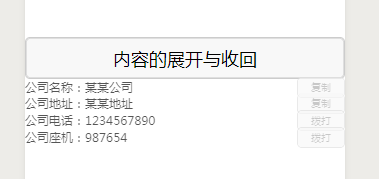
2.显示状态
3.收回状态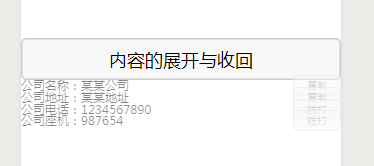
先说一下实现原理:
1.给列表一个动画效果。
2.使用animotion来创建动画。
3.使列表的高度从0到n开始变化,使用setTimeout做延时处理。
4.收回则与上面相反。
5.animotion的用法请查看官方文档
传送门:https://developers.weixin.qq.com/miniprogram/dev/api/ui/animation/wx.createAnimation.html
下面是wxml代码:
<view class='container'> <button class='text' bindtap="{{ stopBtn ? 'showContent' : 'hideContent' }}">内容的展开与收回</button> <view wx:for="{{companyInfo}}" wx:if="{{choose}}" class='companyInfo' wx:for-index="idx" wx:key="0" animation='{{animationData}}'> <view class='companyInfo-left'> <text>{{item.company_base}}</text> <text>{{item.content}}</text> </view> <view class='companyInfo-right'> <button class='small-button' wx:if="{{idx > 1}}" id="{{idx}}" data-set="{{item.content}}" disabled='{{stopBtn}}'>拨打</button> <button class='small-button' wx:else bindtap='copyToClipboard' id="{{idx}}" data-content="{{item.content}}" disabled='{{stopBtn}}'>复制</button> </view> </view></view>然后是wxss代码:
.container { } .text { width: 100%; position: relative; height: 100rpx; line-height: 100rpx; border: 1px solid #ccc;}.companyInfo{ display: flex; flex-direction: row; width: 100%; line-height: 60rpx; height: 60rpx; justify-content: space-between; align-items: center;}.companyInfo-left{ display: flex; flex-direction: row; line-height: 60rpx; height: 60rpx; font-size: 30rpx;}.companyInfo-right{ display: flex; align-items: center; line-height: 60rpx; height: 60rpx;}.small-button{ font-size: 24rpx; background: lightgreen; height: 50rpx; display: flex; justify-content: center; align-items: center;}最后是js代码:
const app = getApp()Page({ data: { choose: false, animationData: {}, stopBtn: true,//动画未执行完之前禁用按钮 companyInfo: [{ company_base: '公司名称:', content: '某某公司' }, { company_base: '公司地址:', content: '某某地址' }, { company_base: '公司电话:', content: '1234567890' }, { company_base: '公司座机:', content: '987654' }] }, onLoad: function () { }, showContent: function (e) { // 用that取代this,防止setTimeout内使用this出错 var that = this; // 创建一个动画实例 var animation = wx.createAnimation({ // 动画持续时间 duration: 500, // 定义动画效果,当前是匀速 timingFunction: 'linear' }) // 将该变量赋值给当前动画 that.animation = animation //用step()完成一个动画, 高度为0,透明度为不可见 animation.height("0").opacity(0).step() // 用setData改变当前动画 that.setData({ // 通过export()方法导出数据 animationData: animation.export(), // 改变显示条件 choose: true }) // 设置setTimeout来改变高度以及透明度,实现有感觉的展开 setTimeout(function () { animation.height("60rpx").opacity(1).step({ duration: 500 }) that.setData({ animationData: animation.export(), }) }, 50) //在动画时间禁用按钮 setTimeout(function () { that.setData({ stopBtn: false }) }, 500) }, // 隐藏 hideContent: function (e) { var that = this; var animation = wx.createAnimation({ duration: 500, timingFunction: 'linear' }) that.animation = animation animation.height(0).opacity(0).step({ duration: 500 }) that.setData({ animationData: animation.export() }) setTimeout(function () { animation.height("60rpx").step(); that.setData({ animationData: animation.export(), choose: false, }) }, 500) //收回动画开始禁用按钮 that.setData({ stopBtn: true, }) },})有什么问题欢迎大家指出,一起学习,一起进步。












