


这样我们就不用写那些重复的代码了,而且修改界面的时候也只需要改动模板一个地方
WXML提供模板(template),可以在模板中定义代码片段,然后在不同的地方调用。

一、定义模板
1、新建一个template文件夹用来管理项目中所有的模板;
"pages/template/personCourseTmp",
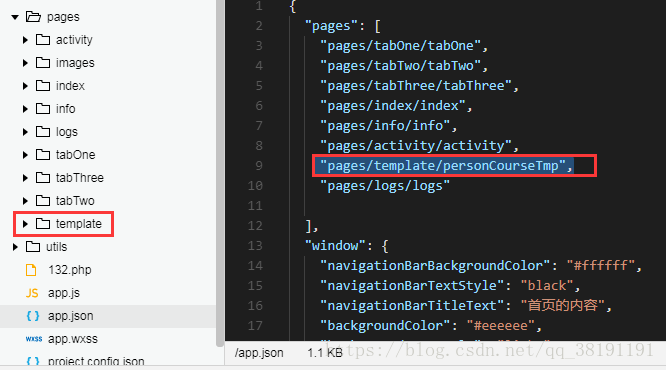 2、新建一个personCourseTmp.wxml文件来定义模板;
3、使用name属性,作为模板的名字。然后在template/内定义代码片段。
templatename="personCourseItemTmp"/template4.那我们开始实现吧,建模板2个文件
1.personCourseTmp.wxml
templatename="personCourseItemTmp"!--显示--viewwx:if="{{mentor_image_uri==null}}"imageclass="widget_arrow"src="http://dev.cfo-mentor.com/menter/public/assets/images/avatar_default.png"mode="aspectFill"/image/viewviewwx:elseimageclass="widget_arrow"src="{{mentor_image_uri}}"mode="aspectFill"/image/viewviewclass='info'姓名:{{mentor_name}}/viewviewclass='info'职位:{{career}}/viewviewclass='info'公司:{{company_name}}/viewviewclass='info'地区:{{address}}/viewviewclass='info'擅长:{{mentor_skills}}/viewnavigatorurl='../../pages/info/info?user_id={{user_id}}'详情/navigatorviewclass='hr'/view/template2.样式文件personCourseTmp.wxss
.name{text-align:center;}.widget_arrow{margin-top:20px;height:200px;width:200px;margin-left:25%;}.info{font-size:14px}.info_border{height:200px;width:200px;border:8pxsolidred;}navigator{margin:0auto;height:40px;width:90%;margin-top:20px;margin-bottom:20px;background-color:green;line-height:40px;text-align:center;}.hr{height:0;width:100%;border:1pxsolidgreen;}那我们如何在页面上使用呢,引入样式文件和视图文件
比如我们要在.wxss上面引入样式文件
@import"../template/personCourseTmp.wxss";只需要在.wxss里面加入上面的代码
我们要在.wxml上面引入视图文件
importsrc="../template/personCourseTmp.wxml"/
blockwx:for="{{message}}"wx:key="id"templateis="personCourseItemTmp"data="{{...item}}"/template/blocktemplateis=''"data=""/template
此时的is用来进行判断data是要传入模板中的数据...eg...(spread运算符)
传数据时item前面加三个点...模板里面就不需要写item了。
注意
import作用域,其仅仅引用目标文件中template。如:
CimportBBimportA,
C中可以使用B定义的template,在B中可以使用A定义的template,但是C不能使用A定义的template。










