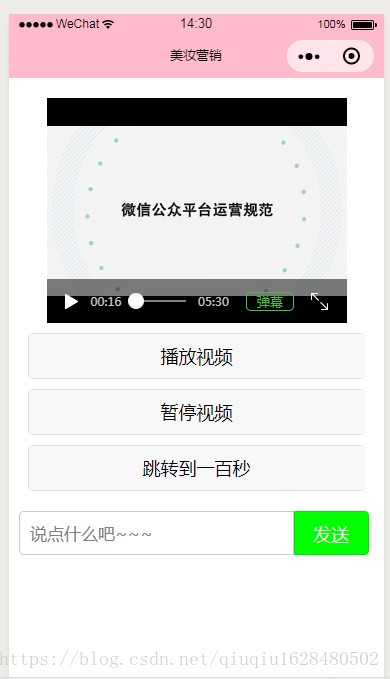
下面为大家整理了自己写的小项目,视频的播放与暂停以及弹幕的相关操作。
video.wxml
<!--pages/video/video.wxml--><view class="video_container"><video id="myvideo" src="http://wxsnsdy.tc.qq.com/105/20210/snsdyvideodownload?filekey=30280201010421301f0201690402534804102ca905ce620b1241b726bc41dcff44e00204012882540400&bizid=1023&hy=SH&fileparam=302c020101042530230204136ffd93020457e3c4ff02024ef202031e8d7f02030f42400204045a320a0201000400" controls='true' danmu-btn='true' enable-danmu='true' danmu-list='{{danmulist}}'></video><button class="btn" bindtap='playVideo'>播放视频</button><button class="btn" bindtap='stopVideo'>暂停视频</button><button class="btn" bindtap='seekVideo'>跳转到一百秒</button></view><form><view class="danmuGrop"> <input type="text" class="danmuinput" placeholder='说点什么吧~~~' bindblur='getInput'></input> <button class="sendDanmu" bindtap='sendDanmu' form-type='reset'>发送</button></view></form>video.wxss
/* pages/video/video.wxss */.video_container{ height: 100%; width: 100%; display: flex; flex-direction: column; justify-content: center; align-items: center; padding: 20px 0;}.btn{ width: 90%; margin-top:20rpx;}.danmuGrop{ margin-top:0rpx; display: flex;}.danmuinput{ border: solid 1px #ccc; margin-left: 20rpx; height: 85rpx; line-height: 80rpx; font-size: 35rpx; padding-left: 20rpx; border-radius: 10rpx; border-top-right-radius: 0px; border-bottom-right-radius: 0px; width: 70%;}.sendDanmu{ width: 20%; margin:0px; background-color: #0f0; color: white; border-top-left-radius:0px; border-bottom-left-radius: 0px; height: 88rpx;}video.js
// pages/video/video.js//生成随机颜色的弹幕function getRandomColor () { let rgb = []; for (let i = 0; i < 3; i++) { let color = (Math.floor(Math.random() * 256)).toString(16); color = color.length == 1 ? ('0' + color) : color; rgb.push(color) } return "#" + rgb.join("");}Page({ /** * 页面的初始数据 */ data: { danmulist:[{ text:"这是第一条弹幕", time:1, color:"#f00" },{ text: "这是第二条弹幕", time:6, color: "#0f0" },{ text: "这是第三条弹幕", time:3, color: "#00f" }], danmu:"default" }, onReady:function(){ this.videoContext = wx.createVideoContext("myvideo"); console.log(this.videoContext); }, playVideo:function(){ this.videoContext.play(); }, stopVideo:function(){ this.videoContext.pause(); }, // 发送弹幕 sendDanmu:function(){ this.videoContext.sendDanmu({ text:this.data.danmu, color: getRandomColor() }) }, seekVideo:function(){ this.videoContext.seek(100); }, getInput:function(e){ console.log(e.detail.value) this.setData({ danmu: e.detail.value }); }, /** * 生命周期函数--监听页面显示 */ onShow: function () { }, /** * 生命周期函数--监听页面隐藏 */ onHide: function () { }, /** * 生命周期函数--监听页面卸载 */ onUnload: function () { }, /** * 页面相关事件处理函数--监听用户下拉动作 */ onPullDownRefresh: function () { }, /** * 页面上拉触底事件的处理函数 */ onReachBottom: function () { }, /** * 用户点击右上角分享 */ onShareAppMessage: function () { }})