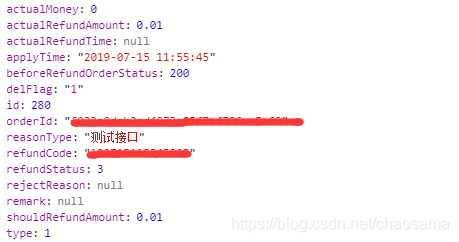
本人审美观送去见孔子,所以将就下
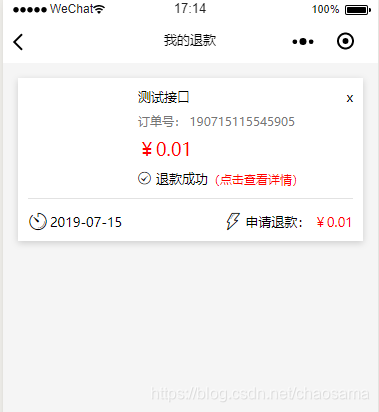
wxml
<wxs module="Filter" src="../../utils/filter/filter.wxs"></wxs><view class="container" wx:if="{{isLogin}}"> <scroll-view scroll-y scroll-top="{{scrollTop}}" class="scroll" style="height: {{wHeight + 'px'}};" bindscrolltolower="handleScrollLower" wx:if="{{isPageShow}}"> <block wx:for="{{dataList}}"> <view class="allwrap"> <view class="allwrap-item flex" data-url="../orderDetail/orderDetail" data-id="{{item.id}}" bindtap="goOrderDetail"> <view class="item-top flex"> <image src="{{item.orderItemInfos[0].goodsImage}}" class="ri-img"></image><!-- 等后端返回图片后再加修改 --> <view class="ri-content flex h200 jc-sb"> <view class="flex ri-name"><text>{{item.reasonType}} </text><text>x</text></view> <text class="color-767676 font12">订单号: {{item.refundCode}}</text> <text class="ri-num color-ff0000 block">¥{{Filter.toFixed(item.shouldRefundAmount, 2)}}</text> <view class="flex ai-center lh15"> <text wx:if="{{item.refundStatus == 4}}" class="iconfont icon-shibai"></text> <text wx:elif="{{item.refundStatus == 3}}" class="iconfont icon-chenggong"></text> <text wx:elif="{{item.refundStatus == 2}}" class="iconfont icon-shibai"></text> <text wx:elif="{{item.refundStatus == 1}}" class="iconfont icon-chenggong"></text> <text wx:else="{{item.refundStatus == 0}}" class="iconfont icon-ziyuan"></text> <text wx:if="{{item.refundStatus == 4}}">平台拒绝退款</text> <text wx:elif="{{item.refundStatus == 3}}">退款成功</text> <text wx:elif="{{item.refundStatus == 2}}">服务商拒绝退款</text> <text wx:elif="{{item.refundStatus == 1}}">服务商同意退款</text> <text wx:else="{{item.refundStatus == 0}}">审核处理中</text> <text class="font12 color-f00">(点击查看详情)</text> </view> </view> </view> <view class="item-bottom flex"> <view> <text class="iconfont icon-history"></text> <text>{{Filter.slice(item.applyTime, 0, 10)}}</text> </view> <view> <text class="iconfont icon-shandianshandianfahuotuikuan"></text> <text>申请退款:</text> <text class="color-ff0000"> ¥{{Filter.toFixed(item.shouldRefundAmount, 2)}}</text> </view> </view> </view> </view> </block> <block wx:if="{{isNodata && !dataList.length}}"> <view class="p50 flex flex-center font12 color-363636 bg-f5f5f5">暂无{{noDataInfo}}记录~</view> </block> <block wx:if="{{isNoMoredata}}"> <view class="p50 flex flex-center font12 color-363636 bg-f5f5f5">暂无更多{{noDataInfo}}记录~</view> </block> </scroll-view></view><include src="../noLogin/noLogin"></include>wxss
.allwrap{ padding: 30rpx 30rpx 0 30rpx;}.allwrap-item{ background: #ffffff; padding: 20rpx; flex-direction: column; margin-bottom: 20rpx; box-shadow: 0 5rpx 20rpx #ccc;}.ri-img{ width: 200rpx; height: 200rpx; margin-right: 20rpx;}.ri-content{ flex-direction: column; flex:1;}.ri-name{ justify-content: space-between;}.ri-num{ font-size: 18px;}.item-top{ padding-bottom: 20rpx; border-bottom: 1px solid #e2e2e2;}.item-bottom{ padding: 20rpx 0 0; justify-content: space-between;}.item-bottom .iconfont{ font-size: 20px; position: relative; top: 4rpx; margin-right: 5rpx;}.ri-detail{ flex:1; flex-direction: column; justify-content: space-around;}.icon-chenggong, .icon-shibai, .icon-ziyuan{ margin-right: 10rpx; position: relative; top: 2rpx;}js
Page({ data: { isPageShow: 1,//控制页面渲染,在数据请求未完成之前,不显示相关模板 isNodata: 1,//是否显示没有数据 isLogin: 1, isNoMoredata: 0,//是否显示没有更多数据 dataList: [],//总数据或第一次加载的数据 isLoading: 0,//是否显示加载动画 _curPage: 1, //当前参数页,用于每次滚动加载 rows: 15,//标准请求数量 curRows: 15,//存储上次请求的长度用于每次请求前比较。数量要与标准请求数量一致。 rowsFlag: 1,//加载更多数据时,当数量小于请求标准时,下一次不再请求 loadingFlag: 1,//请求状态,在加载中只允许发送一次请求 // ---------------------- originalMoney: 0, isRefund: 1, noDataInfo: '退款' }, onLoad: function () { let self = this, url = api.HOUSEINTERFACES.getUserRefundOrderList wx.request({ url: url, header: { 'token': app.globalData.token }, success: function (res) { console.log(res.data.data.list) if (res.data.head.status === 1) { if (res.data.data.list.length!==0){ self.setData({ dataList: res.data.data.list, isPageShow: 1 }) } } else if (res.data.head.statusCode ==="USR_020"){ common.SHOWTIPS(res.data.head.message) setTimeout(function () { common.SWITCHTAB('../selectLogin/selectLogin'); }, 1500); }else{ common.SHOWTIPS(res.data.head.message) } } }) wx.getSystemInfo({ success: function (res) { let wWidth = res.windowWidth, windowHeight = res.windowHeight; self.setData({ wHeight: res.windowHeight, wWidth: res.windowWidth }); } }) },)数据类型