


电商系统的我的订单功能难点就在如何切换tab,其他的技术点就是平常操作。
源码链接下载:https://download.csdn.net/download/qq_39404258/11141525 (积分是csdn默认设置的,我也没办法)
先上效果图:

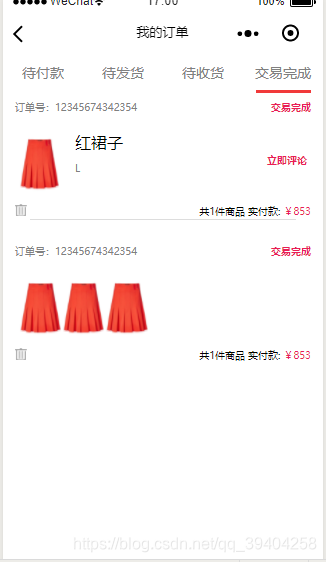
如图所示选中会有红色实现标注,并切换到相应页签,下面订单有两种显示方式,单件商品右侧显示商品描述,多件商品只显示商品图片。
在app.json中先配置该页面,不必多说。 "pages/my/order/order" 多了一级目录
js
Page({ /** * 页面的初始数据 */ data: { currentTab: '0', indicatorDots: true, indicatorColor: "#000000", indicatorActiveColor: "#e91e56", autoplay: true, interval: 3000, duration: 500, circular: true, items: [ { id: 0, title: '红裙子', money: '¥200', imgUrl: '../../img/shop1.jpg', sale: '¥199', evaluation: '23', sell: '33', abstract: '红裙子,物美价廉!', spec: 'L', }, ], }, /** * 生命周期函数--监听页面加载 */ onLoad: function (options) { }, /** * 生命周期函数--监听页面初次渲染完成 */ onReady: function () { }, /** * 生命周期函数--监听页面显示 */ onShow: function () { }, /** * 生命周期函数--监听页面隐藏 */ onHide: function () { }, /** * 生命周期函数--监听页面卸载 */ onUnload: function () { }, /** * 页面相关事件处理函数--监听用户下拉动作 */ onPullDownRefresh: function () { console.log('3333') }, /** * 页面上拉触底事件的处理函数 */ onReachBottom: function () { }, /** * 用户点击右上角分享 */ onShareAppMessage: function () { }, // tab切换 clickTab: function (e) { var that = this; console.log("-1", this.data.currentTab) console.log("-2", e.currentTarget.dataset.current) if (this.data.currentTab == e.currentTarget.dataset.current) { return false; } else { that.setData({ currentTab: e.currentTarget.dataset.current, }) } }, comment:function(e) { wx.navigateTo({ url: 'comment/comment', }) }, orderdetail: function (e) { wx.navigateTo({ url: 'orderdetail/orderdetail', }) },})2.json省略(同前文)
3.wxml
<!--pages/news/news.wxml--><view style='background:#FFF;'> <view class="topbar"><view class="topbar top"> <view class="topbar top text" bindtap="clickTab" data-current="0"> <view class="topbar top text tab " >待付款</view> <view class="topbar top text status {{currentTab=='0'?'active':''}}" style="{{currentTab=='0'?'background-color:#F1393A':'background-color:#FFF'}}"></view></view> <view class="topbar top text" bindtap="clickTab" data-current="1"> <view class="topbar top text tab " >待发货</view> <view class="topbar top text status {{currentTab=='1'?'active':''}}" style="{{currentTab=='1'?'background-color:#F1393A':'background-color:#FFF'}}"></view> </view> <view class="topbar top text" bindtap="clickTab" data-current="2"> <view class="topbar top text tab " >待收货</view> <view class="topbar top text status {{currentTab=='2'?'active':''}}" style="{{currentTab=='2'?'background-color:#F1393A':'background-color:#FFF'}}"></view> </view> <view class="topbar top text" bindtap="clickTab" data-current="3"> <view class="topbar top text tab " >交易完成</view> <view class="topbar top text status {{currentTab=='3'?'active':''}}" style="{{currentTab=='3'?'background-color:#F1393A':'background-color:#FFF'}}"></view> </view> </view></view> <view class='content'> <view class="{{currentTab == 0 ? 'show':'hidden'}}" style='padding: 0 20rpx;'> <scroll-view> <view class='lists'> <!--bindtap绑定事件--> <view class='list-order' bindtap='orderdetail'> <view class='order'> <view class='ordernum'>订单号:12345674342354</view> <view class='status'>待付款</view> </view> <view class='list' wx:key="" wx:for="{{items}}" wx:for-index="index" wx:for-item="item" data-obj='{{item}}'> <image class='list-left' src='{{item.imgUrl}}'></image> <view class='list-right'> <view class='right-text'>{{item.title}}</view> <view class='spec'>{{item.spec}}</view> </view> </view> <view class='order'> <image class='del' src='../../img/del.png'></image> <view class='pay'>共1件商品 实付款: <label style='color:#e91e56'>¥853</label></view> </view> <view class='downline'></view> </view> <view class='list-order'> <view class='order'> <view class='ordernum'>订单号:12345674342354</view> <view class='status'>待付款</view> </view> <view class='list' wx:key="" wx:for="{{items}}" wx:for-index="index" wx:for-item="item" data-obj='{{item}}'> <image class='list-left' src='{{item.imgUrl}}'></image> <image class='list-left' src='{{item.imgUrl}}'></image> <image class='list-left' src='{{item.imgUrl}}'></image> </view> <view class='order'> <image class='del' src='../../img/del.png'></image> <view class='pay'>共1件商品 实付款: <label style='color:#e91e56'>¥853</label></view> </view> </view></view> </scroll-view> </view> <view class="{{currentTab == 1 ? 'show':'hidden'}}" style='padding: 0 20rpx;'> <scroll-view> <view class='lists'> <!--bindtap绑定事件--> <view class='list' bindtap='toDetail' wx:key="" wx:for="{{items}}" wx:for-index="index" wx:for-item="item" data-obj='{{item}}'> <image class='list-left' src='{{item.imgUrl}}'></image> <view class='list-right'> <view class='right-text'>{{item.title}}</view> <view> <view class='spec'>{{item.spec}}</view> <view class='column'> <view class='sale'>{{item.sale}}</view> <view class='total'>{{item.evaluation}}人评价</view> </view> </view> </view> </view> </view> </scroll-view> </view> <view class="{{currentTab == 2 ? 'show':'hidden'}}" style='padding: 0 20rpx;'> <scroll-view> <view class='lists'> <!--bindtap绑定事件--> <view class='list' bindtap='toDetail' wx:key="" wx:for="{{items}}" wx:for-index="index" wx:for-item="item" data-obj='{{item}}'> <image class='list-left' src='{{item.imgUrl}}'></image> <view class='list-right'> <view class='right-text'>{{item.title}}</view> <view> <view class='spec'>{{item.spec}}</view> <view class='column'> <view class='sale'>{{item.sale}}</view> <view class='total'>{{item.evaluation}}人评价</view> </view> </view> </view> </view></view> </scroll-view> </view> <view class="{{currentTab == 3 ? 'show':'hidden'}}" style='padding: 0 20rpx;'> <scroll-view> <view class='lists'> <!--bindtap绑定事件--> <view class='list-order'> <view class='order'> <view class='ordernum'>订单号:12345674342354</view> <view class='status'>交易完成</view> </view> <view class='list' bindtap='toDetail' wx:key="" wx:for="{{items}}" wx:for-index="index" wx:for-item="item" data-obj='{{item}}'> <image class='list-left' src='{{item.imgUrl}}'></image> <view class='list-right'> <view class='right-text'>{{item.title}}</view> <view class='column1'> <view class='spec'>{{item.spec}}</view> <view class='status' bindtap='comment'>立即评论</view> </view> </view> </view> <view class='order'> <image class='del' src='../../img/del.png'></image> <view class='pay'>共1件商品 实付款: <label style='color:#e91e56'>¥853</label></view> </view> <view class='downline'></view> </view> <view class='list-order'> <view class='order'> <view class='ordernum'>订单号:12345674342354</view> <view class='status'>交易完成</view> </view> <view class='list' bindtap='toDetail' wx:key="" wx:for="{{items}}" wx:for-index="index" wx:for-item="item" data-obj='{{item}}'> <image class='list-left' src='{{item.imgUrl}}'></image> <image class='list-left' src='{{item.imgUrl}}'></image> <image class='list-left' src='{{item.imgUrl}}'></image> </view> <view class='order'> <image class='del' src='../../img/del.png'></image> <view class='pay'>共1件商品 实付款: <label style='color:#e91e56'>¥853</label></view> </view> </view></view> </scroll-view> </view> </view></view>4.wxss
/* pages/news/news.wxss */.swiper-tab { width: 100%; text-align: center; height: 100rpx; line-height: 100rpx; display: flex; flex-flow: row; justify-content: space-between; color: #ccc; font-size: 18px; }.swiper-tab-item { width: 50%; color: #434343; background: #ccc;}.active { background-color:#F1393A;}.content { margin-top: 70rpx;}.show { display: block;}.hidden { display: none;}.bottom{ padding-top:30rpx; display: flex; justify-content: space-between; }/* pages/home/home.wxss */.lists{ padding: 10rpx 0rpx; box-sizing: border-box;}.list{ padding: 30rpx 10rpx; background: #FFF; box-sizing: border-box; display: flex; flex-direction: row; margin-top: 20rpx;}.list-order{ width:100%; padding: 30rpx 10rpx; background: #FFF; box-sizing: border-box; display: flex; flex-direction: column;}.column{ margin-top: 30rpx; background: #FFF; display: flex; flex-direction: row; justify-content: space-between;}.column1{ background: #FFF; display: flex; flex-direction: row; justify-content: space-between;}.radio-group{margin-top: 7%;transform:scale(0.7);}.radio-total{transform:scale(0.7);}.list-left{ width:15%; height:60px}.list-right{ width:85%; height:100%; padding-left:36rpx; display: flex; flex-direction: column;}.right-text{ display: -webkit-box; -webkit-box-orient: vertical; -webkit-line-clamp: 1; overflow: hidden;}.order{height: 30rpx;display: flex;justify-content: space-between;}.del{width: 30rpx;height: 30rpx;}.status{ color:#e91e56; font-weight:bold; font-size:10px;}.pay{ font-size:10px;}.ordernum{ font-size: 10px; color:#808080;}.sale{ color:#e91e56; font-weight:bold; font-size:16px; width: 80px;}.spec{ padding-top: 20rpx; font-size: 10px; color:#808080;}.total{ display: flex; align-items: center; font-size: 10px; color:#808080; width: 80px;}.item image{ margin-left: 15rpx; margin-right: 15rpx; width: 50rpx; height: 50rpx;}/*细线*/.downline{ margin-top: 3px; position: relative; height: 1rpx; width: 90%; margin-left: 5%; background-color: #ddd; z-index: 10;}/* 顶部三大功能按钮,固定样式,显示于顶部而不被覆盖 */.topbar{width: 100%;height: 91rpx;position: fixed;z-index: 1;top: 0;}.topbar .top { width: 100%; height: 90rpx; background-color: #FFF; display: flex; flex-direction: row; justify-content: space-around; align-items: center; margin-bottom: 20rpx; position: static; }.topbar .top .text { margin: 0; padding: 0; width: 250rpx; height: 90rpx; display: flex; flex-direction: column; justify-content: space-between;}.topbar .top .text .tab { width: auto; flex-basis: 90%; text-align: center; font-size: 35rpx; color: grey; padding-top: 20rpx;}.topbar .top .text .status { width: 130rpx; height: 10%;}.topbar .top .text .status .active { background-color:#F1393A;}实现页签切换就是控制下面内容的显示与隐藏,也就是这句class="{{currentTab == 0 ? 'show':'hidden'}}"
源码链接下载:https://download.csdn.net/download/qq_39404258/11141525 (积分是csdn默认设置的,我也没办法)












