


目录结构:
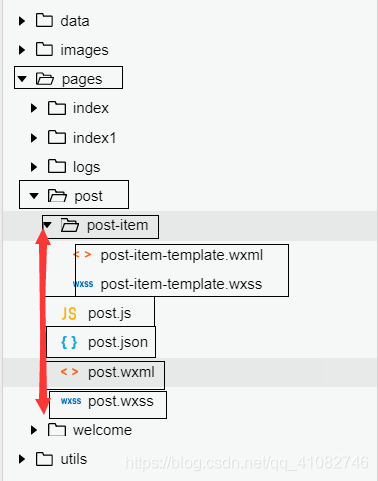
post.wxml:
block wx:for="{{postList}}" view class='post-container' view class='post-author-date' image class='post-author' src="{{item.avatar}}"/image text class='post-date'{{item.date}}/text /view text class='post-title'{{item.title}}/text image class='post-image' src="{{item.imgSrc}}"/image text class='post-content'{{item.content}}/text view class='post-like' image class='post-like-image' src="../../images/icon/chat.png"/image text class='post-like-font'{{item.reading}}/text image class='post-like-image' src="../../images/icon/view.png"/image text class='post-like-font'{{item.collection}}/text /view /view/block 如果只有一个这样的页面这样写是可以的,但是如果多个页面都是这样的样式,就没有模板化的编程
所以要想有模板化编程就引入了template
post.wxml:
首先引入模板:
import src="post-item/post-item-template.wxml" /修改之前写的代码:
block wx:for="{{postList}}" template is="postItem" data="{{item}}" /!-- 通过名字进行查到模板 并通过data属性给模板赋值 --!-- ...item 可以把item这个数组展开,只展开一级 这样的话在template模板中就不用item.变量名了 直接写变量名 --/block post-item-template.wxml:
要给template起一个名字,之后引入通过名字进行查找。
注意:template 里面的路径要使用绝对路径 也就是要修改image 的 src !!!
template name="postItem" view class='post-container' view class='post-author-date' image class='post-author' src="{{item.avatar}}"/image text class='post-date'{{item.date}}/text /view text class='post-title'{{item.title}}/text image class='post-image' src="{{item.imgSrc}}"/image text class='post-content'{{item.content}}/text view class='post-like' image class='post-like-image' src="../../images/icon/chat.png"/image text class='post-like-font'{{item.reading}}/text image class='post-like-image' src="../../images/icon/view.png"/image text class='post-like-font'{{item.collection}}/text /view /view/templatepost.wxss:
@import "./post-item/post-item-template.wxss";










