


闲来没事钻研小程序开发,写了一篇关于微信小程序ble设备控制的底层api,话不多说直接上源码:
目录结构:
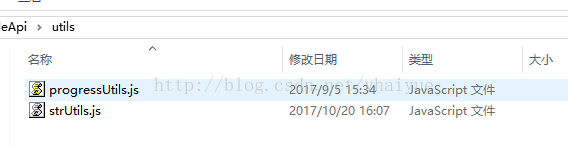
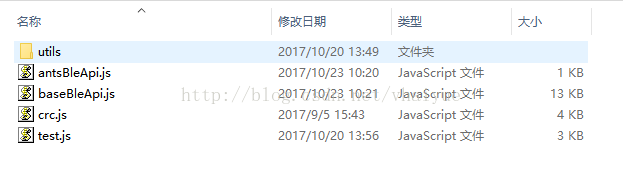
baseBleApi.js文件:
var currentDevice = {};//ble设备var notifyService = {};//唤醒特征值var writeService = {};//写入服务
var writeCharacteristic = {};//写入特征值var notifyCharacteristic = {};//唤醒特征值
var onSendSuccessCallBack = undefined;//成功回调var onConnectCallback = undefined;// 链接回调var bleUtils = require('utils/strUtils.js');var crc = require('crc.js');var isConnected = false;//是否已链接
module.exports = {writeCommend: writeCommend,closeBLEConnection: closeBLEConnection// disConnect, disConnect,// openBluetoothAdapter: openBluetoothAdapter}
/*** @param sendCommend 写入命令* @param deviceName 锁具名称* @param onSuccessCallBack 成功回调* @param onFailCallBack 返回失败回调* @param onCompleteCallBack 成功失败都会回调* * @param services 主服务serviceUUID* @param writeServiceUUID 写入服务UUID* @param notifyServiceUUID 唤醒服务UUID* * @param notifyCharacteristicUUID 唤醒特征值UUID* @param writeCharacteristicUUID 写入特征值UUID*/
function writeCommend(options) {var params = {};var defalt = {adviceId: "",sendCommend: "",onSuccessCallBack: function success(res) { },onFailCallBack: function success(res) { },onCompleteCallBack: function success(res) { },services: [],writeServiceUUID: "",notifyServiceUUID: "",notifyCharacteristicUUID: "",writeCharacteristicUUID: ""};
params = Object.assign(defalt, options)// setConnectionStateChange(params.onFailCallBack)
if (!setConnectionStateChange()) {openBluetoothAdapter(params);} else {// typeof str == 'string'sendCmd(params.sendCommend, params.onSuccessCallBack, params.onFailCallBack);}}
/*** 初始化蓝牙适配器*/
function openBluetoothAdapter(params) {
wx.openBluetoothAdapter({success: function (res) {console.log("初始化蓝牙适配器成功")console.log(res)startBluetoothDevicesDiscovery(params)
}, fail: function (res) {console.log("初始化蓝牙适配器失败")params.onFailCallBack(res.errMsg)console.log(res);return},complete: function (res) {console.log(res);}})}
/*** 开始搜寻附近的蓝牙外围设备。注意,该操作比较耗费系统资源,请在搜索并连接到设备后调用 stop 方法停止搜索。* @ params services:['4asdga'],根据主ServiceUUID进行搜索特定蓝牙,提高搜索效率* 本ble设备主ServiceUUid: "6E400001-B5A3-F393-E0A9-E50E24DCCA9E"*/
var delayTimer;//停止循环获取tagvar isFound = falsefunction startBluetoothDevicesDiscovery(params, connectCallback) {
if (typeof connectCallback =='undefined') {connectCallback = function (errMsg) { }}
onConnectCallback = connectCallback;
setTimeout(function () {if (isFound) {return;}else {console.log("搜索设备超时");params.onFailCallBack("搜索设备超时")stopBluetoothDevicesDiscovery();clearInterval(delayTimer)return}}, 10000);
wx.startBluetoothDevicesDiscovery({
services: params.services,success: function (res) {console.log(res)console.log("开启搜索成功")getBluetoothDevices(params)
}, fail: function (res) {console.log("开启搜索失败")console.log(res)params.onFailCallBack(res)return},complete: function (res) {// completeconsole.log(res);}})
//每隔一秒获取一次delayTimer = setInterval(function () {getBluetoothDevices(params)}, 1000)
}
/*** 获取所有已发现的蓝牙设备,包括已经和本机处于连接状态的设备*/function getBluetoothDevices(params) {
wx.getBluetoothDevices({success: function (res) {console.log("getBluetoothDevices");console.log(res.devices);for (var i =0; i res.devices.length; i++) {//忽略传入的deviceName大小写// isContains bleUtilsvar lockNameFinal = bleUtils.removeBytes(params.adviceId,":")
if (bleUtils.isContains(res.devices[i].name, lockNameFinal)) {console.log("搜索到要链接的设备....")stopBluetoothDevicesDiscovery();isFound = trueclearInterval(delayTimer)currentDevice = res.devices[i]createBLEConnection(params)}}},fail: function (res) {clearInterval(delayTimer)console.log("没有搜索到要链接的设备....")console.log(res)params.onFailCallBack(res)stopBluetoothDevicesDiscovery();return}})}
/*** 停止搜寻附近的蓝牙外围设备。请在确保找到需要连接的设备后调用该方法停止搜索。*/function stopBluetoothDevicesDiscovery() {wx.stopBluetoothDevicesDiscovery({success: function (res) {console.log(res)}})}
/*** 连接低功耗蓝牙设备*/function createBLEConnection(params) {
// setConnectionStateChange(params.onFailCallBack);
setTimeout(function () {if (isConnected) return;console.log("连接设备超时");params.onFailCallBack("连接设备超时")return}, 5000)
wx.createBLEConnection({// 这里的 deviceId 需要在上面的 getBluetoothDevices 或 onBluetoothDeviceFound 接口中获取deviceId: currentDevice.deviceId + "",success: function (res) {console.log(res)console.log(`连接成功 : ${currentDevice.deviceId}`)isConnected = truegetBLEDeviceServices(params);
}, fail: function (res) {console.log(res)params.onFailCallBack(res)console.log(`连接失败 : ${currentDevice.deviceId}`)}})}/*** closeBLEConnection* 断开与低功耗蓝牙设备的连接*/
function closeBLEConnection(deviceId) {
wx.closeBLEConnection({deviceId: currentDevice.deviceId + "",success: function (res) {console.log(res)}})}
/*** * 返回蓝牙是否正处于链接状态*/function setConnectionStateChange(onFailCallback) {wx.onBLEConnectionStateChange(function (res) {// 该方法回调中可以用于处理连接意外断开等异常情况console.log(`device ${res.deviceId} state has changed, connected: ${res.connected}`);return res.connected;});}
/*** 获取蓝牙设备所有 service(服务)* @params writeServiceUUID:ble设备所具有的写入服务UUID* @params notifyServiceUUID:ble设备具有的唤醒服务UUID*/
function getBLEDeviceServices(params) {
wx.getBLEDeviceServices({// 这里的 deviceId 需要在上面的 getBluetoothDevices 或 onBluetoothDeviceFound 接口中获取deviceId: currentDevice.deviceId + "",success: function (res) {console.log(`获取服务成功 :`)console.log('device services:', res.services)
for (var i =0; i res.services.length; i++) {if (res.services[i].uuid == params.writeServiceUUID) {writeService = res.services[i]}if (res.services[i].uuid == params.notifyServiceUUID) {notifyService = res.services[i]}}//获取getNotifyBLEDeviceCharacteristics(params);}})}
/*** 获取蓝牙设备唤醒characteristic(特征值)*/function getNotifyBLEDeviceCharacteristics(params) {
wx.getBLEDeviceCharacteristics({// 这里的 deviceId 需要在上面的 getBluetoothDevices 或 onBluetoothDeviceFound 接口中获取deviceId: currentDevice.deviceId + "",// 这里的 serviceId 需要在上面的 getBLEDeviceServices 接口中获取serviceId: notifyService.uuid + "",
success: function (res) {console.log("唤醒特征值获取成功:")console.log('device getBLEDeviceCharacteristics:', res.characteristics)
for (var i =0; i res.characteristics.length; i++) {if (res.characteristics[i].uuid == params.notifyCharacteristicUUID) {notifyCharacteristic = res.characteristics[i]}}
// getWriteBLEDeviceCharacteristics();console.log("唤醒特征值 :", notifyCharacteristic)getWriteBLEDeviceCharacteristics(params)}})}
function getWriteBLEDeviceCharacteristics(params) {
wx.getBLEDeviceCharacteristics({// 这里的 deviceId 需要在上面的 getBluetoothDevices 或 onBluetoothDeviceFound 接口中获取deviceId: currentDevice.deviceId + "",// 这里的 serviceId 需要在上面的 getBLEDeviceServices 接口中获取serviceId: writeService.uuid + "",
success: function (res) {console.log("写入特征值获取成功:")console.log('device getBLEDeviceCharacteristics:', res.characteristics)for (var i =0; i res.characteristics.length; i++) {if (res.characteristics[i].uuid == params.writeCharacteristicUUID) {writeCharacteristic = res.characteristics[i]}}console.log("xieru :", writeCharacteristic)initNotifyListener(params);}})}
/*** * 连接成功后,初始化回调监听* * 启用低功耗蓝牙设备特征值变化时的 notify 功能。注意:* 必须设备的特征值支持notify才可以成功调用,具体参照 characteristic 的 properties 属性*/function initNotifyListener(params) {
wx.notifyBLECharacteristicValueChanged({
deviceId: currentDevice.deviceId + "",serviceId: notifyService.uuid + "",characteristicId: notifyCharacteristic.uuid + "",state: true,
success: function (res) {console.log(`开启监听成功${res.errMsg}`);
setTimeout(function () {onConnectCallback('ok');// 连接成功后,初始化回调监听回调sendCmd(params.sendCommend, params.onSuccessCallBack, params.onFailCallBack);}, 200);},fail: function (res) {console.log("开启监听失败" + res.errMsg);params.onFailCallBack("开启监听失败");}});onBLECharacteristicValueChange();}
/*** 启用低功耗蓝牙设备特征值变化时的 notify 功能。注意:* 必须设备的特征值支持notify才可以成功调用,具体参照 characteristic 的 properties 属性*/function onBLECharacteristicValueChange() {wx.onBLECharacteristicValueChange(function (res) {console.log(`characteristic ${res.characteristicId} has changed, now is ${bleUtils.arrayBuffer2HexString(res.value)}`);onSendSuccessCallBack(bleUtils.arrayBuffer2HexString(res.value));})}
/*** 发送指令,不关心指令具体长度* @param commond 指令* @param onSuccess 指令执行成功回调*/function sendCmd(commond, onSuccess, onFailCallback) {
var sendCommonds = crc.getCRCCmd(commond);//对commond的CRC处理必须放在这里if (typeof onSuccess =='undefined') {onSuccess = function (result) { }}onSendSuccessCallBack = onSuccess;sendCmds(sendCommonds, 0, onFailCallback);}
/*** * 逐条发送指令*/function sendCmds(commond, index, onFailCallback) {var itemCmd;var isLast = false;// 判断是否是最后一条if (commond.length index + 40) {itemCmd = commond.substr(index, 40);} else {isLast = true;itemCmd = commond.substr(index);}writeCommendToBle(itemCmd, function (errMsg) {if (errMsg == 'ok' && !isLast) { // 发送成功并且不是最后一条时,执行下一条sendCmds(commond, index + 40);}
}, onFailCallback)}
// 向蓝牙中写入数据(ble蓝牙)(增加指纹)function writeCommendToBle(commonds, onSendCallback, onFailCallback) {var commond = commonds;console.log("commond :" + commond)let buffer = bleUtils.hexString2ArrayBuffer(commond);console.log(`执行指令:${bleUtils.arrayBuffer2HexString(buffer)}`);
wx.writeBLECharacteristicValue({deviceId: currentDevice.deviceId + "",serviceId: writeService.uuid + '',characteristicId: writeCharacteristic.uuid + '',// 这里的value是ArrayBuffer类型value: buffer,success: function (res) {console.log('发送指令成功')console.log('writeBLECharacteristicValue success', res.errMsg)onSendCallback('ok');},fail: function (res) {console.log(`执行指令失败${res.errMsg}`);onFailCallback("执行指令失败");
}})}
crc.js文件:
for (var i =0; i len; i++) {crc = (crc ^ (data[i]));for (var j =0; j 8; j++) {crc = (crc & 1) != 0 ? ((crc 1) ^ 0xA001) : (crc 1);}}var hi = ((crc & 0xFF00) 8); //高位置var lo = (crc & 0x00FF); //低位置
// return [hi, lo];return [lo, hi]; // 大端模式}return [0,0];};
function isArray(arr) {return Object.prototype.toString.call(arr) ==='[object Array]';};
function ToCRC16(str, isReverse) {return toString(CRC16(isArray(str) ? str : strToByte(str)), isReverse);};
function strToByte(str) {var tmp = str.split(''), arr = [];for (var i =0, c = tmp.length; i c; i++) {var j = encodeURI(tmp[i]);if (j.length == 1) {arr.push(j.charCodeAt());} else {var b = j.split('%');for (var m =1; m b.length; m++) {arr.push(parseInt('0x' + b[m]));}}}return arr;};
function convertChinese(str) {var tmp = str.split(''), arr = [];for (var i =0, c = tmp.length; i c; i++) {var s = tmp[i].charCodeAt();if (s = 0 || s =127) {arr.push(s.toString(16));}else {arr.push(tmp[i]);}}return arr;};
function filterChinese(str) {var tmp = str.split(''), arr = [];for (var i =0, c = tmp.length; i c; i++) {var s = tmp[i].charCodeAt();if (s 0 && s 127) {arr.push(tmp[i]);}}return arr;};
function strToHex(hex, isFilterChinese) {hex = isFilterChinese ? filterChinese(hex).join('') : convertChinese(hex).join('');
//清除所有空格hex = hex.replace(/s/g, "");//若字符个数为奇数,补一个空格hex += hex.length % 2 != 0 ? " " : "";
var c = hex.length / 2, arr = [];for (var i =0; i c; i++) {arr.push(parseInt(hex.substr(i * 2, 2), 16));}return arr;};
function padLeft(s, w, pc) {if (pc == undefined) {pc = '0';}for (var i =0, c = w - s.length; i c; i++) {s = pc + s;}return s;};
function toString(arr, isReverse) {if (typeof isReverse =='undefined') {isReverse = true;}var hi = arr[0], lo = arr[1];return padLeft((isReverse ? hi + lo * 0x100 : hi * 0x100 + lo).toString(16).toUpperCase(),4,'0');};
function CRC16(data) {var len = data.length;if (len 0) {var crc = 0xFFFF;
for (var i =0; i len; i++) {crc = (crc ^ (data[i]));for (var j =0; j 8; j++) {crc = (crc & 1) != 0 ? ((crc 1) ^ 0xA001) : (crc 1);}}var hi = ((crc & 0xFF00) 8); //高位置var lo = (crc & 0x00FF); //低位置
// return [hi, lo];return [lo, hi]; // 大端模式}return [0,0];};
function ToCRC16(str, isReverse) {return toString(CRC16(isArray(str) ? str : strToByte(str)), isReverse);};
function ToModbusCRC16(str, isReverse) {return toString(CRC16(isArray(str) ? str : strToHex(str)), isReverse);};
/*** 给命令增加CRC 16进制** @param hex* @return 16进制*/function getCRCCmd(hex) {var hexTemp = hex;if (hex.toUpperCase().startsWith("0X")) {hexTemp = hex.substr(4);} else if (hex.toUpperCase().startsWith("AA")) {hexTemp = hex.substr(2);}return hex + getCRCStr(hexTemp);}
/*** 获取CRC 16进制** @param data* @return*/function getCRCStr(data) {return ToModbusCRC16(data);}
module.exports = {ToCRC16: ToCRC16,ToModbusCRC16: ToModbusCRC16,getCRCCmd: getCRCCmd}
strUtils文件:
/*** ArrayBuffer转16进制字符串*/function arrayBuffer2HexString(buf) {var out = "";var u8a = new Uint8Array(buf);var single;for (var i =0; i u8a.length; i++) {single = u8a[i].toString(16)while (single.length 2) single = "0".concat(single);out += single;}return out;}/*** 1、字符串转换为十六进制* 主要使用 charCodeAt()方法,此方法返回一个字符的 Unicode 值,该字符位于指定索引位置。*/function stringToHex(str) {var val = "";for (var i =0; i str.length; i++) {val += str.charCodeAt(i).toString(16);}return val;}
function filterChinese(str) {var tmp = str.split(''), arr = [];for (var i =0, c = tmp.length; i c; i++) {var s = tmp[i].charCodeAt();if (s 0 && s 127) {arr.push(tmp[i]);}}return arr;};function strToHex(hex, isFilterChinese) {hex = isFilterChinese ? filterChinese(hex).join('') : convertChinese(hex).join('');
//清除所有空格hex = hex.replace(/s/g, "");













