


写在前:想实现通过wx:for 为每个循环出来的元素添加动画,并且动画之间互不影响,自定义写法
描述:添加多个地址,想要删除其中的任意一个的时候有一些动态效果,向左后向右滑动删除
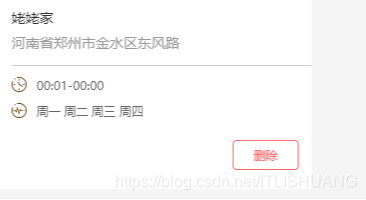
复现第一步:首先是静态页面布局和一些简单的样式
!-- 因为数据是渲染的所以,所以如果你只复制html 到你的项目将什么都不显示 --view class="addbox"block wx:for="{{region}}" wx:for-index="i" wx:key="index"view wx:if="{{item.termshow}}" data-ceshid="{{item.termclear}}" animation="{{animationList[i]}}" class="addtrem"view class="{{state ? 'trem' :'termhei'}}"view class="term-content row"image src="{{item.termimage}}"/imageview class="termtext portrait {{state ? 'localbor' :''}}"text class="term-name {{state ? 'termbotm' :''}}"{{item.termname}}/texttext wx:if="{{state}}"河南省郑州市金水区东风路/text/view/viewview wx:if="{{state}}" class="term-time portrait"view class="term-box row"image src="../../../images/settime_icon.png"/imagetext{{item.termtime}}/text/viewview class="term-box row"image src="../../../images/setfre_icon.png"/imagetext{{item.termweek}}/text/view/view/viewview catchtap="clearTap" class="clear"!-- 标记当前第几个 为了删除 --text data-clearid='{{i}}'删除/text/view/view/block/view.addbox {width: 100%;height: 100%;}.trem {width: 100%;height: 270rpx;background-color: #fff;margin-bottom: 20rpx;}.termhei {width: 100%;height: 120rpx;background-color: #fff;display: flex;align-items: center;margin-bottom: 20rpx;}.row {display: flex;flex-direction: row;align-items: center;}.portrait {display: flex;flex-direction: column;}.term-content {width: 100%;height: 52%;justify-content: space-between;}.termtext {font-size: 14px;color: #999;width: 80%;height: 100%;justify-content: center;}.localbor {border-bottom: 1px solid #ccc;}.term-name {font-size: 14px;color: #333;}.termbotm {margin-bottom: 2%;}.term-time {width: 80%;height: 48%;margin-left: 20%;justify-content: center;}.term-box {font-size: 12px;color: #666;height: 40%;align-content: center;}.term-content image {width: 60rpx;height: 60rpx;margin-left: 28rpx;}.term-box image {width: 30rpx;height: 30rpx;margin-right: 20rpx;}/* 循环的数据样式 */.addtrem {width: 100%;height: 388rpx;background-color: #fff;margin-bottom: 20rpx;}.clear {width: 100%;height: 88rpx;display: flex;justify-content: flex-end;}.clear text {font-size: 12px;color: #fe6969;width: 128rpx;height: 56rpx;line-height: 56rpx;text-align: center;border: 1px solid #fe6969;border-radius: 8rpx;margin-right: 26rpx;}复现第二步,重点提取:
animationList[tap] = animation.export() tap是当前第几项
let termshows = "region[" + tap + "].termshow" 获取当前点击的数组中对象的值,动画完成时删除。
//这是数据 页面循环会用到,里面的图片地址需要你重新改一下data: {state: true,region: [{termname: '学校',termimage: '/images/else_icon.png',termlocal: '上海大学',termtime: '00:01-00:00',termweek: '周一 周二 周三 周四',termshow: true,},{termname: '家',termimage: '/images/else_icon.png',termlocal: '北京三里屯',termtime: '00:01-00:00',termweek: '周一 周二 周三 周四',termshow: true,}],animationList: [], //这是数组 存放动画},// 点击删除 clearTap: function(e) {// 点击删除 删除当前点击 console.log(e.target.dataset.clearid)let that = thislet tap = e.target.dataset.clearid;let length = wx.getSystemInfoSync().windowWidth //获取屏幕的宽度let animationList = this.data.animationList.slice()// 动画 (可以拆分出去,封装成方法调用)const animation = wx.createAnimation({duration: 800,timingFunction: 'ease-in-out',delay: 0,})this.animation = animationanimation.translateX(-length / 6).step() //动画,向左屏幕的六分之一animation.translateX(length).step()animationList[tap] = animation.export()let termshows = "region[" + tap + "].termshow" //获取当前点击的数组中对象的值this.setData({animationList: animationList})setTimeout(function() {console.log("定时器")that.setData({[termshows]: false, //两秒后,删除选中的数据对象})}, 2000)},












