


源码下载地址:http://download.csdn.net/detail/liu537192/8546469
效果图:
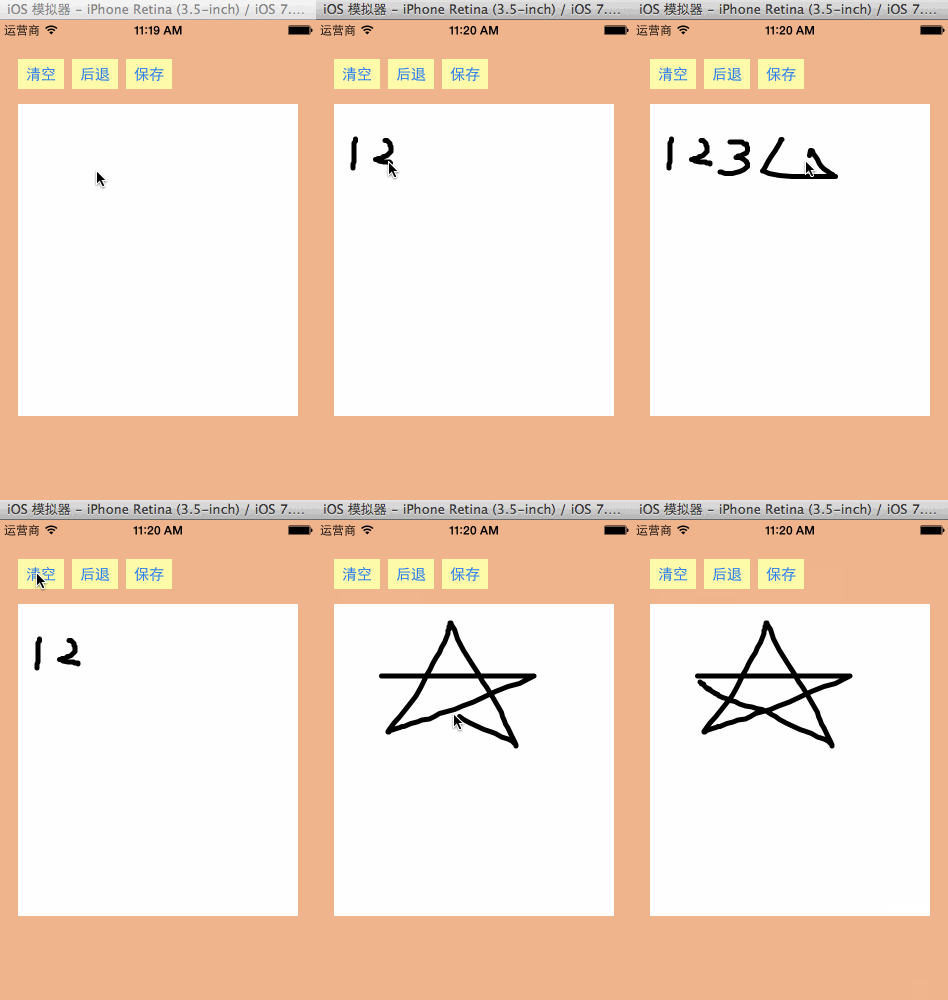
核心代码:
//// JLViewController.m// 02-涂鸦//// Created by XinYou on 15-3-30.// Copyright (c) 2015年 vxinyou. All rights reserved.//#import "JLViewController.h"#import "JLPaintView.h"#import "UIImage+Extension.h"#import "MBProgressHUD+MJ.h"@interface JLViewController ()- (IBAction)clear;- (IBAction)back;- (IBAction)save;@property (weak, nonatomic) IBOutlet JLPaintView *paintView;@end@implementation JLViewController- (void)viewDidLoad{ [super viewDidLoad]; }- (IBAction)clear { [self.paintView clear];}- (IBAction)back { [self.paintView back];}- (IBAction)save { // 1,截图 UIImage *image = [UIImage captureWithView:self.paintView]; // 2,保存到相册 UIImageWriteToSavedPhotosAlbum(image, self, @selector(image:didFinishSavingWithError:contextInfo:), nil);}- (void)image:(UIImage *)image didFinishSavingWithError:(NSError *)error contextInfo:(void *)contextInfo{ if (error) {// 内存不足等情况会导致失败 [MBProgressHUD showError:@"保存失败"]; }else{ [MBProgressHUD showSuccess:@"保存成功"]; }}@end//// JLPaintView.h// 02-涂鸦//// Created by XinYou on 15-3-30.// Copyright (c) 2015年 vxinyou. All rights reserved.//#import @interface JLPaintView : UIView/** * 清空 */- (void)clear;/** * 后退 */- (void)back;@end//// JLPaintView.m// 02-涂鸦//// Created by XinYou on 15-3-30.// Copyright (c) 2015年 vxinyou. All rights reserved.//#import "JLPaintView.h"@interface JLPaintView()/** * 可变数组,用于存储所有的路径(每一条线表示一个路径) */@property (nonatomic, strong)NSMutableArray *allPaths;@end@implementation JLPaintView- (void)clear{ // 清空存储所有路径的数组 [self.allPaths removeAllObjects]; // 重绘(刷新) [self setNeedsDisplay];}- (void)back{ // 删除最后条路径 [self.allPaths removeLastObject]; // 重绘(刷新) [self setNeedsDisplay];}- (NSMutableArray *)allPaths{ if (_allPaths == nil) { _allPaths = [NSMutableArray array]; } return _allPaths;}/** * 手指刚接触屏幕时调用 */- (void)touchesBegan:(NSSet *)touches withEvent:(UIEvent *)event{ UITouch *touch = [touches anyObject]; // 确定起点 CGPoint startPoint = [touch locationInView:touch.view]; // 每一次开始触摸, 就新建一个数组来存放这次触摸过程的所有点(这次触摸过程的路径) NSMutableArray *path = [NSMutableArray array]; // 把起点添加到path这个数组中 [path addObject:[NSValue valueWithCGPoint:startPoint]]; // 把本次的路径(path)添加到allPaths中 [self.allPaths addObject:path]; // 重绘(刷新) [self setNeedsDisplay];}/** * 手指在屏幕上移动时会调用 */- (void)touchesMoved:(NSSet *)touches withEvent:(UIEvent *)event{ UITouch *touch = [touches anyObject]; // 当前移动到了哪个点(当前点) CGPoint currentPoint = [touch locationInView:touch.view]; // 取出本次路径对应的数组 NSMutableArray *path = [self.allPaths lastObject]; // 把当前点添加到path数组中 [path addObject:[NSValue valueWithCGPoint:currentPoint]]; // 重绘(刷新) [self setNeedsDisplay];}/** * 手指离开屏幕时会调用 */- (void)touchesEnded:(NSSet *)touches withEvent:(UIEvent *)event{ [self touchesMoved:touches withEvent:event];}- (void)drawRect:(CGRect)rect{ // 1,获得上下文 CGContextRef ctx = UIGraphicsGetCurrentContext(); // 2,画线 for (NSMutableArray *path in self.allPaths) { for (int i = 0; i path.count; i++) { CGPoint point = [path[i] CGPointValue]; if (i == 0) { // 2.1,画一条线的起点 CGContextMoveToPoint(ctx, point.x, point.y); }else { // 2.2,连线 CGContextAddLineToPoint(ctx, point.x, point.y); } } } // 3,设置样式 // 3.1,设置线宽 CGContextSetLineWidth(ctx, 5); // 3.2,设置线段头尾的样式 CGContextSetLineCap(ctx, kCGLineCapRound); // 3.3,设置线段转折点的样式 CGContextSetLineJoin(ctx, kCGLineJoinRound); // 4,渲染(显示到view上) CGContextStrokePath(ctx);}@end









