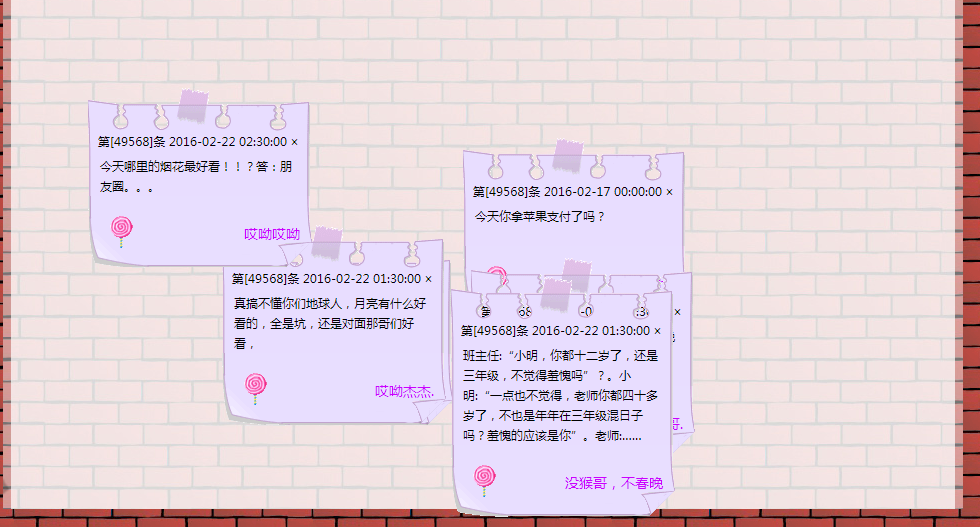
这个练习是看网上的视频自己又写了一遍,对一些知识点进行的总结,从基础到高级都有讲解,有需要的可以看一下。
!DOCTYPE htmlhtml lang="en"head meta charset="UTF-8" title心愿墙/title style body{ margin: 0px auto; padding: 0px; font-size: 12px; background: url("images/bg.gif") repeat center 36px; text-align: center; background-color: #c30230; } #content{ margin: 0px auto; width: 960px; background: url("images/content_bg.jpg") no-repeat left top; height: 627px; position: relative; } #content .tip1, #content .tip2, #content .tip3, #content .tip4, #content .tip5, #content .tip6, #content .tip7, #content .tip8{ position: absolute; width: 227px; left: 200px; top: 100px; } #content .tip1 .tip_h{ background: url("images/tip1_h.gif") no-repeat left top; } #content .tip1 .tip_h, #content .tip2 .tip_h, #content .tip3 .tip_h, #content .tip4 .tip_h, #content .tip5 .tip_h, #content .tip6 .tip_h, #content .tip7 .tip_h, #content .tip8 .tip_h{ width: 227px; height: 23px; padding-top: 45px; text-align: center; cursor: pointer; } #content .tip1 .tip_c{ background: url(images/tip1_c.gif) repeat-y; } #content .tip1 .tip_c, #content .tip2 .tip_c, #content .tip3 .tip_c, #content .tip4 .tip_c, #content .tip5 .tip_c, #content .tip6 .tip_c, #content .tip7 .tip_c, #content .tip8 .tip_c{ width: 200px; padding-left: 12px; padding-right: 15px; min-height: 40px; text-align: left; line-height: 20px; max-height: 160px; word-wrap: break-word; word-break: break-all; overflow: hidden; } #content .tip1 .tip_f { background: url(images/tip1_f.gif) no-repeat left top; } #content .tip1 .tip_f, #content .tip2 .tip_f, #content .tip3 .tip_f, #content .tip4 .tip_f, #content .tip5 .tip_f, #content .tip6 .tip_f, #content .tip7 .tip_f, #content .tip8 .tip_f { width: 227px; height: 53px; padding-top: 20px; } #content .close, #content .close2 { float: left; font-size: 12px; cursor: pointer; color: #000000; } .clr { clear: both; overflow: auto; display: block; height: 0px; } #content .icon { float: left; width: 35px; padding-left: 15px; height: 35px; text-align: center; } #content .name { float: right; padding-right: 15px; text-align: right; font-size: 14px; line-height: 35px; color: #C0F; } #content .num { float: left; padding-left: 7px; width: 195px; } /style/headbody div id="content" /div!-- !–整个页面–-- script // 模拟数据库获取信息 var messages = [ {"id":1,"name":"mahu","content":"今天你拿苹果支付了吗?","time":"2016-02-17 00:00:00"}, {"id":2,"name":"haha","content":"今天天气不错,风和日丽的","time":"2016-02-18 12:40:00"}, {"id":3,"name":"jjjj","content":"常要说的事儿是乐生于苦","time":"2016-03-18 12:40:00"}, {"id":4,"name":"9.8的妹纸","content":"把朋友家厕所拉堵了 不敢出去 掏了半小时了都","time":"2016-03-18 12:40:00"}, {"id":5,"name":"雷锋ii.","content":"元宵节快乐","time":"2016-02-22 12:40:00"}, {"id":6,"name":"哎呦哥哥.","content":"据说今晚央视的元宵晚会导演和春晚导演是同一个人,真是躲得过初一,躲不过十五。","time":"2016-02-22 01:30:00"}, {"id":7,"name":"没猴哥,不春晚","content":"班主任:“小明,你都十二岁了,还是三年级,不觉得羞愧吗”?。小明:“一点也不觉得,老师你都四十多岁了,不也是年年在三年级混日子吗?羞愧的应该是你”。老师:……","time":"2016-02-22 01:30:00"}, {"id":8,"name":"哎呦杰杰.","content":"真搞不懂你们地球人,月亮有什么好看的,全是坑,还是对面那哥们好看,","time":"2016-02-22 01:30:00"}, {"id":9,"name":"哎呦哎呦","content":"今天哪里的烟花最好看!!?答:朋友圈。。。","time":"2016-02-22 02:30:00"} ]; //获取相关元素 var content = document.getElementById("content"); //循环生成div标签,然后为innerHTML属性添加内容 for(var i=0;imessages.length;i++){ var newDiv = document.createElement("div"); //绑定类名和ID newDiv.className = "tip1"; newDiv.id = "tip"+ messages[i].id; //改变位置 var topValue = parseInt(Math.random()*400); var leftValue = parseInt(Math.random()*700); newDiv.style.top = topValue + "px"; newDiv.style.left = leftValue + "px"; //赋值内容 newDiv.innerHTML = 'div class="tip_h" title="双击关闭纸条"'+ 'div class="num"第[49568]条 '+messages[i].time+'/div'+ 'div class="close" title="关闭纸条" ×/div'+ 'div class="clr"/div'+ '/div'+ 'div class="tip_c"'+ messages[i].content+ '/div'+ 'div class="tip_f"'+ 'div class="icon"'+ 'img src="images/bpic_1.gif" alt="小程序" title=""'+ '/div'+ 'div class="name"'+messages[i].name+'/div'+ 'div class="clr"/div'+ '/div'; //把新元素放到content中 content.appendChild(newDiv); //绑定事件,提高层级 newDiv.onclick = fn; //点击关闭按钮的时候关闭父盒子 var closeDiv = newDiv.getElementsByClassName("close")[0]; closeDiv.onclick = function () { content.removeChild(this.parentNode.parentNode); } //双击关闭按钮类名叫做tip_h var dbDiv = newDiv.getElementsByClassName("tip_h")[0]; dbDiv.ondblclick = function () { //不能用newDiv,因为在页面加载的时候newDiv,已经变成最后一个了,当你点击的时候,用远关闭的是最后的那个div。// content.removeChild(newDiv); content.removeChild(this.parentNode); } } var index = 1; function fn(){ this.style.zIndex = index; index++; } /script/body/html运行效果如下: