


最近开发一个小程序,需要上传头像图片,找了好多例子,都不好用,要么用不了,要么功能不全,或者还需要第三方代码,总之就是不合适,最后还是自己捣鼓了一个。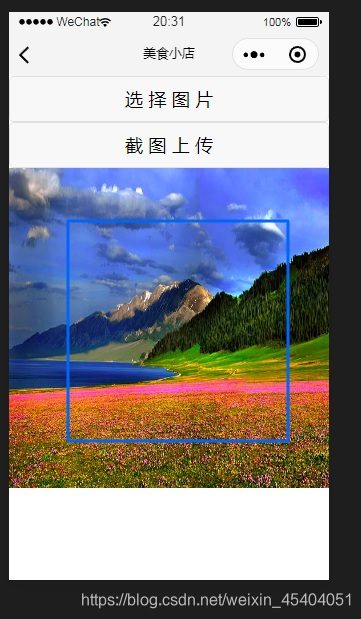
js代码
const app = getApp()Page({ data: { coordinate:{ px: 0, py: 0, x:0, y:0, x1: 0, y2: 0, img:'', }, a0:0,//这三个变量是其它页面传来的数据,可删除 a1: 0, a2: 0, }, onLoad: function (e) { var a0=e.a0 var a1=e.a1 var a2 = e.a2 var _this = this var coordinate = _this.data.coordinate//取可用屏幕长宽 const res = wx.getSystemInfoSync() coordinate.px = res.windowWidth coordinate.py = res.windowHeight this.setData({ coordinate: coordinate, a0: a0, a1: a1, a2: a2}) }, button: function () { var _this = this var coordinate = _this.data.coordinate var a1 = _this.data.a1 var a0 = _this.data.a0 var a2 = _this.data.a2 if (coordinate.img!=''){ wx.canvasToTempFilePath({ x: coordinate.x + 2, y: coordinate.y + 2, width: coordinate.px - 104, height: coordinate.px - 104, canvasId: 'map_id', fileType: 'jpg', quality: 0.5,//压缩 destHeight: 250,//保存图片的长宽 destWidth: 250,//三个属性决定了图片文件的大小 success: function (res) { console.log(a0+','+a1+','+a2) console.log(res.tempFilePath) wx.showLoading({ title: '数据更新中' }) wx.uploadFile({ url: app.globalData.url + 'img.php', //接口 filePath: res.tempFilePath, name: 'file', formData: { a0: a0, a1: a1, a2: a2, }, success: function (res) { wx.hideLoading()//加载完成 console.log(res.data) wx.navigateBack({ delta: 1 }) } }) } }) }else{ wx.showToast({ title: '没有选择图片', icon: 'none' }) } }, button1: function (){ var _this = this var coordinate = _this.data.coordinate var map = _this.data.map wx.chooseImage({ count: 1, sizeType: ['compressed'], sourceType: ['album', 'camera'], success: function (res) { coordinate.img = res.tempFilePaths[0] _this.setData({ coordinate: coordinate, }) var ctx = wx.createCanvasContext('map_id'); ctx.drawImage(coordinate.img, 0, 0, coordinate.px, coordinate.px); ctx.setLineWidth(3) ctx.setStrokeStyle('#0065fa') ctx.rect(coordinate.x, coordinate.y, coordinate.px - 100, coordinate.px - 100) ctx.setLineJoin('round') ctx.stroke() ctx.draw() } }) }, a1:function(e){ var _this = this var coordinate = _this.data.coordinate coordinate.x1 = e.changedTouches[0].x coordinate.y1 = e.changedTouches[0].y _this.setData({ coordinate: coordinate }) }, a2: function (e) {//移动框框 var x2 = e.changedTouches[0].x var y2 = e.changedTouches[0].y var _this = this var coordinate = _this.data.coordinate var a = x2 - coordinate.x1 var b = y2 - coordinate.y1 coordinate.x = coordinate.x + a coordinate.y = coordinate.y + b coordinate.x1 = x2 coordinate.y1 = y2 if (coordinate.x < 1) {coordinate.x = 1} if (coordinate.x > 100) { coordinate.x = 100} if (coordinate.y < 1) { coordinate.y = 1} if (coordinate.y > 100) { coordinate.y = 100} _this.setData({ coordinate: coordinate }) var ctx = wx.createCanvasContext('map_id'); ctx.drawImage(coordinate.img, 0, 0, coordinate.px, coordinate.px); ctx.setLineWidth(3) ctx.setStrokeStyle('#0065fa') ctx.rect(coordinate.x, coordinate.y, coordinate.px - 100, coordinate.px - 100) ctx.setLineJoin('round') ctx.stroke() ctx.draw() },})wxml:
<view> <button bindtap='button1' >选 择 图 片</button> <button bindtap='button' >截 图 上 传</button> <canvas class="map" disable-scroll="true" bindtouchstart="a1" bindtouchmove="a2" canvas-id="map_id"></canvas> </view>wxss:
.map{ width: 750rpx; height: 750rpx;}









