


先放上效果图,然后再解构如何实现。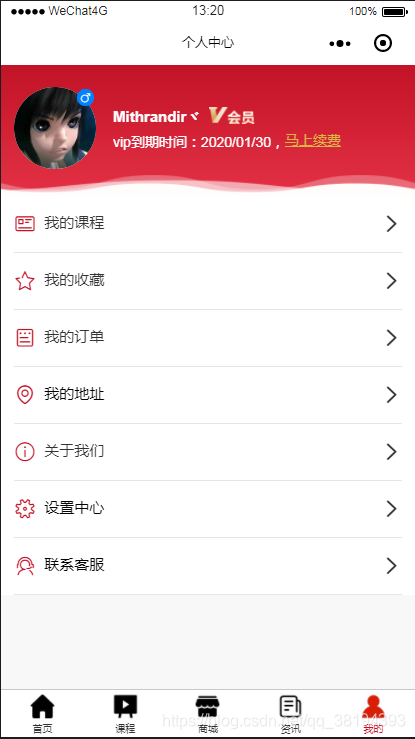
常见的个人中心内容包括了:
头像,用户昵称,会员信息,充值信息,还有个人设置,收货地址,订单历史,收藏记录,浏览历史等等。
这些板块都可以用组件来实现。
页面逻辑中:
将头像和昵称还有会员信息放在顶部在一个宣传版面展示。剩余的个人中心的功能则单独拿出来做一个列表功能。很多人可能会想到,实现列表功能,列表有多少是不是对应的功能函数就要有多少呢,其实大可不必。除了navgator组件和button组件外,我们也可以使用view来实现。个人中心的原生API则直接使用button组件的opentype能力,其余我们则用view的属性绑定来实现操作传参。
详细见view标签内的属性:
bindtap=“openPage” class=“item” data-url="/pages/my_course/my_course" formType=“submit” hoverClass=“none”
统一命名一个openPage方法来跳转,跳转的url就是data-url。参数需要添加的同样以data-xx的形式,在openpage的参数中就可以获取到。
实现页面的代码:
!--pages/my/my.wxml--form reportSubmit bindsubmit="submitFormId" view class="header" view class="user" hoverClass="none" view class="user_box" view catchtap="previewImage" class="logo" image src="{{userInfo.avatarUrl}}"/image view class="cu-tag badge {{male==1?'icon-male bg-blue':'icon-female bg-pink'}}"/view /view block wx:if="{{vip}}" view class="user_info" view class="user_name" text{{userInfo.nickName}}/text image src="/images/main/vip.png"/image /view view class="vip_expires"vip到期时间:{{vip_time}},button class="joinVip" bindtap='joinVip'马上续费/button/view /view /block block wx:else view class="user_info" view class="user_name" text{{userInfo.nickName}}/text /view view class="vip_expires" bindtap='joinVip'您还不是VIP, span style="color:blue;"请充值/span /view /view /block /view /view image src='https://edu.qinhui88.com/assets/wx/image/wave.gif' mode='scaleToFill' class='gif-wave'/image view class="info" style='display:none' view class="item" bindtap='' text class="count"{{today_s}}/text text class="title"坚持学习/{{practiceday}}天/text /view view class="item" text class="count"{{studytime}}/text text class="title"学习时长/{{studytime}}分钟/text /view view class="item" text class="count"{{practicetime}}/text text class="title"完成练习/{{practicetime}}节/text /view /view /view !-- 功能列表 -- view class="nav" view bindtap="openPage" class="item" data-url="/pages/my_course/my_course" formType="submit" hoverClass="none" view class='wallet' text class='icon-news icon'/text text decode="{{true}}" space="{{true}}" /text text我的课程/text /view view class="icon" text class='icon-right'/text /view /view view bindtap="openPage" class="item" data-url="/pages/collect/collect" formType="submit" hoverClass="none" view class='wallet' text class='icon-favor icon'/text text decode="{{true}}" space="{{true}}" /text text我的收藏/text /view view class="icon" text class='icon-right'/text /view /view !-- view bindtap="openPage" class="item" data-url="/pages/wallet/wallet" formType="submit" hoverClass="none" view class='wallet' text class='icon-moneybag icon'/text text decode="{{true}}" space="{{true}}" /text text我的钱包/text /view view class="icon" text class='icon-right'/text /view /view -- !-- -- view bindtap="openPage" class="item" data-url="/pages/purchase_history/purchase_history" formType="submit" hoverClass="none" view class='wallet' text class='icon-form icon'/text text decode="{{true}}" space="{{true}}" /text text我的订单/text /view view class="icon" text class='icon-right'/text /view /view button bindtap="chooseGeren" class="item" view class='wallet' text class='icon-location icon'/text text decode="{{true}}" space="{{true}}" /text text我的地址/text /view view class="icon" text class='icon-right'/text /view /button view bindtap="openPage" class="item" data-url="/pages/about/about" formType="submit" hoverClass="none" view class='wallet' text class='icon-info icon'/text text decode="{{true}}" space="{{true}}" /text text关于我们/text /view view class="icon" text class='icon-right'/text /view /view !-- view bindtap="openPage" class="item" data-url="/pages/advice/advice" formType="submit" hoverClass="none" view class='wallet'text class='icon-deit icon'/texttext decode="{{true}}" space="{{true}}" /texttext意见反馈/text/view view class="icon" text class='icon-right'/text /view /view -- button class="item" bindtap='changeView' view class='wallet' text class='icon-settings icon'/text text decode="{{true}}" space="{{true}}" /text text设置中心/text /view view class="icon" text class='icon-right'/text /view /button button class="item" formType="submit" hoverClass="none" openType="contact" view class='wallet' text class='icon-service icon'/text text decode="{{true}}" space="{{true}}" /text text联系客服/text /view view class="icon" text class='icon-right'/text /view /button /view/form样式上为了美观,可以自定义,这里使用的样式使用的是colorUi提供的UI样式。
/* pages/my/my.wxss */page { padding-bottom: 50rpx; background: f8f8f8;}.header { padding: 0 25rpx; padding-top: 40rpx; padding-bottom: 50rpx; width: 100%; background: linear-gradient(c21327, e42e42); position:relative;}.user { display: flex; justify-content: space-between; align-items: center;}.header .gif-wave{ position: absolute; width: 100%; bottom: 0; left: 0; z-index: 99; mix-blend-mode: screen; height: 100rpx; }.user_box { display: flex; align-items: center;}.edit { display: flex; width: 70rpx; height: 70rpx; padding: 18rpx; box-sizing: border-box;}.edit image { width: 100%; height: 100%; transform: rotate(180deg);}.logo { width: 150rpx; height: 150rpx; border-radius: 50%; background: fff; will-change: transform; position:relative;}.logo image { width: 100%; height: 100%;}.logo image { width: 100%; height: 100%; border-radius: 100%; will-change: transform;}.user_info { padding-left: 32rpx;}.user_name { display: flex; align-items: center; font-size: 36rpx; font-weight: bold; color: fff;}.user_name image { margin-left: 16rpx; width: 84rpx; height: 31rpx;}.vip_expires { margin-top: 12rpx; font-size: 27rpx; color: fff;}.info { display: flex; margin-top: 62rpx; width: 100%; height: 110rpx;}.info .item { flex: 1; display: flex; justify-content: center; align-items: center; flex-direction: column; line-height: 1.5; border-right: 1px solid fff;}.info .item:last-child { border-right: none;}.info .item .count { font-size: 46rpx; color: fff;}.info .item .title { font-size: 24rpx; color: fff;}.card { display: flex; justify-content: space-between; padding: 25rpx; background: fff;}.card .item { display: flex; justify-content: center; align-items: center; width: 340rpx; height: 200rpx; font-size: 34rpx; color: fff; border-radius: 16rpx; background: d2d2d2; overflow: hidden; will-change: transform;}.card .item image { width: 100%; height: 100%;}.nav { padding: 0 25rpx; font-size: 34rpx; background: fff;}.nav .item { display: flex; justify-content: space-between; border-bottom: 1px solid e5e5e5; padding: 30rpx 0;}.nav button.item { margin: 0; line-height: inherit; font-size: inherit;}.nav button.item .new_tips { position: relative;}.nav button.item .new_tips:before { content: ''; position: absolute; top: -2rpx; right: -14rpx; width: 20rpx; height: 20rpx; background-color: f43530; border-radius: 100%;}.nav .icon { display: flex; align-items: center; font-size: 40rpx; color:333;}.nav .wallet{ display:inline-flex;}.nav .wallet .icon { color: c21327;}.nav .discount_coupon .icon { color: bd9445;}.nav image { margin-left: 20rpx; width: 40rpx; height: 40rpx;}.joinVip{ font-size:27rpx; line-height:27rpx; display:inline-block; color:dab643; text-decoration:underline;}最重要的就是JS了,其实从页面功能实现来讲,几乎内容都是要靠获取后台数据来实现的。用户信息,在登陆的时候存储在后台服务器中,在打开个人中心页面的时候请求出来,用户性别标志的显示,同样以后台用户信息的sex值来判断显示图片。
会员信息也是携带在用户信息中一起请求出来,不是会员则显示为不是会员,请购买,是会员则显示会员身份并显示到期时间。图片显示和信息显示可用wx:if
// pages/my/my.jsvar e = require("../../utils/util.js"), time = require('../../utils/util.js');var app = getApp();Page({ data: { defaultAvatarUrl: "/images/main/default_avatar.png", defaultNickName: "用户名称", presentCount: 0, practiceday: '', studytime: '', practicetime: "", today_s: "", vip: false, StatusBar: app.globalData.StatusBar, CustomBar: app.globalData.CustomBar, ColorList: app.globalData.ColorList, }, onLoad: function(options) { var that = this, userInfo = wx.getStorageSync("_userInfo"); var userNid = wx.getStorageSync("unionid"); wx.request({ //位登录 url: app.globalData.Url + '/api/login/event/userinfo/', data: { unionid: userNid, }, method: 'POST', header: { 'content-type': 'application/x-www-form-urlencoded' // 默认值 }, success: function (res) { console.log('----用户信息', res) if (res.data.data.utype == 2) { res.data.data.uvipdaoqi = time.toDate(res.data.data.uvipdaoqi) that.setData({ vip: true, vip_time: res.data.data.uvipdaoqi, }) } else if (res.data.data.utype == 1) { console.log(res.errMsg) that.setData({ vip: false, }) } that.setData({ male:res.data.data.usex }) }, }) that.setData({ //转换完毕存储 userInfo: userInfo, }) wx.getSystemInfo({ success: function(res) { var windowWidth = res.windowWidth * 0.5; that.setData({ //圆点坐标,x为屏幕一半,y为半径与margin-top之和,px //后面获取的触摸坐标是px,所以这里直接用px. dotPoint: { clientX: windowWidth, clientY: 250 } }) } }) }, onReady: function() { }, openPage: function(a) { var e = a.currentTarget.dataset.url; wx.navigateTo({ url: e }); }, joinVip: function() { //加入VIP wx.navigateTo({ url: '../vip/vip', }) }, chooseGeren: function() { wx.navigateTo({ url: '../form/form', }) }, changeView: function() { wx.openSetting({ success: (res) = { console.log("授权结果..") console.log(res) if (!res.authSetting["scope.userInfo"] || !res.authSetting["scope.userLocation"] || !res.authSetting["scope.address"] || !res.authSetting["scope.camera"]) { console.log(res) } } }) }, sign_in: function() { wx.navigateTo({ url: '../sign_in/sign_in', }) }, onPullDownRefresh() { }, /** * 用户点击右上角分享 */ onShareAppMessage: function(res) { if (res.from === 'button') { // 来自页面内转发按钮 console.log(res.target) } return { title: '看看', path: 'pages/study/study', success: function(res) { // 转发成功 wx.showShareMenu({ // 要求小程序返回分享目标信息 withShareTicket: true }); }, fail: function(res) { // 转发失败 } } }})下一章讲解微信钱包功能。
小程序









