


到了实现三个菜单里面最后一个个人中心页面的时候了,这个没有自己写,因为写到现在虽然对小程序前端有了一些了解,但是还谈不上很熟悉,所以借鉴了一个网友的文章,在他的基础上自己改了一下,因为之前的我直接用是显示不全的,不过改了之后不如之前好看,后面会附上这个网友的文章地址。
最终我实现的效果是这样的:
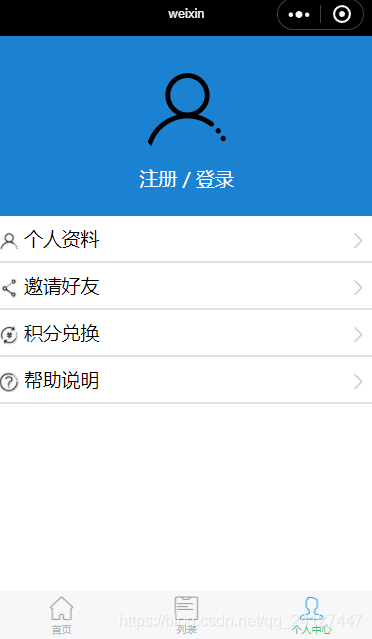
其实用到的东西并不多,主要还是一些前端的样式,下面是实现步骤和代码。
第一,准备图片素材
我依旧还是从阿里矢量图上找的图片,下面附上网站:
http://www.iconfont.cn/collections/detail?cid=29
找到自己需要的矢量图下载png格式就可以了
第二,目录结构
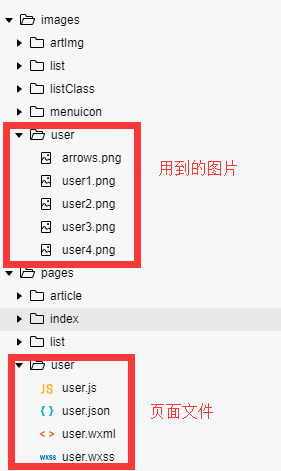
第三,实现代码
.wxml文件
!--pages/user/user.wxml--view class="mine-wrapper" view class="avatar-wrapper" view view class="avatar" image style="border-radius:50%;" src="{{userinfo.avatarUrl ? userinfo.avatarUrl:'/images/user/user1.png'}}"/image /view view class="text" text wx:if="{{userinfo.nickName}}"{{userinfo.nickName}}/text text wx:else bindtap="toLogin"注册 / 登录/text /view view class="text" text wx:if="{{userSign==2}}"{{"您还没有填写真实信息,请填写"}}/text text wx:elif="{{userSign==1}}"{{"会员用户"}}/text /view /view /view view class="list-wrapper" view class="alllists" block wx:for="{{menuitems}}" wx:key="menu_for" navigator url="{{item.url}}" class="lists" view class='content' view class="listimg" image src="{{item.icon}}"/image /view view class="listtext"{{item.text}}/view view class="listicon"{{item.tips}}/view view class="arrows" image src="{{item.arrows}}"/image /view /view /navigator !-- 分割线 -- view class="divLine"/view /block /view /view/view.js文件
// pages/user/user.jsvar _app = getApp()Page({ /** * 页面的初始数据 */ data: { menuitems: [ { text: '个人资料', url: '', icon: '/images/user/user1.png', tips: '', arrows: '/images/user/arrows.png' }, { text: '邀请好友', url: '', icon: '/images/user/user2.png', tips: '', arrows: '/images/user/arrows.png' }, { text: '积分兑换', url: '', icon: '/images/user/user3.png', tips: '', arrows: '/images/user/arrows.png' }, { text: '帮助说明', url: '', icon: '/images/user/user4.png', tips: '', arrows: '/images/user/arrows.png' } ] }, /** * 生命周期函数--监听页面加载 */ onLoad: function (options) { }, /** * 生命周期函数--监听页面初次渲染完成 */ onReady: function () { }, /** * 生命周期函数--监听页面显示 */ onShow: function () { }, /** * 生命周期函数--监听页面隐藏 */ onHide: function () { }, /** * 生命周期函数--监听页面卸载 */ onUnload: function () { }, /** * 页面相关事件处理函数--监听用户下拉动作 */ onPullDownRefresh: function () { }, /** * 页面上拉触底事件的处理函数 */ onReachBottom: function () { }, /** * 用户点击右上角分享 */ onShareAppMessage: function () { }}).wxss
/* pages/user/user.wxss */.avatar-wrapper { background: 1b82d1; padding: 25px 0;}.avatar-wrapper .avatar { margin: 0 auto; text-align: center;}.avatar-wrapper .avatar image { width: 100px; height: 100px;}.avatar-wrapper .text { text-align: center; color: fff;}.listimg image { margin-right: 5px; vertical-align: middle; width: 20px; height: 20px;}.content{ display: flex; margin-top: 10px; margin-bottom: 10px;}/*分割线样式*/.divLine{ background: E0E3DA; width: 100%; height: 5rpx;}.arrows image { vertical-align: middle; width: 15px; height: 15px; margin-left: 500rpx;}/* user.wxss */最后附上借鉴的网友的文章,感谢!
https://blog.csdn.net/xbw12138/article/details/75213088
小程序









