


在一二月份做项目的时候,需要做一个微信小程序的自定义的二维码,在此记录与分享如何用Canvas画图怎么自定义一个美观的二维码分享图。
先展示下效果:
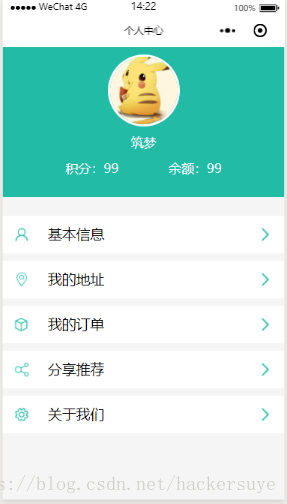
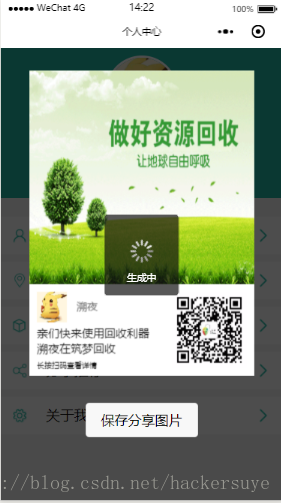

展示的是一个个人中心的小demo,下文会把这个demo的地址分享,导入项目后,点击分享推荐就可得到该效果。
页面
//PersonalPage.wxmlview class='user' view class='firstlayout' image src="{{img}}" class='firstimagestyle'/image view class='firstfontstyle'{{name}}/view view class='secondlayout' view class='secondlayoutitem' view class='firstfontstyle'积分:/view view class='firstfontstyle'{{scores}}/view /view !--view class='lineview'/view-- view class='secondlayoutitem' view class='firstfontstyle'余额:/view view class='firstfontstyle'{{balance}}/view /view /view /view view class='user-item' view class='item' bindtap='bindViewTapbasic' image class='secondimagestyle' src='/images/personCenter/5.png'/image view class=' item-title'基本信息/view image src='/images/personCenter/2.png' class='thirdimagestyle'/image /view view class='item' bindtap='bindViewTapaddress' image class='secondimagestyle' src='/images/personCenter/3.png'/image view class=' item-title'我的地址/view image src='/images/personCenter/2.png' class='thirdimagestyle'/image /view view class='item' bindtap="bindViewTap" image class='secondimagestyle' src='/images/personCenter/7.png'/image view class=' item-title'我的订单/view image src='/images/personCenter/2.png' class='thirdimagestyle'/image /view view class='item' bindtap="onShareTap" image class='secondimagestyle' src='/images/personCenter/4.png'/image view class=' item-title'分享推荐/view image src='/images/personCenter/2.png' class='thirdimagestyle'/image /view view class='item' bindtap='bindViewTapsetup' image class='secondimagestyle' src='/images/personCenter/6.png'/image view class='item-title'关于我们/view image src='/images/personCenter/2.png' class='thirdimagestyle'/image /view /view/view//二维码分享图是隐藏的view class="bg" bindtap='hideview' style='display:{{display}}'/viewview class="show" bindtap='hideview' style='display:{{display}}' view class='containera' image class="imagesa" src="{{shareImgSrc}}"/image view class='fourlayoutstylea' button size="{{primarySize}}" bindtap="showLocal" 保存分享图片 /button /view view class="canvas-box" canvas canvas-id="myCanvas" style="width:100%;height:{{windowHeight}}px;"/canvas /view /view/view布局
//PersonalPage.wxsspage{ width:100%; height: 100%;}.user{ background: rgb(245, 245, 245); width:100%; height: 100%;}.user-item{ margin-top: 30rpx; width:100%; display: flex; flex-direction: column;}.item{ background: fff; height:100rpx; margin-top:20rpx; line-height: 100rpx; display: flex; justify-content: space-between;}.item-title{ flex-grow: 4; margin-left: 20rpx;}.container{ /*弹性模型*/ display:flex; /*垂直方向 列方向 排布*/ flex-direction:column; /*居中*/ /*align-items:center;*/ /*要从整体解决排布的问题是最好的方案*/ background: rgb(245, 245, 245);}.containe1{ margin-top: 50rpx; width: 100%; display: flex; flex-direction:column;}.firstlayout{ /*弹性模型*/ display:flex; /*垂直方向 列方向 排布*/ flex-direction:column; /*居中*/ align-items:center; /*要从整体解决排布的问题是最好的方案*/ width: 100%; height: 400rpx; background: 21bba6;}.firstimagestyle{ width: 180rpx; height: 180rpx; margin: 20rpx; border-radius: 50%; border:3px solid FFFFFF;}.firstfontstyle{ font-size:34rpx; color: FFFFFF;}.secondlayout{ width: 550rpx; height: 50rpx; /*弹性模型*/ display:flex; flex-direction: row; /*居中*/ /*align-items:center;*/ justify-content:center; margin-top: 25rpx;}.secondlayoutitem{ width: 50%; display:flex; flex-direction: row; justify-content:center;}.lineview{ width: 2rpx; height: 40rpx; background: FFFFFF; margin-top: 6rpx;}.secondimagestyle{ width: 40rpx; height: 40rpx; margin: 30rpx;}.fourthlayout{ width:50%; height: 100%; text-align:right;}.thirdimagestyle{ width: 60rpx; height: 60rpx; margin: 20rpx;}.secondfontstyle{ flex-grow: 4; margin-left: 40rpx;}.lineviewtwo{ width: 100%rpx; height: 1px; background: 708090;}.bg { display: none; position: absolute; top: 0%; left: 0%; width: 100%; height: 100%; background-color: black; z-index: 1001; -moz-opacity: 0.7; opacity: 0.70; filter: alpha(opacity=70);}.show { text-align: center; position小程序









