


授权获取用户信息
文章目录
- 授权获取用户信息
- 效果图
- 参考API
- wxml
- js
授权获取
用户信息需要经过用户授权同意才能调用。
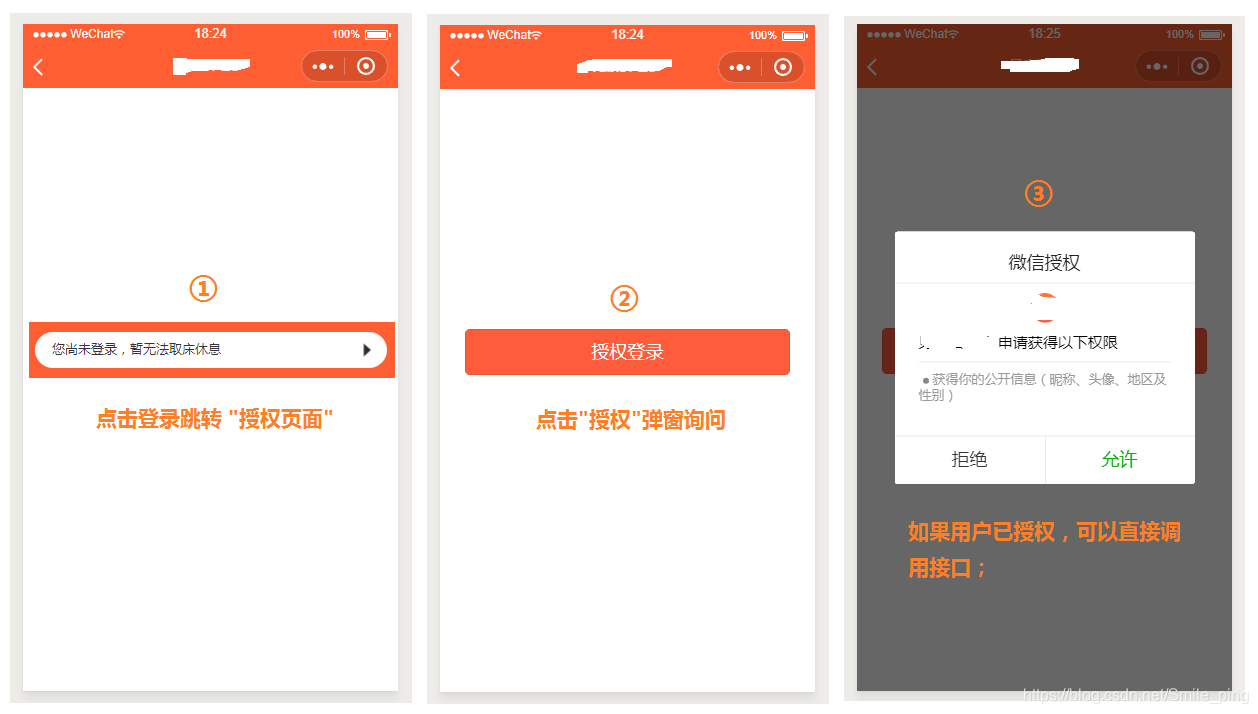
- 如果用户未接受或拒绝过此权限,会弹窗询问用户,用户点击同意后方可调用接口;
- 如果用户已授权,可以直接调用接口;
- 如果用户已拒绝授权,则不会出现弹窗,而是直接进入接口 fail 回调。请开发者兼容用户拒绝授权的场景。
ps: 抽时间记录下,以下是个人使用方案(仅供参考),欢迎大神们指教…
效果图
参考API
wx.login
wx.getSetting
wx.getUserInfo
ps: 授权登录独立在一个页面中,当没有token时跳转到此页面,当用户触发按钮时会弹窗询问用户是否授权
如果已授权,下次直接跳过此页面
wxml
view class='authBox' wx:if="{{canIUse}}" view class='bottom' button type='primary' style='background-color:{{backgroundccolor}}' open-type="getUserInfo" lang="zh_CN" bindgetuserinfo="bindGetUserInfo" 授权登录 /button /view/viewview wx:else请升级微信版本/viewjs
const app = getApp();var http = require('../../utils/request.js');Page({ data: { //判断小程序的API,回调,参数,组件等是否在当前版本可用。 canIUse: wx.canIUse('button.open-type.getUserInfo'), backgroundccolor: app.globalData.backgroundColor, }, onLoad: function (options) { var that = this; // 获取页面来源 var from = options.from; //from是a页面传递过来的名称 from = from == undefined || from == null ? 'index' : from; var from_return = '/pages/' + from + '/' + from var from_url = '/pages/loginReg/loginReg?from=' + from that.setData({ from_url: from_url, from_return: from_return, }) var that = this; //获取登录凭证(code) that.getcode(); // 查看是否授权 wx.getSetting({ success: function (res) { if (res.authSetting['scope.userInfo']) { wx.getUserInfo({ success: function (res) { // console.log('查看是否授权'); console.log(res); that.queryUsreInfo(res.encryptedData, res.iv); } }); } } }) }, /*** 获取登录凭证(code)*/ getcode:function(){ wx.login({ success: res = { // 发送 res.code 到后台换取 openId, sessionKey, unionId console.log('重新获取res.code~~~~' + res.code); app.globalData.user_code = res.code } }) }, /*** 授权登录*/ bindGetUserInfo: function (e) { var that = this; if (e.detail.userInfo) { that.queryUsreInfo(e.detail.encryptedData, e.detail.iv); } else { //用户按了拒绝按钮 } }, /** * 获取用户信息接口 */ queryUsreInfo: function (encryptedData,iv) { //用户按了允许授权按钮 var that = this; //插入登录的用户的相关信息到数据库 var params = { code: app.globalData.user_code, encryptedData: encryptedData, iv: iv, // nickName: e.detail.userInfo.nickName, } http.postReq("login/user/test", params, function (res) { if (parseInt(res.code) == 200) { var data = res.data; //请忽略,这里是处理后台返回数据的业务(每个人需求不一样) var bc_userinfo = {}; for (var index in data) { if (index == 'userinfo') { var userinfodata = data[index] for (var key in userinfodata) { bc_userinfo[key] = userinfodata[key]; } } else { bc_userinfo[index] = data[index]; } } // console.log(bc_userinfo); wx.setStorageSync('userinfo', bc_userinfo); //成功后跳回原来的页面 wx.switchTab({ url: that.data.from_return }) } else { feedbackApi.showToast({ title: res.msg, mask: false }) //获取code that.getcode(); } }) },})









