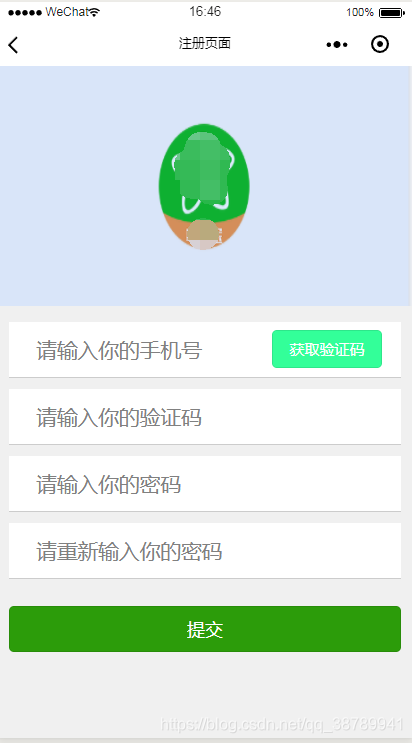
// pages/register/register.jsPage({ /** * 页面的初始数据 */ data: { text: '获取验证码', //按钮文字 currentTime: 61, //倒计时 disabled: false, //按钮是否禁用 phone: '', //获取到的手机栏中的值 VerificationCode: '', Code: '', NewChanges: '', NewChangesAgain: '', success: false, state: '0', url: '' }, /** * 获取验证码 */ return_home: function (e) { wx.navigateTo({ url: '/pages/register/register', }) }, handleInputPhone: function (e) { this.setData({ phone: e.detail.value }) }, handleVerificationCode: function (e) { console.log(e); this.setData({ Code: e.detail.value }) }, handleNewChanges: function (e) { console.log(e); this.setData({ NewChanges: e.detail.value }) }, handleNewChangesAgain: function (e) { console.log(e); this.setData({ NewChangesAgain: e.detail.value }) }, doGetCode: function () { var that = this; that.setData({ disabled: true, //只要点击了按钮就让按钮禁用 (避免正常情况下多次触发定时器事件) color: '#ccc', }) var phone = that.data.phone; var currentTime = that.data.currentTime //把手机号跟倒计时值变例成js值 var warn = null; //warn为当手机号为空或格式不正确时提示用户的文字,默认为空 wx.request({ url: 'http://192.168.41.40:8002/isExist', //后端判断是否已被注册, 已被注册返回1 ,未被注册返回0 method: "GET", header: { 'content-type': 'application/x-www-form-urlencoded' }, success: function (res) { that.setData({ state: res.data }) if (phone == '') { warn = "号码不能为空"; } else if (phone.trim().length != 11 || !/^1[3|4|5|6|7|8|9]d{9}$/.test(phone)) { warn = "手机号格式不正确"; } //手机号已被注册提示信息 else if (that.data.state == 1) { //判断是否被注册 warn = "手机号已被注册"; } else { wx.request({ url: 'http://192.168.41.40:8002/sendCode', //填写发送验证码接口 method: "POST", data: { coachid: that.data.phone }, header: { 'content-type': 'application/x-www-form-urlencoded' }, success: function (res) { console.log(res.data) that.setData({ VerificationCode: res.data.verifycode }) //当手机号正确的时候提示用户短信验证码已经发送 wx.showToast({ title: '短信验证码已发送', icon: 'none', duration: 2000 }); //设置一分钟的倒计时 var interval = setInterval(function () { currentTime--; //每执行一次让倒计时秒数减一 that.setData({ text: currentTime + 's', //按钮文字变成倒计时对应秒数 }) //如果当秒数小于等于0时 停止计时器 且按钮文字变成重新发送 且按钮变成可用状态 倒计时的秒数也要恢复成默认秒数 即让获取验证码的按钮恢复到初始化状态只改变按钮文字 if (currentTime <= 0) { clearInterval(interval) that.setData({ text: '重新发送', currentTime: 61, disabled: false, color: '#33FF99' }) } }, 100); } }) }; //判断 当提示错误信息文字不为空 即手机号输入有问题时提示用户错误信息 并且提示完之后一定要让按钮为可用状态 因为点击按钮时设置了只要点击了按钮就让按钮禁用的情况 if (warn != null) { wx.showModal({ title: '提示', content: warn }) that.setData({ disabled: false, color: '#33FF99' }) return; } } }) }, submit: function (e) { var that = this if (this.data.Code == '') { wx.showToast({ title: '请输入验证码', image: '/images/error.png', duration: 2000 }) return } else if (this.data.Code != this.data.VerificationCode) { wx.showToast({ title: '验证码错误', image: '/images/error.png', duration: 2000 }) return } else if (this.data.NewChanges == '') { wx.showToast({ title: '请输入密码', image: '/images/error.png', duration: 2000 }) return } else if (this.data.NewChangesAgain != this.data.NewChanges) { wx.showToast({ title: '两次密码不一致', image: '/images/error.png', duration: 2000 }) return } else { var that = this var phone = that.data.phone; wx.request({ url: 'http://192.168.41.40:8002/register', method: "POST", data: { coachid: phone, coachpassword: that.data.NewChanges }, header: { "content-type": "application/x-www-form-urlencoded" }, success: function (res) { wx.showToast({ title: '提交成功~', icon: 'loading', duration: 2000 }) console.log(res.data) that.setData({ success: true, url: res.data }) } }) } }, /** * 用户点击右上角分享 */ onShareAppMessage: function () { }})
{ "usingComponents": {}, "navigationBarTitleText": "注册页面"}
<!--pages/register/register.wxml--><view wx:if="{{!success}}"> <view class="login-icon"> <image class="login-img" src="/images/loginLog.jpg"></image> </view> <view class='row'> <view class='info'> <input class= 'info-input1' bindinput="handleInputPhone" placeholder="请输入你的手机号" /> </view> <button class='button' bindtap='doGetCode' disabled='{{disabled}}' style="background-color:{{color}}" >{{text}}</button> </view> <view class='row'> <view class='info'> <input class= 'info-input' bindinput="handleVerificationCode" placeholder="请输入你的验证码" /> </view> </view> <view class='row'> <view class='info'> <input type='password' class= 'info-input' bindinput="handleNewChanges" placeholder="请输入你的密码" /> </view> </view> <view class='row'> <view class='info'> <input type='password' class= 'info-input' bindinput="handleNewChangesAgain" placeholder="请重新输入你的密码" /> </view> </view> <button class='submit' bindtap='submit'>提交</button></view><view class = 'success' wx:if="{{success}}"> <web-view src="{{url}}"></web-view> </view>
/* pages/register/register.wxss */page{ background: #F0F0F0 ;}/*登录图片*/.login-icon{ flex: none; } .login-img{ width: 750rpx; }.row{ margin-top: 20rpx; overflow: hidden; line-height: 100rpx; border-bottom: 1rpx solid #ccc; margin-left: 20rpx; margin-right: 20rpx; color: #777; background: #fff; }.info-input{ height: 100rpx; margin-left: 50rpx; color: #777; float: left;}.info-input1{ height: 100rpx; margin-left: 50rpx; color: #777; float: left; width: 420rpx;}.button{ width: 200rpx; height: 70rpx; line-height: 70rpx; font-size: 28rpx; background: #33FF99; float: left; margin-left: 10rpx; margin-top: 15rpx; color: #FFFFFF;}.submit{ margin-top: 50rpx; margin-left: 20rpx; margin-right: 20rpx; background: rgb(44, 156, 10); color: #FFFFFF;}.success{ background: #ffffff; }.cheer{ text-align: center; line-height: 400rpx; font-size: 60rpx; position: relative;}.return{ margin: 20rpx;}最后完成效果图