


又是期末,做了一个基于Java界面的数据库课设--VIP管理系统
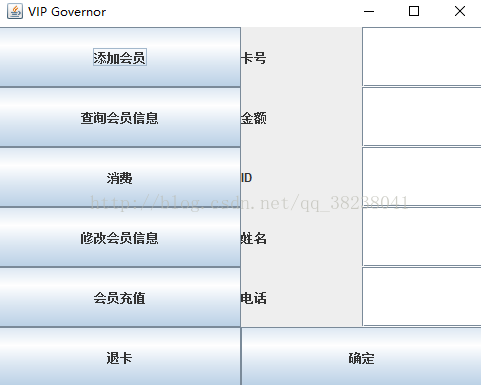
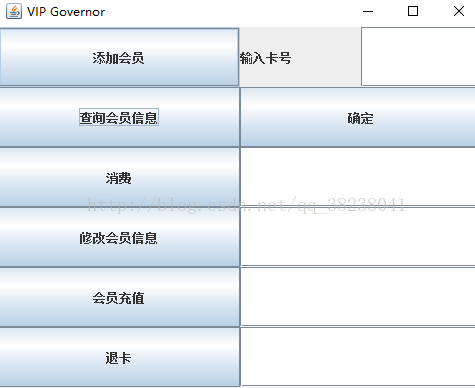
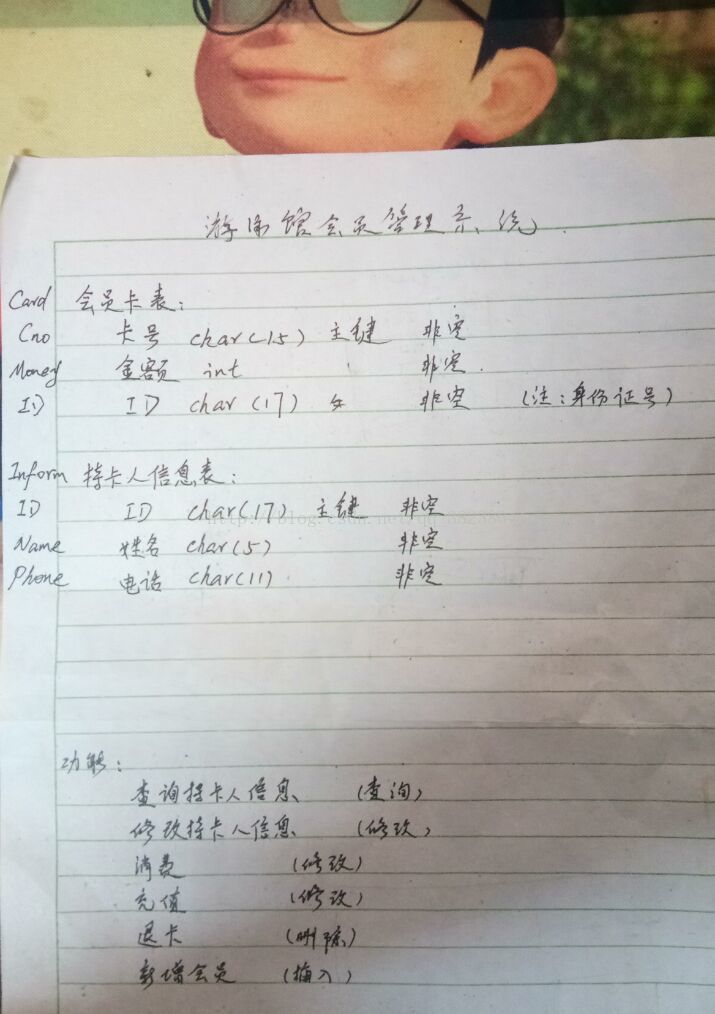
显示效果及表的设计如下图
/*** * @author 逸川同学 */public class Main {public static void main(String[] args) {new MyJframe();}}import java.awt.Container;import java.awt.GridLayout;import java.awt.event.ActionEvent;import java.awt.event.ActionListener;import javax.swing.JButton;import javax.swing.JFrame;import javax.swing.JLabel;import javax.swing.JOptionPane;import javax.swing.JPanel;import javax.swing.JTextField;public class MyJframe extends JFrame {private static final long serialVersionUID = 1L;public MyJframe() {super("VIP Governor");setBounds(300, 200, 500, 400);setLayout(new GridLayout(1, 2));setDefaultCloseOperation(EXIT_ON_CLOSE);JPanel leftJpanel = new JPanel();final JPanel rightJpanel = new JPanel();final Container container = getContentPane();container.add(leftJpanel);// 左边功能选择面板container.add(rightJpanel);// 右边功能实现面板leftJpanel.setLayout(new GridLayout(6, 1));JButton addUserBut = new JButton("添加会员");leftJpanel.add(addUserBut);addUserBut.addActionListener(new ActionListener() {@Overridepublic void actionPerformed(ActionEvent e) {rightJpanel.removeAll();rightJpanel.setLayout(new GridLayout(6, 1));JLabel cnoLabel = new JLabel("卡号");JTextField cnotField = new JTextField(18);JPanel cnoPanel = new JPanel();cnoPanel.setLayout(new GridLayout(1, 2));cnoPanel.add(cnoLabel);cnoPanel.add(cnotField);JLabel moneyLabel = new JLabel("金额");JTextField montField = new JTextField(18);JPanel monPanel = new JPanel();monPanel.setLayout(new GridLayout(1, 2));monPanel.add(moneyLabel);monPanel.add(montField);JLabel IDLabel = new JLabel("ID");JTextField IDtField = new JTextField(18);JPanel IDPanel = new JPanel();IDPanel.setLayout(new GridLayout(1, 2));IDPanel.add(IDLabel);IDPanel.add(IDtField);JLabel nameLabel = new JLabel("姓名");JTextField nametField = new JTextField(18);JPanel namePanel = new JPanel();namePanel.setLayout(new GridLayout(1, 2));namePanel.add(nameLabel);namePanel.add(nametField);JLabel phoneLabel = new JLabel("电话");JTextField phonetField1 = new JTextField(18);JPanel phonePanel = new JPanel();phonePanel.setLayout(new GridLayout(1, 2));phonePanel.add(phoneLabel);phonePanel.add(phonetField1);JButton yesbtn = new JButton("确定");rightJpanel.add(cnoPanel);rightJpanel.add(monPanel);rightJpanel.add(IDPanel);rightJpanel.add(namePanel);rightJpanel.add(phonePanel);rightJpanel.add(yesbtn);yesbtn.addActionListener(new ActionListener() {@Overridepublic void actionPerformed(ActionEvent e) {// 信息String cno = cnotField.getText();int money = 0;try {money = Integer.parseInt(montField.getText());} catch (NumberFormatException e1) {//有异常,不需要处理}String ID = IDtField.getText();String name = nametField.getText();String phone = phonetField1.getText();int addUser = -1;if (cno != null && ID != null && name != null && phone != null) {addUser = ControlDB.AddUser(new Person(cno, money, ID, name, phone));}if (addUser == 2) {JOptionPane.showMessageDialog(null, "添加成功");}else{JOptionPane.showMessageDialog(null, "该用户已存在或其他错误,添加失败");}}});setVisible(true);}});// 根据卡号查询会员的信息JButton searchBut = new JButton("查询会员信息");leftJpanel.add(searchBut);searchBut.addActionListener(new ActionListener() {@Overridepublic void actionPerformed(ActionEvent e) {rightJpanel.removeAll();rightJpanel.setLayout(new GridLayout(6, 1));JPanel panel = new JPanel();panel.setLayout(new GridLayout(1, 2));JLabel cnoLabel = new JLabel("输入卡号");JTextField cnoTextField = new JTextField(18);panel.add(cnoLabel);panel.add(cnoTextField);rightJpanel.add(panel);JButton yesbtn = new JButton("确定");rightJpanel.add(yesbtn);JTextField IDField = new JTextField(18);// IDrightJpanel.add(IDField);JTextField nameField = new JTextField(18);// 姓名rightJpanel.add(nameField);JTextField moneyField = new JTextField(18);// 金额rightJpanel.add(moneyField);JTextField phoneField = new JTextField(18);// 电话rightJpanel.add(phoneField);//点击确认按钮进行 数据库查询yesbtn.addActionListener(new ActionListener() {@Overridepublic void actionPerformed(ActionEvent e) {//有数据输入的时候才查询if(cnoTextField != null && !cnoTextField.getText().equals("")){Person user = ControlDB.SearchUser(cnoTextField.getText());if(user.getID()!=""){IDField.setText("ID = "+user.getID());nameField.setText("姓名 "+user.getName());moneyField.setText("金额 "+user.getMoney());phoneField.setText("电话 "+user.getPhone());}}}});setVisible(true);}});//输入卡号进行消费JButton consumeBut = new JButton("消费");leftJpanel.add(consumeBut);consumeBut.addActionListener(new ActionListener() {@Overridepublic void actionPerformed(ActionEvent e) {rightJpanel.removeAll();rightJpanel.setLayout(new GridLayout(3, 1));// 输入卡号框JPanel cnoPanel = new JPanel();cnoPanel.setLayout(new GridLayout(1, 2));JLabel cnoLabel = new JLabel("卡号 ");JTextField cnotField = new JTextField(18);cnoPanel.add(cnoLabel);cnoPanel.add(cnotField);rightJpanel.add(cnoPanel);//确定按钮JButton yesbtn = new JButton("确定");rightJpanel.add(yesbtn);//信息JPanel monPanel = new JPanel();monPanel.setLayout(new GridLayout(1, 2));JLabel moneyleft = new JLabel("消费后金额");JTextField montField = new JTextField(18);monPanel.add(moneyleft);monPanel.add(montField);rightJpanel.add(monPanel);yesbtn.addActionListener(new ActionListener() {@Overridepublic void actionPerformed(ActionEvent e) {//调用数据库if(cnotField != null && cnotField.getText()!=""){int mon = ControlDB.consum(cnotField.getText());if(mon>0){montField.setText(""+mon);}else {JOptionPane.showMessageDialog(null, "没有该会员或该会员金额不足!");}}}});setVisible(true);}});JButton changeBut = new JButton("修改会员信息");leftJpanel.add(changeBut);changeBut.addActionListener(new ActionListener() {@Overridepublic void actionPerformed(ActionEvent e) {rightJpanel.removeAll();rightJpanel.setLayout(new GridLayout(4, 1));// 输入卡号框JPanel cnoPanel = new JPanel();cnoPanel.setLayout(new GridLayout(1, 2));JLabel cnoLabel = new JLabel("输入需要修改的卡号 ");JTextField cnotField = new JTextField(18);cnoPanel.add(cnoLabel);cnoPanel.add(cnotField);// 修改姓名框JPanel namePanel = new JPanel();namePanel.setLayout(new GridLayout(1, 2));JLabel nameLabel = new JLabel("姓名修改为 ");JTextField nameField = new JTextField(18);namePanel.add(nameLabel);namePanel.add(nameField);// 修改电话号码框JPanel phonePanel = new JPanel();phonePanel.setLayout(new GridLayout(1, 2));JLabel phoneLabel = new JLabel("电话修改为");JTextField phoneField = new JTextField(18);phonePanel.add(phoneLabel);phonePanel.add(phoneField);//确定JButton yesBtn = new JButton("确定");rightJpanel.add(cnoPanel);rightJpanel.add(namePanel);rightJpanel.add(phonePanel);rightJpanel.add(yesBtn);//监听,数据库修改yesBtn.addActionListener(new ActionListener() {@Overridepublic void actionPerformed(ActionEvent e) {if (!cnotField.getText().equals("") && !nameField.getText().equals("") && !phoneField.getText().equals("")) {int i = ControlDB.change(cnotField.getText(), nameField.getText(), phoneField.getText());if(i==1){JOptionPane.showMessageDialog(null, "修改成功");}else {JOptionPane.showMessageDialog(null, "修改失败");}}}});setVisible(true);}});//根据会员卡号进行充值JButton rechargeBut = new JButton("会员充值");leftJpanel.add(rechargeBut);rechargeBut.addActionListener(new ActionListener() {@Overridepublic void actionPerformed(ActionEvent e) {rightJpanel.removeAll();rightJpanel.setLayout(new GridLayout(3, 1));JPanel phane2 = new JPanel();phane2.setLayout(new GridLayout(1, 2));JLabel labe2 = new JLabel("充值卡号");JTextField count2 = new JTextField(18);phane2.add(labe2);phane2.add(count2);rightJpanel.add(phane2);JPanel phanel = new JPanel();phanel.setLayout(new GridLayout(1, 2));JLabel cnoLabel = new JLabel("充值金额");JTextField count1 = new JTextField(10);phanel.add(cnoLabel);phanel.add(count1);rightJpanel.add(phanel);JButton yesbtn = new JButton("确定");rightJpanel.add(yesbtn);yesbtn.addActionListener(new ActionListener() {@Overridepublic void actionPerformed(ActionEvent e) {if(count1.getText()!=""&&!count2.getText().equals("")){int mon = 0;try {mon = Integer.parseInt(count1.getText());} catch (NumberFormatException e1) {}int i = ControlDB.charge(count2.getText(),mon);if(i>0){JOptionPane.showMessageDialog(null, "充值成功");}else {JOptionPane.showMessageDialog(null, "充值失败");}}}});setVisible(true);}});JButton outBut = new JButton("退卡");leftJpanel.add(outBut);outBut.addActionListener(new ActionListener() {@Overridepublic void actionPerformed(ActionEvent e) {rightJpanel.removeAll();rightJpanel.setLayout(new GridLayout(2, 1));JPanel cnoPanel = new JPanel();cnoPanel.setLayout(new GridLayout(1, 2));JLabel cnoLabel = new JLabel("卡号");JTextField cnotField = new JTextField(18);cnoPanel.add(cnoLabel);cnoPanel.add(cnotField);rightJpanel.add(cnoPanel);JButton yesbtn = new JButton("确定");rightJpanel.add(yesbtn);//添加监听,连接数据库yesbtn.addActionListener(new ActionListener() {@Overridepublic void actionPerformed(ActionEvent e) {if(cnotField.getText()!=null&&!cnotField.getText().equals("")){int i = ControlDB.out(cnotField.getText());if(i==2){JOptionPane.showMessageDialog(null, "退卡成功");}else {JOptionPane.showMessageDialog(null, "退卡失败");}}}});setVisible(true);}});setVisible(true);}}import java.sql.Connection;import java.sql.ResultSet;import java.sql.SQLException;import java.sql.Statement;public class ControlDB {// 添加用户public static int AddUser(Person person) {String cno = person.getCno();int money = person.getMoney();String ID = person.getID();String name = person.getName();String phone = person.getPhone();Connection connection = DBUtils.getConnection();Statement statement = null;int i = -1;try {statement = connection.createStatement();String sqlCard = "INSERT INTO Card VALUES('" + cno + "'," + money + ",'" + ID+ "')";String sqlInform = "INSERT INTO Inform VALUES('" + ID + "','" + name + "','" + phone+ "')";i = statement.executeUpdate(sqlCard);i += statement.executeUpdate(sqlInform);} catch (SQLException e) {e.printStackTrace();}/* finally {DBUtils.close(connection, statement);}*/return i;}// 根据卡号查询会员的信息// 返回一个Personpublic static Person SearchUser(String string) {String cno = string;// 卡号int money = 0;String ID = "";String name = "";String phone = "";Connection connection = DBUtils.getConnection();Statement statement = null;try {statement = connection.createStatement();//连表查询String sql ="SELECT money,card.id,name,phone FROM card,inform WHERE card.id = inform.id AND cno LIKE '" + cno+"'";ResultSet executeQuery = statement.executeQuery(sql);if(executeQuery.next()){money = executeQuery.getInt("money");ID = executeQuery.getString("ID");name = executeQuery.getString("name");phone = executeQuery.getString("phone");}} catch (SQLException e) {e.printStackTrace();} /*finally {DBUtils.close(connection, statement);}*/return new Person(cno, money, ID, name, phone);}// 输入卡号进行消费// 返回消费一次之后的余额public static int consum(String string) {String cno = string;// 卡号int money = -1;Connection connection = DBUtils.getConnection();Statement statement = null;try {statement = connection.createStatement();//假设一次消费10元,传过来的money不足10元就返回-1表示金额不足,,并且不做下面的操作//否则返回消费后的金额String sqlSearch = "SELECT money FROM Card WHERE Cno like " + cno;ResultSet resultSet = statement.executeQuery(sqlSearch);if(resultSet.next()){money = resultSet.getInt("money");}if((money=money-10)>0){String sql = "UPDATE Card SET Money = " + money + " WHERE Cno like " + cno;statement.execute(sql);}} catch (SQLException e) {//e.printStackTrace();} /*finally {DBUtils.close(connection, statement);}*/return money;}// 根据cno 修改会员信息(name phone)public static int change(String cno,String name,String phone) {Connection connection = DBUtils.getConnection();Statement statement = null;int i = 0;try {statement = connection.createStatement();String sql1 = "UPDATE inform SET name = '"+name+"' ,phone = '"+phone+"' "+ "WHERE ID IN(SELECT ID FROM card WHERE card.Cno LIKE '"+cno+"' )";i = statement.executeUpdate(sql1);} catch (SQLException e) {e.printStackTrace();} /*finally {DBUtils.close(connection, statement);}*/return i;}//根据卡号充值public static int charge(String cno,int money){int i = 0;Connection connection = DBUtils.getConnection();Statement statement = null;try {statement = connection.createStatement();String sqlse = "SELECT money from card WHERE cno LIKE '"+cno+"'";ResultSet query = statement.executeQuery(sqlse);if(query.next()){money += query.getInt("money");String sql = "UPDATE card SET Money = "+money+" WHERE cno LIKE '"+cno+"'";i = statement.executeUpdate(sql);}} catch (SQLException e) {e.printStackTrace();}return i;}//根据卡号进行退卡public static int out(String cno){int i = 0;Connection connection = DBUtils.getConnection();Statement statement = null;try {statement = connection.createStatement();//连表,先删掉外键的那个表的一行,在删主键的一行String sql1 = "DELETE inform FROM inform, card WHERE card.cno LIKE '"+cno+"' AND card.ID=inform.ID";String sql2 = "DELETE card FROM card WHERE card.cno LIKE '"+cno+"'";i = statement.executeUpdate(sql1);i += statement.executeUpdate(sql2);} catch (SQLException e) {e.printStackTrace();}return i;}}import java.sql.Connection;import java.sql.DriverManager;import java.sql.ResultSet;import java.sql.SQLException;import java.sql.Statement;public class DBUtils {// 构造方法私有private DBUtils() {}// 连接private static Connection connection;// 静态块,执行一次static {try {Class.forName("com.mysql.jdbc.Driver");String url = "jdbc:mysql://localhost:3306/ISwing?useUnicode=true&characterEncoding=utf-8";String username = "root";String password = "";connection = DriverManager.getConnection(url, username, password);} catch (ClassNotFoundException e) {e.printStackTrace();} catch (SQLException e) {e.printStackTrace();}}// 获取连接public static Connection getConnection() {return connection;}// 两个关闭方法public static void close(Connection connection, Statement statement, ResultSet rSet) {try {if (connection != null) {connection.close();}} catch (SQLException e) {e.printStackTrace();}try {if (statement != null) {statement.close();}} catch (SQLException e) {e.printStackTrace();}try {if (rSet != null) {rSet.close();}} catch (SQLException e) {e.printStackTrace();}}public static void close(Connection connection, Statement statement) {try {if (connection != null) {connection.close();}} catch (SQLException e) {e.printStackTrace();}try {if (statement != null) {statement.close();}} catch (SQLException e) {e.printStackTrace();}}}public class Person {private String cno;private int money;private String ID;private String name;private String phone;public Person(String cno, int money, String ID, String name, String phone) {super();this.cno = cno;this.money = money;this.ID = ID;this.name = name;this.phone = phone;}public Person() {}public String getCno() {return cno;}public void setCno(String cno) {this.cno = cno;}public int getMoney() {return money;}public void setMoney(int money) {this.money = money;}public String getID() {return ID;}public void setID(String iD) {ID = iD;}public String getName() {return name;}public void setName(String name) {this.name = name;}public String getPhone() {return phone;}public void setPhone(String phone) {this.phone = phone;}}









