


目录
用来解决的问题是 不是request的合法域名问题
现在出来这个问题 net::ERR_CONNECTION_REFUSED
小程序这么写的
login:function(e){ const that = this; let first, second; console.log("登录中...") that.data.username= e.detail.value.username, that.data.password = e.detail.value.password wx.request({ url: 'http://localhost:8080/login', data: { username: that.data.username, password: that.data.password }, header: {'content-type': 'application/x-www-form-urlencoded'}, method: 'GET', dataType: 'json', responseType: 'text', success: function(res) { console.log("login success!!") wx.navigateTo({ url: '/pages/main/main?username=' + this.data.username }) }, fail: function(res) { }, complete: function(res) {}, }) }
用来解决的问题是 不是request的合法域名问题
使用本地连接localhost等需要配置此处
步骤 工具栏
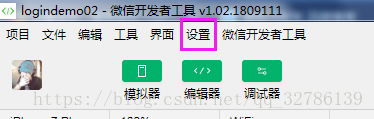
设置-项目设置-
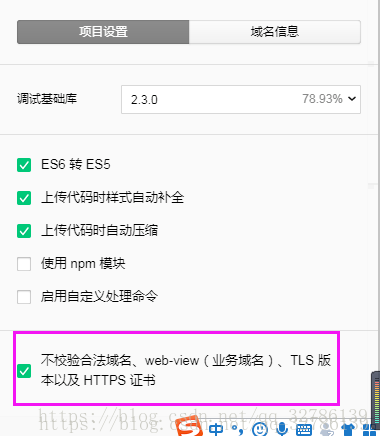
当不使用用本地连接时
需要去微信公众平台 左边栏的设置里面去配置里面的域名信息
后端代码只有这一点
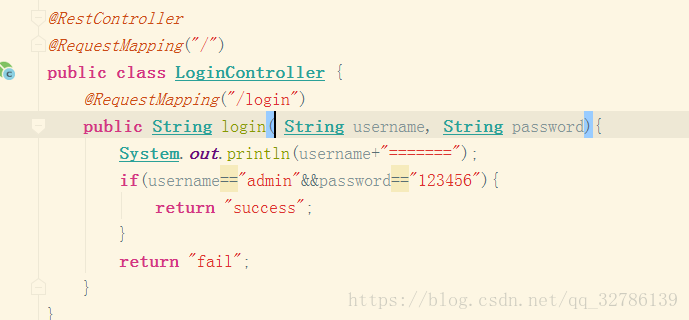
到这里就已经解决了不是request合法域名问题
现在出来这个问题 net::ERR_CONNECTION_REFUSED

这个问题的解决方式
步骤
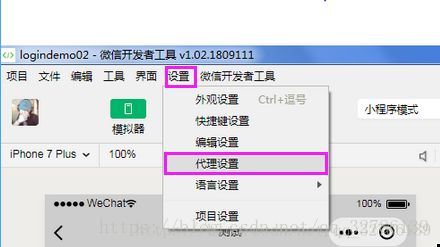
在菜单栏里面点击:设置 - 代理设置-下图

如果不行就 重启编辑器,还不行重启电脑,还还不行放弃小程序喽。










