


在本文 微信小程序-从相册获取图片 使用相机拍照 本地图片上传之前需要看看
微信小程序-获取用户session_key,openid,unionid - 后端为nodejs
代码封装是在上文添加的。
本文知识点:
1、微信小程序选择图片wx.chooseImage()接口的使用
2、微信小程序选择视频wx.chooseVideo()接口的使用
3、微信小程序上传文件接口wx.uploadFile()的使用
4、nodejs上传文件multer模块的使用
效果
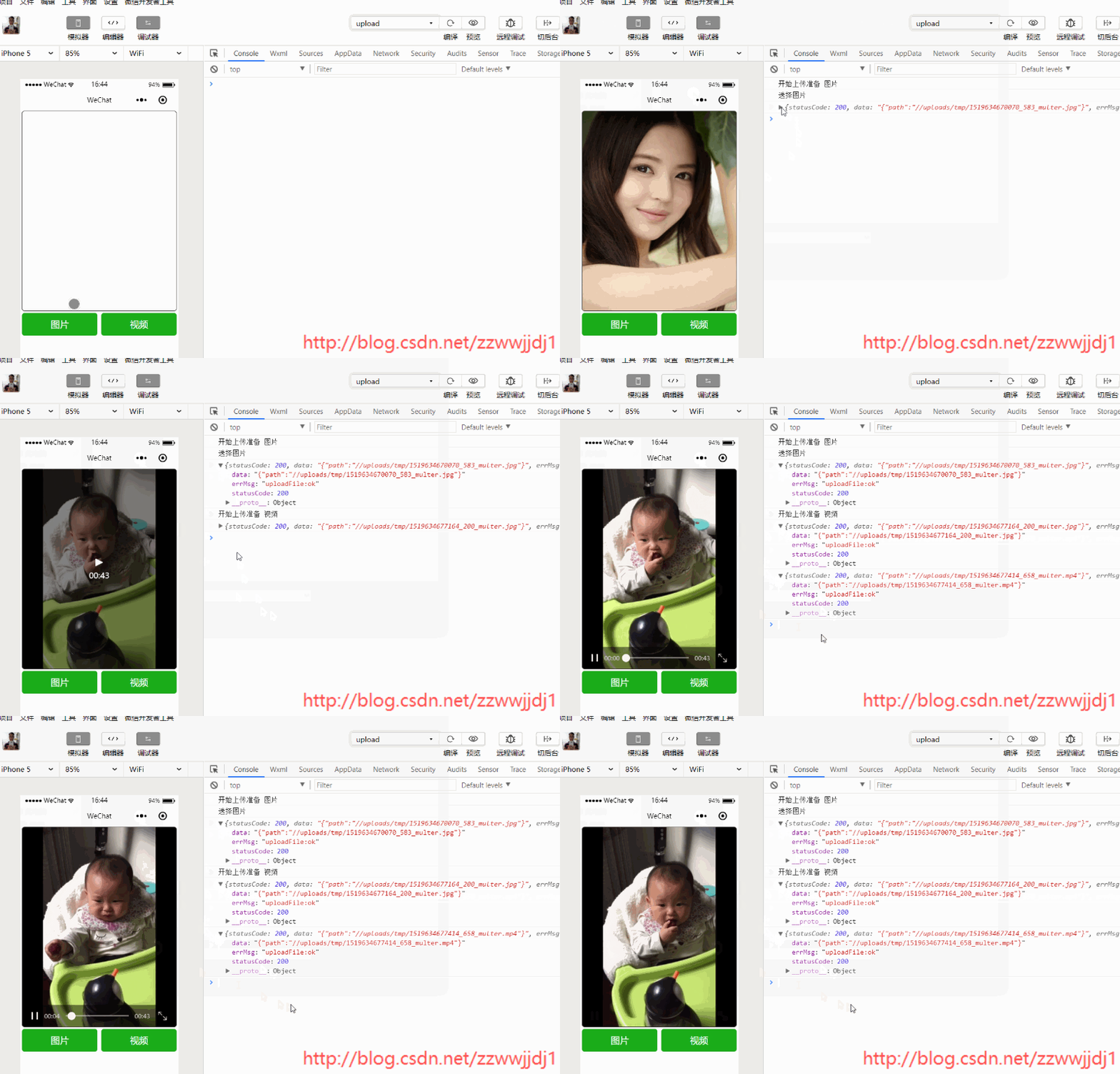
注意:1、在微信开发工具里选择视频接口wx.chooseVideo()返回的数据有视频缩略图字段(thumbTempFilePath),在真机上没有;
2、上传视频时,compressed压缩字段无效,不知是所有手机无效还是部分,本文测试时,使用的是华为mate9,这也是小程序的深坑之一;3、上传视频时,使用录制方式,华为mate9视频大小过大,录制的6秒钟视频就有20多M,网上说好像mate9的视频编码格式是h265,普通手机为h264,也许是无法压缩问题引起的;
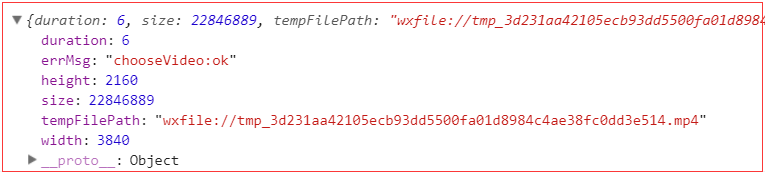
所以尝试了另外一种方式录制,使用camera组件,这种方式需要自己自定义录制界面:点击这里。
小程序代码
在utils下的wechat.js文件里添加代码,如有则忽略 /** * 从本地相册选择图片或使用相机拍照。 * @param {number} count 最多可选图片的数量 * @param {array} sizeType original 原图,compressed 压缩图 * @param {array} sourceType album 从相册选图,camera 使用相机 */ static chooseImage(count = 1, sizeType = ['compressed'], sourceType = ['album', 'camera']) { return new Promise((resolve, reject) => wx.chooseImage({ count, sizeType, sourceType, success: resolve, fail: reject })); } /** * 拍摄视频或从手机相册中选视频,返回视频的临时文件路径。 * @param {boolean} compressed 是否压缩 * @param {array} sourceType album 从相册选图,camera 使用相机 * @param {number} maxDuration 拍摄视频最长拍摄时间,单位秒。最长支持 60 秒 */ static chooseVideo(compressed = true, sourceType = ['album', 'camera'], maxDuration = 60) { return new Promise((resolve, reject) => wx.chooseVideo({ sourceType, compressed, maxDuration, success: resolve, fail: reject })); } /** * 将本地资源上传到开发者服务器,客户端发起一个 HTTPS POST 请求 * @param {string} url 开发者服务器 url * @param {string} filePath 要上传文件资源的路径 * @param {string} name * @param {object} formData HTTP 请求中其他额外的 form data */ static uploadFile(url, filePath, name, formData = { openid: "test" }) { return new Promise((resolve, reject) => { let opts = { url, filePath, name, formData, header: { 'Content-Type': "multipart/form-data" }, success: resolve, fail: reject }; wx.uploadFile(opts); }); }let app = getApp();let wechat = require("../../utils/wechat");Page({ data: { tempImagePath: "", // 拍照的临时图片地址 tempThumbPath: "", // 录制视频的临时缩略图地址 tempVideoPath: "", // 录制视频的临时视频地址 type: "chooseImage", }, onLoad() { }, camera(e) { let { type } = e.target.dataset; this.setData({ type }) console.log("开始上传准备", type == "chooseImage" ? "图片" : "视频"); // 拍照 if (type == "chooseImage") { console.log("选择图片"); wechat.chooseImage() .then(d => { let { path, size } = d.tempFiles[0]; this.setData({ tempImagePath: path, }); return wechat.uploadFile("https://xx.xxxxxx.cn/api/upload", path, "uploadImg") }) .then(d => { console.log(d); }) .catch(e => { console.log(e); }) } // 录视频 else if (type == "chooseVideo") { wechat.chooseVideo() .then(d => { console.log(d); let { tempFilePath, thumbTempFilePath, size } = d; this.setData({ // tempThumbPath: thumbTempFilePath, tempVideoPath: tempFilePath, }); return wechat.uploadFile("https://xx.xxxxxx.cn/api/upload", tempFilePath, "tempVideoPath"); }) .then(d => { console.log(d); }) .catch(e => { console.log(e); }) } }})<view class="view"> <view class="window"> <image class="cover-9" src="{{tempImagePath}}" bindtap="img" wx:if="{{type=='chooseImage'}}"></image> <video class="cover-9" src="{{tempVideoPath}}" poster="{{tempThumbPath}}" wx:if="{{type=='chooseVideo'}}"></video> <view class="window-2"> <button bindtap="camera" type="primary" data-type="chooseImage">图片</button> <button bindtap="camera" type="primary" data-type="chooseVideo">视频</button> </view> </view></view>page{ height: 100%;}.view{ width: 100%; height: 100%;}.window{ width: 100%; height: 100%;}.window-2{ display: flex; flex-direction: row;}.cover-9{ width: 728rpx; height: 80%; margin: 0 10rpx; border:2rpx solid; border-radius:5px; }button{ margin: 0 10rpx; width: 100%;}nodejs代码
const multer = require('multer'); let path = require("path"); //上传文件配置 const storage = multer.diskStorage({ //文件存储位置 destination: (req, file, cb) => { cb(null, path.resolve(__dirname, '../uploads/tmp/')); }, //文件名 filename: (req, file, cb) => { cb(null, `${Date.now()}_${Math.ceil(Math.random() * 1000)}_multer.${file.originalname.split('.').pop()}`); } }); const uploadCfg = { storage: storage, limits: { //上传文件的大小限制,单位bytes fileSize: 1024 * 1024 * 20 } }; router.post("/api/upload", async (req, res) => { let upload = multer(uploadCfg).any(); upload(req, res, async (err) => { if (err) { res.json({ path: `//uploads/tmp/${uploadFile.filename}` }); console.log(err); return; }; console.log(req.files); let uploadFile = req.files[0]; res.json({ path: `//uploads/tmp/${uploadFile.filename}` }); }); }) 后端打印
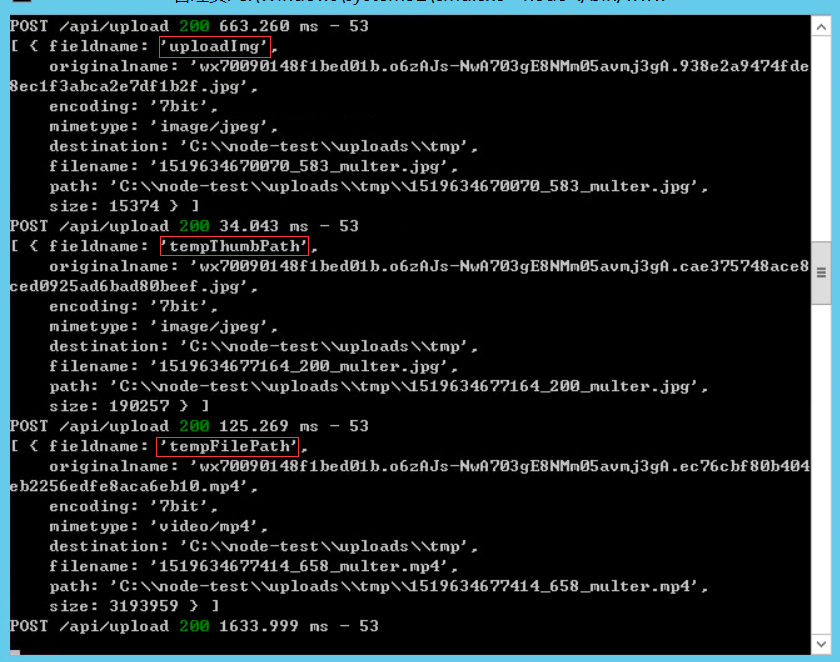
上传的文件














