


1.学生信息页
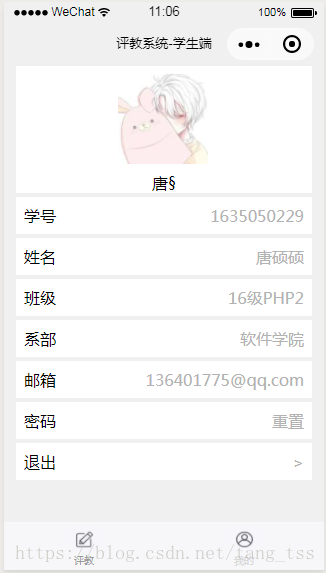
2.点击邮箱进行绑定页面

下面是绑定邮箱页面相关代码
<view class='container'> <view class='content'> <form class='login-from' bindsubmit="formSubmit"> <view class='pwd'> <text class='text'>登录密码</text> <input class="inputText" name="pwd" password="true" placeholder='请输入登录密码'/> </view> <view class='email'> <text class='text'>邮箱</text> <input class="inputText" name="email" type='text' placeholder='请输入邮箱'/> </view> <view class='bottom'> <button type='primary' form-type="submit">提交</button> </view> </form> </view></view>下面是js代码
将输入的邮箱存入学生信息中
Page({ /** * 页面的初始数据 */ data: { }, formSubmit: function (e) { var pwd = e.detail.value.pwd; var email = e.detail.value.email; var student = wx.getStorageSync('student'); var no = student.no; // console.log(oldpwd); if (pwd == '') { wx.showToast({ title: '请输入密码', icon: 'none', duration: 1000 }) } else if (email == '') { wx.showToast({ title: '请输入邮箱', icon: 'none', duration: 1000 }) } else { var url = ....; //仅为示例 // console.log(no); wx.request({ url: url, method: 'POST', data: { no: no, pwd: pwd, email: email }, header: { 'content-type': 'application/x-www-form-urlencoded' }, success: (res) => { console.log(res); if (res.data.error) { wx.showToast({ title: res.data.msg, icon: 'none', duration: 2000 }) } else { var stu = wx.getStorageSync('student'); stu.email = email; wx.setStorageSync('student', stu); wx.showToast({ title: res.data.msg, icon: 'success', duration: 2000, success: () => { setTimeout(function () { wx.navigateBack({ delta: 1 }) }, 2000) } }) } } }) } },}1.输入绑定的邮箱,向邮箱发送邮件

2.输入新密码以及邮箱收到的验证码

下面是相关代码:
<view class='container'> <view class='content'> <form class='login-from' bindsubmit="submit_no" wx:if="{{form_index == 0}}"> <view class='top'> <text>找回密码:第1步</text> </view> <view class='pwd'> <input class="inputText" name="no" type='text' placeholder='请输入学号' /> </view> <view class='email'> <input class="inputText" name="email" type='text' placeholder='请输入绑定的邮箱' /> </view> <view class='bottom'> <button type='primary' form-type="submit">下一步</button> </view> </form> <form class='login-from' bindsubmit="submit_password" wx:else> <view class='top'> <text>找回密码:第2步</text> </view> <view class='section'> <view class='s'> <view class='left'> <input class="inputText" name="pwd" password="{{mask}}" placeholder='输入新密码'/> </view> <view class='right'> <switch bindchange="switchChange"/> </view> </view> <view class='x'> <view class='left'> <input class="inputText" name="validcode" type='text' placeholder='输入邮件中的验证码'/> </view> <view class='right'> <text>剩余:{{second}}秒</text> </view> </view> <view class='bottom'> <button type='primary' form-type="submit" disabled='{{disabled}}'>提交</button> </view> </view> </form> </view></view>下面是js代码:
其中用到了countdown倒计时组件,要在规定时间内输入验证码,否则验证码将失效
//倒计时function countdown(that) { var second = that.data.second if (second == 0) { // console.log("Time Out..."); that.setData({ disabled: true, }); return ; } var time = setTimeout(function(){ that.setData({ second: second - 1 }); countdown(that); },1000) } // pages/forgotpwd/forgotpwd.jsPage({ /** * 页面的初始数据 */ data: { form_index: 0, disabled: false, second: 30, mask: true }, switchChange: function (e) { // console.log(e.detail.value) this.setData({ mask: !e.detail.value }) }, submit_no: function(e){ var no = e.detail.value.no; var email = e.detail.value.email; if(no == ''){ wx.showToast({ title: '请输入学号', icon: 'none', duration: 2000 }) return; } else if(email == '' || email == null){ wx.showToast({ title: '请输入邮箱', icon: 'none', duration: 2000 }) return; } wx.request({ url: app.globalData.url.forgotpwd, method: 'POST', data: { no: no, email: email }, header: { 'content-type': 'application/x-www-form-urlencoded' }, success: (res) => { if (res.data.error) { wx.showToast({ title: res.data.msg, icon: 'none', duration: 2000 }) }else{ console.log(res.data); this.setData({ no: no, second: res.data.expire }); countdown(this); wx.showToast({ title: res.data.msg, icon: 'none', duration: 2000 }) setTimeout(() => { this.setData({ form_index: 1 }); }, 2000) } } }) }, //重设密码 submit_password: function (e) { console.log(e); var validcode = e.detail.value.validcode; var pwd = e.detail.value.pwd; if (validcode == '' || validcode == null || pwd == '' || pwd == null) { wx.showToast({ title: '验证码和密码不能为空', icon: 'none', duration: 2000 }) } else { wx.request({ url: ..., //仅为示例 method: 'POST', data: { no: this.data.no, validcode: validcode, pwd: pwd }, header: { 'content-type': 'application/x-www-form-urlencoded' }, success: (res) => { // console.log(res.data); if (res.data.error) { wx.showToast({ title: res.data.msg, icon: 'none', duration: 2000 }) } else { wx.showToast({ title: res.data.msg, icon: 'success', duration: 2000 }) setTimeout(() => { wx.navigateBack({ delta: 1 }) }, 2000) } } }) } },}









