


1.需要申请一个微信公众号并且资质审核通过,申请一个小程序也是要资质审核通过
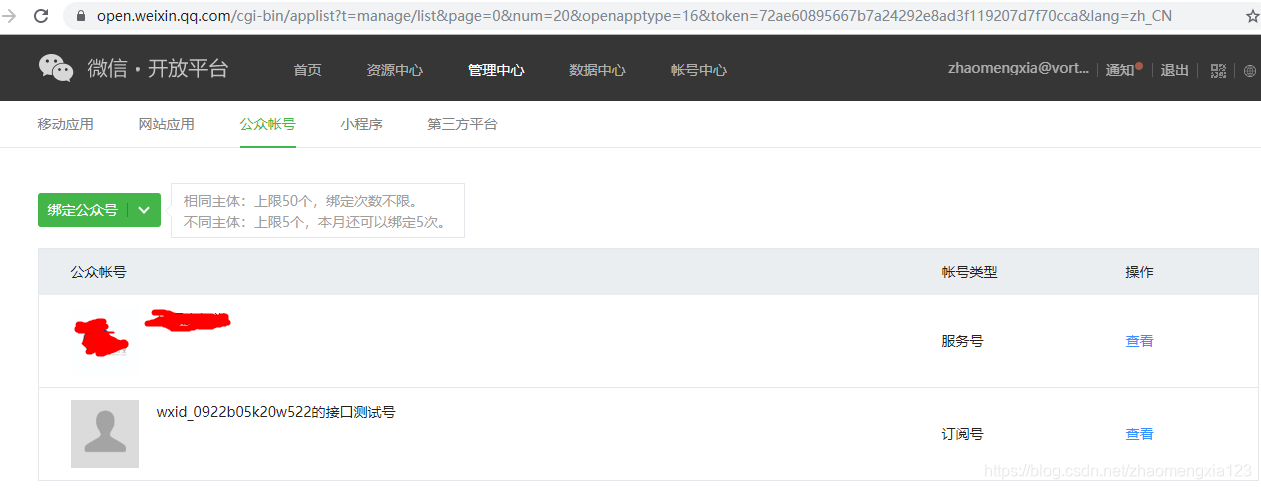
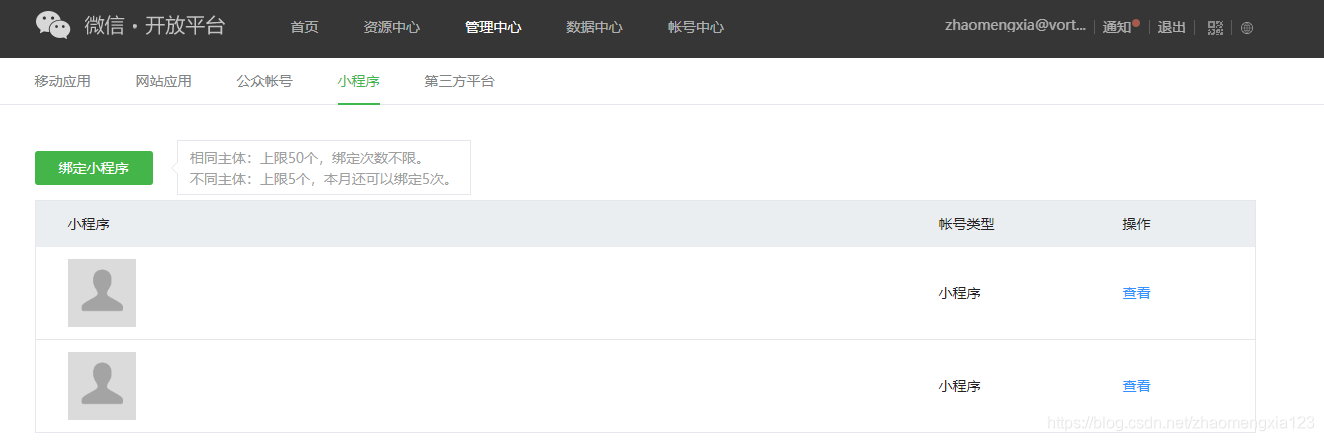
2.申请一个微信开放平台,将上诉两个准备好的微信公众号和微信小程序绑定在这个微信开放平台上
绑定的公众号和其测试号
绑定的小程序
3.微信开发文档下载卡券开发资料并解压,将需要的信息复制到我们的项目中。
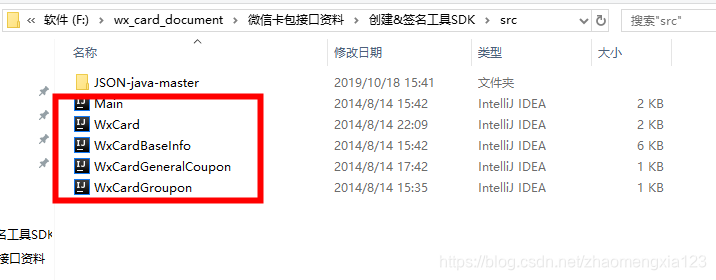
将以下几个类复制到项目中的合适位置
之后引入相应的包
//https://mvnrepository.com/artifact/org.json/jsoncompilegroup:'org.json',name:'json',version:'20180813'接下来需要一个处理post请求的工具类
packagecom.huankeyun.community.utils;importjava.io.;importjava.net.HttpURLConnection;importjava.net.URL;/@Authorzhaomengxia@create2019/10/1816:50/publicclassHttpRequestUtil{publicstaticStringresponse(Stringurl,Stringcontent){Stringline="";Stringmessage="";StringreturnData="";booleanpostState=false;BufferedReaderbufferedReader=null;try{URLurlObject=newURL(url);HttpURLConnectionurlConn=(HttpURLConnection)urlObject.openConnection();urlConn.setDoOutput(true);/设定禁用缓存/urlConn.setRequestProperty("Cache-Control","no-cache");/维持长连接/urlConn.setRequestProperty("Connection","Keep-Alive");/设置字符集/urlConn.setRequestProperty("Charset","UTF-8");/设定输出格式为json/urlConn.setRequestProperty("Content-Type","application/json;charset=utf-8");/设置使用POST的方式发送/urlConn.setRequestMethod("POST");/设置不使用缓存/urlConn.setUseCaches(false);/设置容许输出/urlConn.setDoOutput(true);/设置容许输入/urlConn.setDoInput(true);urlConn.connect();OutputStreamWriteroutStreamWriter=newOutputStreamWriter(urlConn.getOutputStream(),"UTF-8");outStreamWriter.write(content);outStreamWriter.flush();outStreamWriter.close();/若post失败/if((urlConn.getResponseCode()!=200)){returnData="{"jsonStrStatus":0,"processResults":[]}";message="发送POST失败!"+"code="+urlConn.getResponseCode()+","+"失败消息:"+urlConn.getResponseMessage();//定义BufferedReader输入流来读取URL的响应InputStreamerrorStream=urlConn.getErrorStream();if(errorStream!=null){InputStreamReaderinputStreamReader=newInputStreamReader(errorStream,"utf-8");bufferedReader=newBufferedReader(inputStreamReader);while((line=bufferedReader.readLine())!=null){message+=line;}inputStreamReader.close();}errorStream.close();System.out.println("发送失败!错误信息为:"+message);}else{/发送成功返回发送成功状态/postState=true;//定义BufferedReader输入流来读取URL的响应InputStreaminputStream=urlConn.getInputStream();InputStreamReaderinputStreamReader=newInputStreamReader(inputStream,"utf-8");bufferedReader=newBufferedReader(inputStreamReader);while((line=bufferedReader.readLine())!=null){message+=line;}returnData=message;inputStream.close();inputStreamReader.close();System.out.println("发送POST成功!返回内容为:"+returnData);}}catch(Exceptione){e.printStackTrace();}finally{try{if(bufferedReader!=null){bufferedReader.close();}}catch(IOExceptionex){ex.printStackTrace();}returnreturnData;}}}其中:WxCardBaseInfo这个类是处理卡券(团购券,代金券,折扣券等)的通用字段为指定的json格式
WxCard是整理卡券创建的整个json字符串(可以根据不同的卡券类型进行创建相应的卡券),WxCardGroupon类继承了WxCard,就是创建团购券的。
下面这个运行出来的结果就是我们文档中看到的创建团购券时的post数据格式实例
importjava.util.ArrayList;importjava.util.Calendar;/Tochangethislicenseheader,chooseLicenseHeadersinProjectProperties.Tochangethistemplatefile,chooseTools|Templatesandopenthetemplateintheeditor.//@authorjackylian/publicclassMain{publicstaticvoidmain(String[]args){WxCardGrouponcard=newWxCardGroupon();WxCardBaseInfobaseInfo=card.getBaseInfo();baseInfo.setLogoUrl("123");baseInfo.setDateInfoTimeRange(Calendar.getInstance().getTime(),Calendar.getInstance().getTime());baseInfo.setBrandName("brandname");baseInfo.setBindOpenid(false);baseInfo.setCanGiveFriend(false);baseInfo.setCanShare(true);baseInfo.setCodeType(WxCardBaseInfo.CODE_TYPE_QRCODE);baseInfo.setColor("Color010");baseInfo.setDescription("desc");baseInfo.setGetLimit(3);baseInfo.setUseCustomCode(false);baseInfo.setNotice("notice");baseInfo.setServicePhone("phone");baseInfo.addLocationIdList(123123);baseInfo.addLocationIdList(5345);baseInfo.setUseLimit(5);baseInfo.setQuantity(10000000);System.out.println(baseInfo.toJsonString());baseInfo.setLogoUrl("435345");ArrayListIntegerlocationIdList=newArrayListInteger();locationIdList.add(809809);locationIdList.add(423532);card.setDealDetail("团购详情啊啊啊啊啊!!!");System.out.println(locationIdList.getClass().isArray());baseInfo.setLocationIdList(locationIdList);System.out.println(card.toJsonString());}}再比如我要创建代金券,第一步创建一个类继承WxCard并添加其专用的字段
packagecom.huankeyun.community.weixinsdk;/@Authorzhaomengxia@create2019/10/1817:17/publicclassWxCardCashextendsWxCard{//代金券publicWxCardCash(){init("CASH");}//代金券专用,表示起用金额(单位为分),如果无起用门槛则填0publicvoidsetLeastCost(intleastCost){m_data.put("least_cost",leastCost);}//代金券专用,表示减免金额。(单位为分)publicvoidsetReduceCost(intreduceCost){m_data.put("reduce_cost",reduceCost);}}接下来就可以处理业务层
/创建代金券@paramaccessToken@return/publicStringcreateCash(StringaccessToken,CouponCashDTOcouponCashDTO){Stringurl="https://api.weixin.qq.com/card/create?access_token="+accessToken;WxCardCashcard=newWxCardCash();WxCardBaseInfobaseInfo=card.getBaseInfo();CardBaseInfoDTOcardBaseInfoDTO=couponCashDTO.getCardBaseInfoDTO();cardCommon(baseInfo,cardBaseInfoDTO);//起用金额card.setLeastCost(couponCashDTO.getLeastCost());//减少金额card.setReduceCost(couponCashDTO.getReduceCost());//处理post请求Stringresponse=HttpRequestUtil.response(url,card.toJsonString());returnresponse;}4.按照微信开发文档进行开发
5.微信测试号申请流程
6.微信服务器配置url,可以处理好之后可以处理微信的各种推送消息,拿到我们需要拿到的数据。注意微信公众号服务器配置会影响微信公众号的自定义菜单。
packagecom.huankeyun.community.resource.sign;importcom.huankeyun.community.model.coupon.CouponUserView;importcom.huankeyun.community.repo.coupon.CouponUserRepository;importcom.huankeyun.community.utils.Identities;importcom.huankeyun.community.utils.SerializeXmlUtil;importcom.huankeyun.community.utils.SignUtil;importcom.huankeyun.community.wxmessage.ImageMessage;importcom.huankeyun.community.wxmessage.InputMessage;importcom.huankeyun.community.wxmessage.MsgType;importcom.huankeyun.community.wxmessage.OutputMessage;importcom.thoughtworks.xstream.XStream;importio.swagger.annotations.Api;importio.swagger.annotations.ApiOperation;importorg.springframework.beans.factory.annotation.Autowired;importorg.springframework.web.bind.annotation.;importjavax.servlet.ServletInputStream;importjavax.servlet.http.HttpServletRequest;importjavax.servlet.http.HttpServletResponse;importjava.io.IOException;importjava.util.Calendar;importjava.util.Date;/@Authorzhaomengxia@create2019/10/239:03/@RestController@RequestMapping(value="/wechat/")@Api(tags="微信公众号服务器配置url")publicclassCardSignResource{@AutowiredprivateCouponUserRepositorycouponUserRepository;@GetMapping(value="wx")@RequestMapping(value="wx",method={RequestMethod.GET,RequestMethod.POST})@ApiOperation(value="微信公众号服务器配置")@ResponseBodypublicStringcardSign(HttpServletRequestrequest,HttpServletResponseresponse){Stringsignature=request.getParameter("signature");Stringtimestamp=request.getParameter("timestamp");Stringnonce=request.getParameter("nonce");Stringechostr=request.getParameter("echostr");System.out.println(signature);booleanisGet=request.getMethod().toLowerCase().equals("get");if(isGet){if(SignUtil.checkSignature(signature,timestamp,nonce)){returnechostr;}}else{try{acceptMessage(request,response);}catch(IOExceptione){e.printStackTrace();}}returnnull;}privatevoidacceptMessage(HttpServletRequestrequest,HttpServletResponseresponse)throwsIOException{//处理接收消息ServletInputStreamin=request.getInputStream();//将POST流转换为XStream对象XStreamxs=SerializeXmlUtil.createXstream();xs.processAnnotations(InputMessage.class);xs.processAnnotations(OutputMessage.class);//将指定节点下的xml节点数据映射为对象xs.alias("xml",InputMessage.class);//将流转换为字符串StringBuilderxmlMsg=newStringBuilder();byte[]b=newbyte[4096];for(intn;(n=in.read(b))!=-1;){xmlMsg.append(newString(b,0,n,"UTF-8"));}System.out.println(xmlMsg.toString()+"---------");//将xml内容转换为InputMessage对象InputMessageinputMsg=(InputMessage)xs.fromXML(xmlMsg.toString());Stringservername=inputMsg.getToUserName();//服务端Stringcustermname=inputMsg.getFromUserName();//客户端longcreateTime=inputMsg.getCreateTime();//接收时间LongreturnTime=Calendar.getInstance().getTimeInMillis()/1000;//返回时间//取得消息类型StringmsgType=inputMsg.getMsgType();StringcardId=inputMsg.getCardId();StringuserCardCode=inputMsg.getUserCardCode();StringfromUserName=inputMsg.getFromUserName();Stringevent=inputMsg.getEvent();StringunionId=inputMsg.getUnionId();//处理领取卡券事件,记录领取卡券的用户的openid,code,cardIdif(event.equals("user_get_card")){CouponUserViewcouponUserView=newCouponUserView();couponUserView.setCreateOn(System.currentTimeMillis());couponUserView.setCouponUserId(Identities.COUPONUSER.identity());couponUserView.setOpenid(fromUserName);couponUserView.setUserCardCode(userCardCode);couponUserView.setCardId(cardId);couponUserView.setUnionId(unionId);couponUserRepository.save(couponUserView);}//根据消息类型获取对应的消息内容if(msgType.equals(MsgType.Text.toString())){//文本消息System.out.println("开发者微信号:"+inputMsg.getToUserName());System.out.println("发送方帐号:"+fromUserName);System.out.println("消息创建时间:"+inputMsg.getCreateTime()+newDate(createTime1000l));System.out.println("消息内容:"+inputMsg.getContent());System.out.println("消息Id:"+inputMsg.getMsgId());StringBufferstr=newStringBuffer();str.append("xml");str.append("ToUserName![CDATA["+custermname+"]]/ToUserName");str.append("FromUserName![CDATA["+servername+"]]/FromUserName");str.append("CreateTime"+returnTime+"/CreateTime");str.append("MsgType![CDATA["+msgType+"]]/MsgType");str.append("Content![CDATA[你说的是:"+inputMsg.getContent()+",吗?]]/Content");str.append("/xml");System.out.println(str.toString());response.getWriter().write(str.toString());}//获取并返回多图片消息if(msgType.equals(MsgType.Image.toString())){System.out.println("获取多媒体信息");System.out.println("多媒体文件id:"+inputMsg.getMediaId());System.out.println("图片链接:"+inputMsg.getPicUrl());System.out.println("消息id,64位整型:"+inputMsg.getMsgId());OutputMessageoutputMsg=newOutputMessage();outputMsg.setFromUserName(servername);outputMsg.setToUserName(custermname);outputMsg.setCreateTime(returnTime);outputMsg.setMsgType(msgType);ImageMessageimages=newImageMessage();images.setMediaId(inputMsg.getMediaId());outputMsg.setImage(images);System.out.println("xml转换:/n"+xs.toXML(outputMsg));response.getWriter().write(xs.toXML(outputMsg));}}}工具类
packagecom.huankeyun.community.utils;importjava.security.MessageDigest;importjava.security.NoSuchAlgorithmException;/@Authorzhaomengxia@create2019/10/2417:06/publicclassSignUtil{//与接口配置信息中的Token要一致privatestaticStringtoken="zhaomengxia";/验证签名@paramsignature@paramtimestamp@paramnonce@return/publicstaticbooleancheckSignature(Stringsignature,Stringtimestamp,Stringnonce){String[]arr=newString[]{token,timestamp,nonce};//将token、timestamp、nonce三个参数进行字典序排序//Arrays.sort(arr);sort(arr);StringBuildercontent=newStringBuilder();for(inti=0;iarr.length;i++){content.append(arr[i]);}MessageDigestmd=null;StringtmpStr=null;try{md=MessageDigest.getInstance("SHA-1");//将三个参数字符串拼接成一个字符串进行sha1加密byte[]digest=md.digest(content.toString().getBytes());tmpStr=byteToStr(digest);}catch(NoSuchAlgorithmExceptione){e.printStackTrace();}content=null;//将sha1加密后的字符串可与signature对比,标识该请求来源于微信returntmpStr!=null?tmpStr.equals(signature.toUpperCase()):false;}/将字节数组转换为十六进制字符串@parambyteArray@return/privatestaticStringbyteToStr(byte[]byteArray){StringstrDigest="";for(inti=0;ibyteArray.length;i++){strDigest+=byteToHexStr(byteArray[i]);}returnstrDigest;}/将字节转换为十六进制字符串@parammByte@return/privatestaticStringbyteToHexStr(bytemByte){char[]Digit={'0','1','2','3','4','5','6','7','8','9','A','B','C','D','E','F'};char[]tempArr=newchar[2];tempArr[0]=Digit[(mByte4)&0X0F];tempArr[1]=Digit[mByte&0X0F];Strings=newString(tempArr);returns;}publicstaticvoidsort(Stringa[]){for(inti=0;ia.length-1;i++){for(intj=i+1;ja.length;j++){if(a[j].compareTo(a[i])0){Stringtemp=a[i];a[i]=a[j];a[j]=temp;}}}}}7.微信卡券分为两个模式,自制和代制
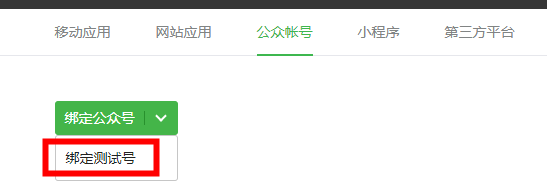
8.微信公众号测试号配置成功之后,在领取卡券的时候如果报该卡券未审核则可以关注测试号并拿到微信号,将微信号作为openid调用测试白名单接口既可以进行领取卡券。注意如果测试号没有跟上诉公众号和小程序一起绑定在同一个微信开放平台,会遇到同一个用户的unionid不一致的情况(小程序拿到的unioid和通过微信服务配置的url拿到的微信的推送信息中的不一致),解决办法就是在微信开放平台-绑定公众号那里选择绑定测试号进行绑定该测试号即可解决问题,实现同一个用户拿到的unioid一致,就可以通过unioid来识别同一用户。
这里选择绑定微信测试号
微信卡券有特别的接口.
第一个即上传图片素材。即post请求方式,用form表单方式上传。
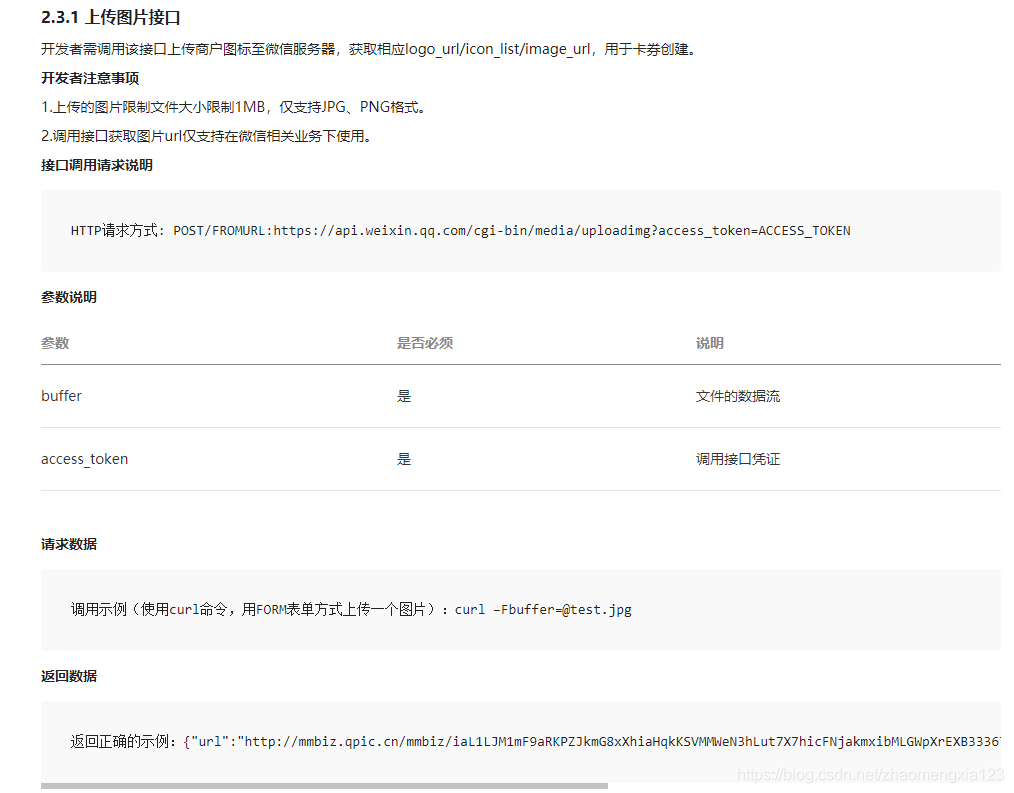
另一个,如果采用第三方代制模式,需要上传授权函,这里就需要用到素材管理中的新增临时素材
请求方式是同样的。
调用以下工具类即可解决问题FormUploadUtil.java
packagecom.huankeyun.community.utils;importjavax.activation.MimetypesFileTypeMap;importjavax.imageio.ImageIO;importjava.io.;importjava.net.HttpURLConnection;importjava.net.MalformedURLException;importjava.net.URL;importjava.util.Iterator;importjava.util.Map;/@Authorzhaomengxia@create2019/10/2911:12/publicclassFormUploadUtil{publicstaticStringrealPath(Stringfilepath,Stringpath)throwsIOException{//现将图片上传到服务器指定文件夹,这里是Windows服务器,linux的话也同样指定一个文件存放即可StringrealPath="D:\upload\image\";URLurl=newURL(filepath);//图片不是原来的了。ImageIO.write(ImageIO.read(url),"jpg",newFile("image-01.jpg"));BufferedInputStreaminput=null;BufferedOutputStreamoutput=null;try{input=newBufferedInputStream(url.openStream());output=newBufferedOutputStream(newFileOutputStream(realPath+path));for(intd=input.read();d!=-1;d=input.read()){output.write(d);}}catch(Exceptione){}finally{if(input!=null){input.close();}if(output!=null){output.close();}}returnrealPath;}/上传图片@paramurlStr@paramfileMap@return/publicstaticStringformUpload(StringurlStr,MapfileMap){Stringres="";HttpURLConnectionconn=null;StringBOUNDARY="---------------------------"+System.currentTimeMillis();//boundary就是request头和上传文件内容的分隔符try{URLurl=newURL(urlStr);conn=(HttpURLConnection)url.openConnection();conn.setConnectTimeout(5000);conn.setReadTimeout(30000);conn.setDoOutput(true);conn.setDoInput(true);conn.setUseCaches(false);conn.setRequestMethod("POST");conn.setRequestProperty("Connection","Keep-Alive");conn.setRequestProperty("User-Agent","Mozilla/5.0(Windows;U;WindowsNT6.1;zh-CN;rv:1.9.2.6)");conn.setRequestProperty("Content-Type","multipart/form-data;boundary="+BOUNDARY);OutputStreamout=newDataOutputStream(conn.getOutputStream());//fileif(fileMap!=null){Iteratoriter=fileMap.entrySet().iterator();while(iter.hasNext()){Map.Entryentry=(Map.Entry)iter.next();StringinputName=(String)entry.getKey();StringinputValue=(String)entry.getValue();if(inputValue==null){continue;}Filefile=newFile(inputValue);Stringfilename=file.getName();StringcontentType=newMimetypesFileTypeMap().getContentType(file);Stringpath=file.getPath();if(filename.endsWith(".png")){contentType="image/png";}if(contentType==null||contentType.equals("")){contentType="application/octet-stream";}StringBufferstrBuf=newStringBuffer();strBuf.append("--").append(BOUNDARY).append("r");strBuf.append("Content-Disposition:form-data;name="+inputName+"";filename=""+filename+""r");strBuf.append("Content-Type:"+contentType+"rr");out.write(strBuf.toString().getBytes());if(!file.exists()){file.mkdirs();file.createNewFile();}DataInputStreamin=newDataInputStream(newFileInputStream(file));intbytes=0;byte[]bufferOut=newbyte[1024];while((bytes=in.read(bufferOut))!=-1){out.write(bufferOut,0,bytes);}in.close();}}byte[]endData=("r--"+BOUNDARY+"--r").getBytes();out.write(endData);out.flush();out.close();//读取返回数据StringBufferstrBuf=newStringBuffer();BufferedReaderreader=newBufferedReader(newInputStreamReader(conn.getInputStream()));Stringline=null;while((line=reader.readLine())!=null){strBuf.append(line).append("");}res=strBuf.toString();reader.close();reader=null;}catch(Exceptione){System.out.println("发送POST请求出错。"+urlStr);e.printStackTrace();}finally{if(conn!=null){conn.disconnect();conn=null;}}returnres;}}具体实现这里是先调用本地上传的接口,这里是先将图片上传到阿里云服务器拿到返回的图片链接filepath
/上传临时多媒体素材@paramaccessToken@paramtype@paramfilepath@return/publicStringuploadMedia(StringaccessToken,Stringtype,Stringfilepath)throwsIOException{Stringurl1="https://api.weixin.qq.com/cgi-bin/media/upload?access_token="+accessToken+"&type="+type;Stringpath="image-03.jpg";StringrealPath=FormUploadUtil.realPath(filepath,path);Mapmap=newHashMap();//map.put("type",type);map.put("media",realPath+path);Stringres=FormUploadUtil.formUpload(url1,map);returnres;}这里的filepath同上
/上传图片素材@paramaccessToken@paramfilepath@return@throwsIOException/publicLogoUrlDTOupload(StringaccessToken,Stringfilepath)throwsIOException{StringurlStr="https://api.weixin.qq.com/cgi-bin/media/uploadimg?access_token="+accessToken;MapfileMap=newHashMap();Stringpath="image-02.jpg";StringrealPath=FormUploadUtil.realPath(filepath,path);fileMap.put("buffer",realPath+path);Stringret=FormUploadUtil.formUpload(urlStr,fileMap);LogoUrlDTOlogoUrlDTO=JSON.parseObject(ret,LogoUrlDTO.class);returnlogoUrlDTO;}










