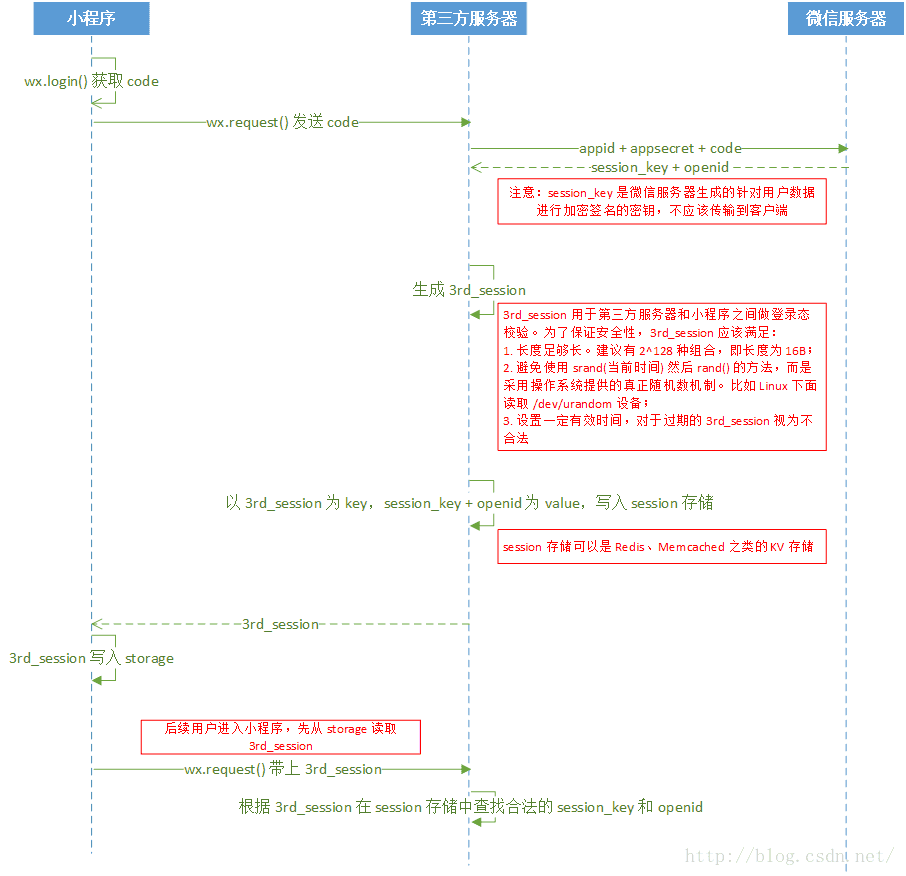
第一种使用wx.getUserInfo直接获取微信头像,昵称wx.getUserInfo({success:function(res){that.setData({nickName:res.userInfo.nickName,avatarUrl:res.userInfo.avatarUrl,})},})第二种我们在使用小程序wx.loginAPI进行登录的时候,直接使用wx.getUserInfo是不能获取更多的信息的,如微信用户的openid。官方提示,需要发送获取到的code进行请求到微信的后端API,根据文档,只需要进行一个get请求到如下地址即可:https://api.weixin.qq.com/sns/jscode2session?appid=APPID&secret=SECRET&js_code=JSCODE&grant_type=authorization_codeappid和secret在微信小程序后台可以看到,js_code为使用wx.login登录时获取到的code参数数据,grant_type这个不用改动。官方推荐在login获取到code,然后发送到开发者后端,后端再通过接口去微信后端换取到openid和sessionKey(并且现在会将unionid也一并返回)之后,然后把3rd_session返回给前端,就已经完成登录行为。而login行为是静默,不必授权的,不会对用户造成骚扰。getUserInfo只是为了提供更优质的服务而存在,比如展示头像昵称,判断性别,通过unionId和其他公众号上已有的用户画像结合起来提供历史数据。所以不必在刚刚进入小程序的时候就强制要求授权。js文件varopenId=(wx.getStorageSync('openId'))if(openId){wx.getUserInfo({success:function(res){that.setData({nickName:res.userInfo.nickName,avatarUrl:res.userInfo.avatarUrl,})},fail:function(){//failconsole.log("获取失败!")},complete:function(){//completeconsole.log("获取用户信息完成!")}})}else{wx.login({success:function(res){console.log(res.code)if(res.code){wx.getUserInfo({withCredentials:true,success:function(res_user){wx.request({//后台接口地址url:'https://....com/wx/login',data:{code:res.code,encryptedData:res_user.encryptedData,iv:res_user.iv},method:'GET',header:{'content-type':'application/json'},success:function(res){//this.globalData.userInfo=JSON.parse(res.data);that.setData({nickName:res.data.nickName,avatarUrl:res.data.avatarUrl,})wx.setStorageSync('openId',res.data.openId);}})},fail:function(){wx.showModal({title:'警告通知',content:'您点击了拒绝授权,将无法正常显示个人信息,点击确定重新获取授权。',success:function(res){if(res.confirm){wx.openSetting({success:(res)={if(res.authSetting["scope.userInfo"]){////如果用户重新同意了授权登录wx.login({success:function(res_login){if(res_login.code){wx.getUserInfo({withCredentials:true,success:function(res_user){wx.request({url:'https://....com/wx/login',data:{code:res_login.code,encryptedData:res_user.encryptedData,iv:res_user.iv},method:'GET',header:{'content-type':'application/json'},success:function(res){that.setData({nickName:res.data.nickName,avatarUrl:res.data.avatarUrl,})wx.setStorageSync('openId',res.data.openId);}})}})}}});}},fail:function(res){}})}}})},complete:function(res){}})}}})}},globalData:{userInfo:null}后台是php框架是laravel5.4版本官方文档:https://mp.weixin.qq.com/debug/wxadoc/dev/api/signature.html微信官方提供了多种编程语言的示例代码(点击下载)。每种语言类型的接口名字均一致。调用方式可以参照示例。下载之后在php文件中引入:?phpnamespaceAppHttpControllersAdmin;useIlluminateHttpRequest;useAppHttpControllersController;useAppModelsUser;useAppModelsWechatuser;include_onceapp_path('/Http/Controllers/Admin/PHP/wxBizDataCrypt.php');//获取微信用户信息publicfunctiongetWxLogin(Request$request){//require_onceROOTPATH."./PHP/wxBizDataCrypt.php";$code=$request-get('code');$encryptedData=$request-get('encryptedData');$iv=$request-get('iv');$appid="";$secret="";$URL="https://api.weixin.qq.com/sns/jscode2session?appid=$appid&secret=$secret&js_code=$code&grant_type=authorization_code";$apiData=file_get_contents($URL);//var_dump($code,'wwwwwwww',$apiData['errscode']);//$ch=curl_init();//curl_setopt($ch,CURLOPT_URL,$URL);//curl_setopt($ch,CURLOPT_RETURNTRANSFER,1);//curl_setopt($ch,CURLOPT_HEADER,0);//$output=curl_exec($ch);//curl_close($ch)if(!isset($apiData['errcode'])){$sessionKey=json_decode($apiData)-session_key;$userifo=newWXBizDataCrypt($appid,$sessionKey);$errCode=$userifo-decryptData($encryptedData,$iv,$data);if($errCode==0){return($data."");}else{returnfalse;}}}官方文档的登录流程图,整个登录流程基本如下图所示:
wx.getUserInfo接口调整https://developers.weixin.qq.com/blogdetail?action=get_post_info&lang=zh_CN&token=1731615444&docid=0000a26e1aca6012e896a517556c01












