


最近在写小程序的项目,做了个积分抽奖的功能!开始的时候是自己凭想象做,后面ui给了图,有点想骂人!!
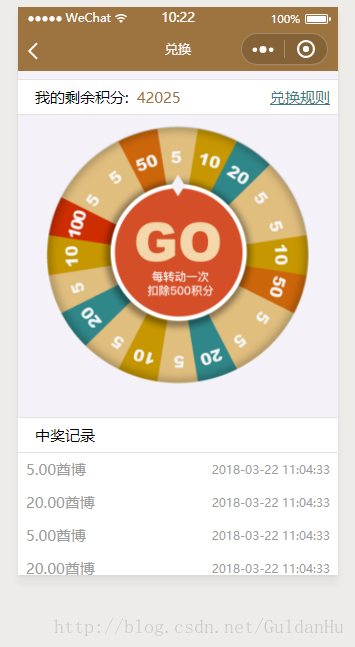
点击中间的部分,外圆转动,然后取值,直接上代码了
界面的代码:
!-- 转盘以及文字 -- view class="plate-wrap" image class='zhuanpan' src='../../image/zhuanpan.png'/image //没图片就直接画就这么暴躁 !-- view class="plate-box" wx:for="{{ lottery}}" wx:key="" style="top:-{{ (lottery.length - 6)=2?(36+4*(lottery.length - 6)):50 }}rpx;transform-origin: 50% {{ (lottery.length - 6) =2?(256+4*(lottery.length - 6)):370 }}rpx;border-top: {{ (lottery.length - 6) =2?(256+4*(lottery.length - 6)):370 }}rpx solid {{item[1]}};transform:translate(-50%,0) rotate({{ 360 / lottery.length * ( index )}}deg);border-left: {{ 600 / lottery.length * 2 }}rpx solid transparent;border-right: {{ 600 / lottery.length * 2 }}rpx solid transparent;" text class="text-box" style="color:#ffffff"{{ item[0] }}/text /view view class='yinying' /view -- /view/view view class="plate-btn-wrap" bindtap="startRollTap" view class="plate-btn-box" image class='jiantou' src='../../image/jiantou.png'/image !-- view class="plate-inner-btn" text开始 抽奖/text /view -- /view /view
定义的样式:
page {
width: 100%;
height: 100%;
}
.container {
z-index: 1;
padding-top: 220rpx;
padding-bottom: 20rpx;
box-sizing: border-box;
height: 100%;
}
.plate-wrap-box {
position: relative;
z-index: 999;
width: 650rpx;
height: 650rpx;
border-radius: 50%;
margin: 0 auto 60rpx;
}
.plate-border {
position: relative;
z-index: 9;
width: 650rpx;
height: 650rpx;
/* background-color: #ffbe04; */
border-radius: 50%;
}
.yinying{
position: absolute;
width: 640rpx;
height: 640rpx;
border-radius: 50%;
z-index: 999999;
box-shadow:0px 0px 30px #666666 inset;
}
.plate-wrap {
position: absolute;
left: 50%;
top: 50%;
transform: translate(-50%, -50%);
z-index: 9;
width: 640rpx;
height: 640rpx;
/* border: 1rpx solid #e88605; */
border-radius: 50%;
overflow: hidden;
margin: auto;
}
.plate-light {
z-index: 1;
width: 500rpx;
height: 500rpx;
border: none;
}
.plate-box {
position: absolute;
z-index: 1;
left: 50%;
width: 0;
height: 0;
font-size: 24rpx;
}
.bulb {
position: absolute;
width: 16rpx;
height: 16rpx;
left: 50%;
top: -242rpx;
transform: translate(-50%, 0);
border-radius: 50%;
background-color: #fff0c7;
filter: blur(0.5rpx);
}
.text-box {
position: absolute;
text-align: center;
display: inline-block;
width: 15px;
top: -300rpx;
transform: translate(-100%, 0);
font-size: 15px;
font-weight: 600;
}
.plate-btn-wrap {
position: absolute;
z-index: 10;
left: 50%;
top: 50%;
transform: translate(-50%, -50%);
width: 450rpx;
height: 450rpx;
border-radius: 50%;
}
.plate-btn-box {
position: relative;
z-index: 11;
width: 100%;
height: 100%;
display: flex;
justify-content: center;
align-items: center;
}
.plate-inner-btn {
position: relative;
z-index: 999;
width: 90rpx;
height: 90rpx;
border-radius: 50%;
background-color: #ca1518;
font-size: 28rpx;
color: #fdcf03;
display: flex;
justify-content: center;
align-items: center;
}
.lottery-plate-shadow {
position: absolute;
z-index: 1;
width: 100%;
height: 50rpx;
border-radius: 50%;
background-color: #d50a0c;
filter: blur(4rpx);
bottom: -35rpx;
}
js的代码:
let canRoll = true, //加控制,防止用户点击两次
num = 1, //用在动画上,让用户在第二次点击的时候可以接着上次转动的角度继续转
lotteryArrLen = 0, //放奖品的数组的长度
// lottery = [‘10’, ‘20’, ‘10’, ‘50’, ‘20’, ‘10’, ‘20’, ‘10’, ‘100’, ‘50’]; //放奖品
lottery =[
[‘5’, ‘#DDBB7D’],
[‘10’,’#C39500’],
[‘20’,’#2B7B7C’],
[‘5’, ‘#DDBB7D’],
[‘5’, ‘#DDBB7D’],
[‘10’, ‘#C39500’],
[‘50’, ‘#B45909’],
[‘5’, ‘#DDBB7D’],
[‘5’, ‘#DDBB7D’],
[‘20’, ‘#2B7B7C’],
[‘5’, ‘#DDBB7D’],
[‘10’, ‘#C39500’],
[‘5’, ‘#DDBB7D’],
[‘20’, ‘#2B7B7C’],
[‘5’, ‘#DDBB7D’],
[‘10’, ‘#C39500’],
[‘100’,’#BE2A02’],
[‘5’, ‘#DDBB7D’],
[‘5’, ‘#DDBB7D’],
[‘50’, ‘#B45909’],
]; //放奖品
Page({
data: {},
onLoad(opt) {
this.setPlateData(); //执行设置转盘表面的文字
let that = this;
let aniData = wx.createAnimation({ //创建动画对象
duration: 4000,
timingFunction: ‘ease’
});
this.aniData = aniData; //将动画对象赋值给this的aniData属性
},
setPlateData() { //设置奖品数组
// lotteryArrLen = lottery.length; //获取奖品数组的长度,用来判断
// if (lotteryArrLen 2) { //数组的奖品只有一个,扩展数组的长度到4
// let evenArr = new Array(4); //创建一个数组,方便操作。
// for (let i = 0; i 4; i++) {
// if (i % 2 == 1) { //这里为什么要取1是为了在默认的界面将指针放在谢谢的地方,防止别人拿着中奖的截图来要奖品
// evenArr[i] = lottery[0]; //将原数组的内容赋值到新的数组
// } else {
// evenArr[i] = ‘5’ //在数组中间隔插入谢谢
// }
// }
// lottery = […evenArr]; //将整合好的数组赋值给lottery数组
// } else { //数组中的奖品超过1个,则正常扩展数组,扩展的数组为原来的2倍
// let dataLen = 0; //用来放原来数组的索引
// let evenArr = new Array(lotteryArrLen * 2); //创建扩展数组
// for (let i = 0; i (lotteryArrLen * 2); i++) {
// if (i % 2 == 1) {
// evenArr[i] = lottery[dataLen]; //将原来数组的值赋值给新数组
// dataLen++; //原来数组的索引加一
// } else {
// evenArr[i] = ‘5’
// }
// }
// lottery = […evenArr]; //将整合好的数组赋值给lottery数组
// }
lotteryArrLen = lottery.length; //获取新的数组长度this.setData({ lottery: lottery //设置好值,用于页面展示})},
startRollTap() { //开始转盘
let that = this;
if (canRoll) {
canRoll = false;
let aniData = this.aniData; //获取this对象上的动画对象
let rightNum = ~~(Math.random() * lotteryArrLen); //生成随机数
console.log(随机数是${rightNum});
console.log(奖品是:${lottery[rightNum]});
console.log(lottery[0][1]);
aniData.rotate(3600 * num - 360 / lotteryArrLen * rightNum).step(); //设置转动的圈数
this.setData({
aniData: aniData.export()
})
num++;
setTimeout(function () {
//要延时执行的代码
canRoll = true;
}, 6000)
}}
})
//用的是图片,外圆转动的时候感觉有点抖动的感觉,赶着上交没时间改了










