


Face++是一个 人工智能开放平台,要使用它我们得先注册并进入控制台创建API Key,这是前提。
平台网址:https://www.faceplusplus.com.cn
整个项目代码我已经上传到网盘。
链接:https://pan.baidu.com/s/156C64y-CO0PNw1jWmfgqcw
提取码:o3jb
一、编写微信小程序界面
界面中有一个相机和两个按钮,本文只管功能实现界面没有美化,在IDE中相机可能打不开是空白的,在真机上是可以的,代码如下。
index.wxml:
!--index.wxml--view class="container"camera device-position="front" flash="off" binderror="error" style="width: 100%; height: 300px;"/cameraview class="test"button type="primary" bindtap="register"拍照注册/buttonbutton id="verify" type="primary" bindtap="verify"拍照验证/button/view/viewindex.wxss:
/**index.wxss**/.test{ display: flex; flex-direction:row;}#login{ margin-left: 10px;}二、功能实现
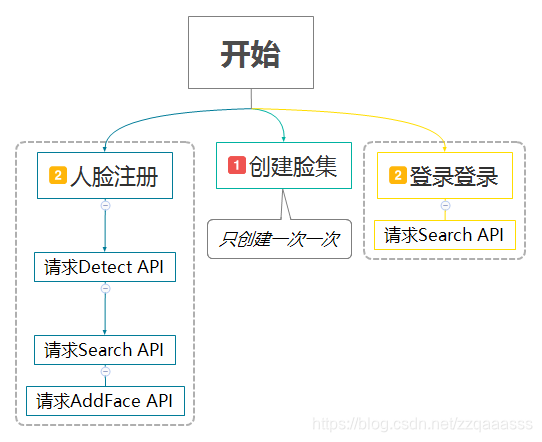
大概请求的过程如下,画的不太标准
1、创建脸集(FaceSet)
这是一组用来管理人脸(Face)或人脸集合(FaceSet)的API。通过这组API,您可以实现查询Face属性、新建FaceSet、删除FaceSet、添加Face到FaceSet等功能。FaceSet能够存储的 人脸数量10000个。
注意:只创建一次,当脸集容量满了可以再创建
请求代码如下:
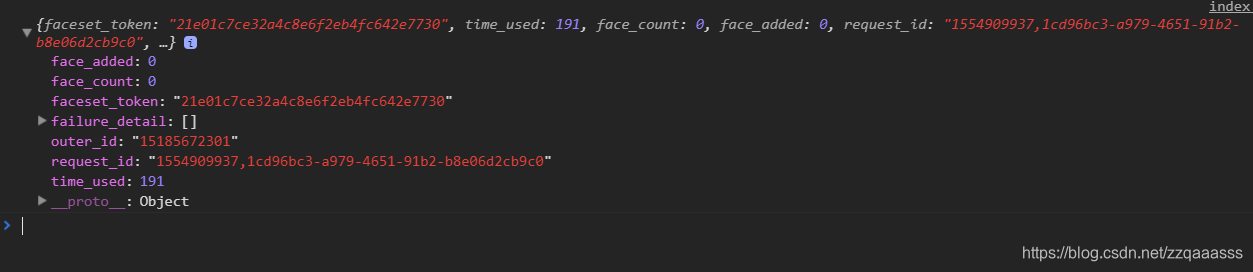
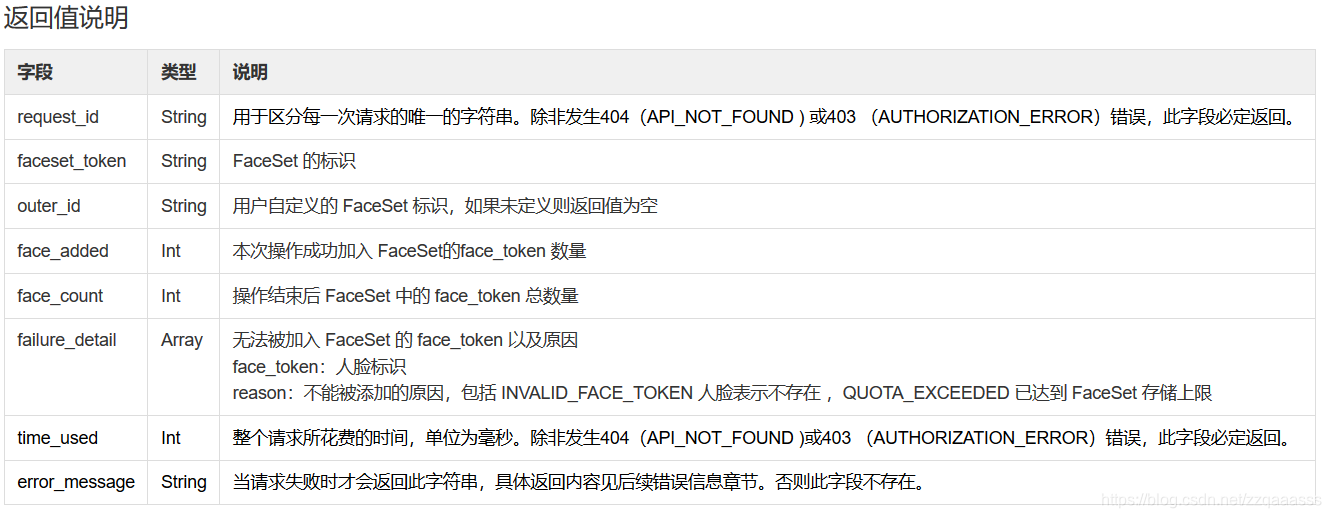
wx.request({ url: 'https://api-cn.faceplusplus.com/facepp/v3/faceset/create',//请求接口 method: 'post', data: { 'api_key': '',//请填写你创建的api_key 'api_secret': '',//请填写你的api_secret 'outer_id':'15185672300',//账号下全局唯一的 FaceSet 自己自定义,后面要用到 }, header: { 'content-type': 'application/x-www-form-urlencoded', }, success(res) { console.log(res.data)//打印 },fail:function(e){ wx.showModal({ title: '提示', content: '创建失败', showCancel: false }) },complete:function(){ } })请求后打印如下信息:
2、人脸注册、登录实现
请看代码详细注释
index.js:
//index.js//获取应用实例const app = getApp()Page({ data: { }, onLoad: function () { }, //人脸注册按钮触发此函数 register: function () { const ctx = wx.createCameraContext() //创建相机上下文 ctx.takePhoto({ quality: 'high', //获取原图 success: (res) = { this.setData({ src: res.tempImagePath //得到拍照后的图片地址 }); wx.showToast({ icon: "loading", title: "正在上传中。。。" }); console.log(res); var that = this; wx.uploadFile({ //上传图片到接口,获取人脸唯一标识,face_token url: "https://api-cn.faceplusplus.com/facepp/v3/detect", filePath: that.data.src, //刚才拍照的图片地址 name: 'image_file', //图片的字段名和接口的字段要对应上 header: { "Content-Type": "multipart/form-data" //必须用此header }, formData: { 'api_key': '3f7C895Stwfxw5yAfFQcrnn5rJ_WBXcD',//请填写你创建的 apikey 'api_secret': 'R9Y-UKyUZOkXeWYEsXcgLVcsdPFlbiGV',//请填写你的api_secret }, success: function (res) { console.log(res); var obj = JSON.parse(res.data); //转换成json格式不然解析不了 if (obj['faces'][0] == null || obj['faces'][0] == '') { //根据反回的数据判断是是否检测到人脸 wx.showModal({ title: '提示', content: '检测不到人脸', showCancel: true }) return; } else { that.setData({ face_token: obj['faces'][0]['face_token'],//获取得到的人脸标识 }); //把新注册的人脸与脸集进行对比获得confidence值 这个值大于80我们就认为人脸集中有这个人 wx.request({ url: 'https://api-cn.faceplusplus.com/facepp/v3/search',//接口 method: 'post', data: { 'api_key': '3f7C895Stwfxw5yAfFQcrnn5rJ_WBXcD',//请填写你创建的 apikey 'api_secret': 'R9Y-UKyUZOkXeWYEsXcgLVcsdPFlbiGV',//请填写你的api_secret 'face_token': that.data.face_token,//传入face_token和脸集中的数据比对 'outer_id': '15185672300', //脸集唯一标识,就是上面我们创建的脸集 'return_result_count': '1'//返回一条匹配数据,范围1-5 }, header: { 'content-type': 'application/x-www-form-urlencoded', }, success(res) { console.log(res.data) //var obj = JSON.parse(res.data); that.setData({ confidence: res.data['results'][0]['confidence'] //对比得到的可信值 }); }, fail: function (e) { wx.showModal({ title: '提示', content: '注册失败', showCancel: false }) }, complete: function () { wx.hideToast(); } }) if (that.data.confidence 80) { //可信值小于80我们就把他加到脸集中 //把face_token添加到脸集中 wx.request({ url: 'https://api-cn.faceplusplus.com/facepp/v3/faceset/addface',//添加到脸集的接口 method: 'post', data: { 'api_key': '3f7C895Stwfxw5yAfFQcrnn5rJ_WBXcD',//请填写你创建的 apikey 'api_secret': 'R9Y-UKyUZOkXeWYEsXcgLVcsdPFlbiGV',//请填写你的api_secret 'face_tokens': that.data.face_token,//把上请求得到的人脸标识添加到脸集中 'outer_id': '15185672300', }, header: { 'content-type': 'application/x-www-form-urlencoded', }, success(res) { console.log(res.data) wx.showModal({ title: '提示', content: '注册成功', showCancel: false }) }, fail: function (e) { wx.showModal({ title: '提示', content: '注册失败', showCancel: false }) }, complete: function () { wx.hideToast();//隐藏提示 } }) } else { wx.showModal({ title: '提示', content: '你已经注册过了', showCancel: false }) return; } } console.log('face_token:' + that.data.face_token); if (res.statusCode != 200) { wx.showModal({ title: '提示', content: '上传失败', showCancel: false }) return; } }, fail: function (e) { console.log(e); wx.showModal({ title: '提示', content: '上传失败', showCancel: false }) }, complete: function () { wx.hideToast(); //隐藏Toast } }) } }) }, error(e) { console.log(e.detail) }, //登录验证 login: function () { var that = this const ctx = wx.createCameraContext(); //创建相机上下文 ctx.takePhoto({ quality: 'high', success: (res) = { this.setData({ src: res.tempImagePath //相机拍照得到照片的地址 }) wx.showToast({ icon: "loading", title: "正在上传中。。。" }); wx.uploadFile({ //上传照片和脸集中的照片对比并得出结果 url: 'https://api-cn.faceplusplus.com/facepp/v3/search', //对比人脸接口 filePath: that.data.src,//上传相机拍照得到照片的地址 name: 'image_file', header: { 'content-type': 'application/x-www-form-urlencoded' }, formData: { 'api_key': '3f7C895Stwfxw5yAfFQcrnn5rJ_WBXcD',//请填写你创建的 apikey 'api_secret': 'R9Y-UKyUZOkXeWYEsXcgLVcsdPFlbiGV',//请填写你的api_secret 'outer_id': '15185672300', //脸集唯一标识 'return_result_count': '1',//只反回一条匹配数据 }, success: function (res) { if (res.statusCode != 200) { wx.showModal({ title: '提示', content: '上传失败', showCancel: false }) return; } console.log(res) var obj = JSON.parse(res.data);//转成json对象 if (obj['faces'][0] == null || obj['faces'][0] == '') {//判断是否检测到人脸 wx.showModal({ title: '提示', content: '未检测到人脸', showCancel: false }) return; } else { that.setData({ confidence: obj['results'][0]['confidence'] //可信值 }); console.log(obj['results'][0]['confidence']); if (that.data.confidence = 80) { //可信值大于80就认为是同一个人 wx.showModal({ title: '提示', content: '验证通过', showCancel: false }) return; } else { wx.showModal({ title: '提示', content: '验证失败', showCancel: false }) return; } } }, fail: function (e) { console.log(e); wx.showModal({ title: '提示', content: '上传失败', showCancel: false }) }, complete: function () { wx.hideToast(); //隐藏Toast } }) } }) }, error(e) { console.log(e.detail) }})整个项目代码我已经上传到网盘。
链接:https://pan.baidu.com/s/156C64y-CO0PNw1jWmfgqcw
提取码:o3jb










