


首先我们看效果
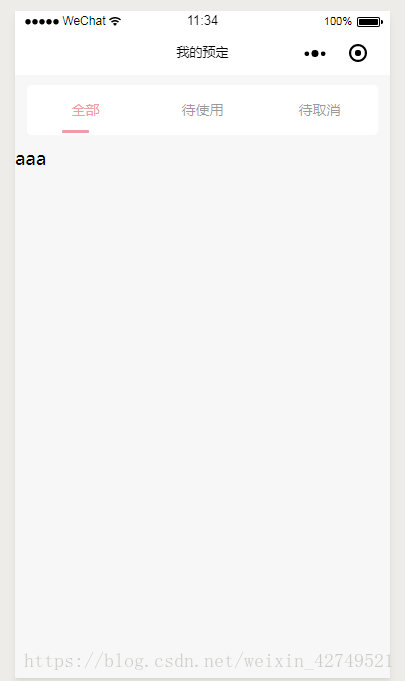
接下来是wxml部分代码
!-- tab框 --view class="nav_title" view class="nav_tab" !-- 如果选中的下表等于当前的索引,就使用active class名,否则class名为common -- view wx:for="{{list}}" wx:key="list" class="{{selected==index?'active':'common'}}" data-index='{{index}}' bindtap="selected"{{item}} !-- 如果选中的下表等于当前的索引,就添加下划线 -- view class="{{selected==index?'nav_underline':''}}"/view /view /view !-- tab框显示内容 -- view wx:if="{{selected == 0}}"aaa/view !-- 待使用 -- view wx:if="{{selected == 1}}"bbb/view !-- 待取消 -- view wx:if="{{selected == 2}}"ccc/view/viewwxss部分代码
/* 页面背景色 */page { background: rgba(247, 247, 247, 1);}.nav_tab { width: 702rpx; margin: 20rpx auto; height: 100rpx; display: flex; background: #fff; border-radius: 10rpx; flex-direction: row;}/* 未选中的样式 */.common { line-height: 100rpx; text-align: center; flex: 1; color: #333; font-size: 28rpx; opacity: 0.5;}/* 选中时的样式 */.active { line-height: 100rpx; text-align: center; color: #ef9ba8; flex: 1; font-size: 28rpx;}/* 下划线的样式 */.nav_underline { background: #ef9ba8; width: 54rpx; height: 6rpx; margin-top: -10rpx; margin-left: 70rpx; border-radius: 8rpx;}最后是js部分
// pages/mine/reserve/reserve.jsPage({ /** * 页面的初始数据 */ data: { selected: 0, list: ['全部', '待使用', '待取消'], }, //tab框 selected: function (e) { let that = this console.log(e) let index = e.currentTarget.dataset.index console.log("index",index) if (index == 0) { that.setData({ selected: 0 }) } else if (index == 1) { that.setData({ selected: 1 }) } else { that.setData({ selected: 2 }) } }, /** * 生命周期函数--监听页面加载 */ onLoad: function (options) { }, /** * 生命周期函数--监听页面初次渲染完成 */ onReady: function () { }, /** * 生命周期函数--监听页面显示 */ onShow: function () { }, /** * 生命周期函数--监听页面隐藏 */ onHide: function () { }, /** * 生命周期函数--监听页面卸载 */ onUnload: function () { }, /** * 页面相关事件处理函数--监听用户下拉动作 */ onPullDownRefresh: function () { }, /** * 页面上拉触底事件的处理函数 */ onReachBottom: function () { }, /** * 用户点击右上角分享 */ onShareAppMessage: function () { }})









