


最开始的时候,在小程序中实现吸顶效果,开发工具看起来还挺好的,但是在真机上就会有问题了。 原因是我不停的去
setData会导致操作反馈延迟严重,无法及时将操作处理结果及时传递到视图层。

后面就对代码进行了调整,避免不停的去setData
效果图
吸顶前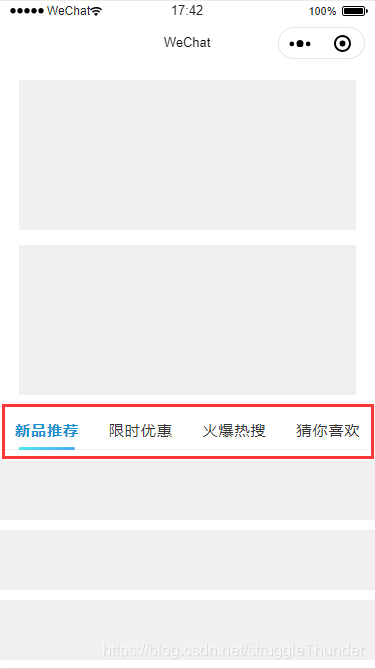
吸顶后
代码部分
wxml
view style="width: 90%; height: 300rpx; background: #f0f0f0; margin: 30rpx auto;"/viewview style="width: 90%; height: 300rpx; background: #f0f0f0; margin: 30rpx auto;"/viewview class="navbar-wrap" view class="column {{isFixedTop?'fixed':''}}" id="navbar" view class="block active"新品推荐/view view class="block"限时优惠/view view class="block"火爆热搜/view view class="block"猜你喜欢/view /view !-- 用于吸顶后 占位用的 -- view class="column" wx:if="{{isFixedTop}}"/view/viewblock wx:for="{{20}}" wx:key="list" view style="width: 100%; height: 120rpx; background: #f0f0f0; margin: 20rpx auto;"/view/blockwxss
view, text { box-sizing: border-box; -moz-box-sizing: border-box; -webkit-box-sizing: border-box;}.navbar-wrap { width: 100%;}.navbar-wrap .column { width: 100%; height: 80rpx; display: flex; flex-direction: row; align-items: center; justify-content: space-around; background: #fff; border-bottom: solid 1px #eee; top: 0; left: 0; z-index: 100;}.navbar-wrap .column.fixed { position: fixed;}/* 以下的代码不重要 */.navbar-wrap .column .block { width: 25%; height: 80rpx; line-height: 80rpx; text-align: center; font-size: 30rpx; color: #333; letter-spacing: 1px; position: relative;}.navbar-wrap .column .block::after { content: ""; width: 60%; height: 3px; border-radius: 2px; position: absolute; bottom: 0; left: 50%; transform: translateX(-50%); background: transparent;}.navbar-wrap .column .block.active { color: #1490ce; font-weight: bold;}.navbar-wrap .column .block.active::after { background: linear-gradient(160deg, rgba(8, 220, 230, 0.7) 10%, rgba(0, 140, 255, 0.7) 90%);}js
Page({ data: { navbarInitTop: 0, //导航栏初始化距顶部的距离 isFixedTop: false, //是否固定顶部 }, /** * 生命周期函数--监听页面加载 */ onLoad: function(options) { }, /** * 生命周期函数--监听页面显示 */ onShow: function() { var that = this; if (that.data.navbarInitTop == 0) { //获取节点距离顶部的距离 wx.createSelectorQuery().select('#navbar').boundingClientRect(function(rect) { if (rect && rect.top 0) { var navbarInitTop = parseInt(rect.top); that.setData({ navbarInitTop: navbarInitTop }); } }).exec(); } }, /** * 监听页面滑动事件 */ onPageScroll: function(e) { var that = this; var scrollTop = parseInt(e.scrollTop); //滚动条距离顶部高度 //判断'滚动条'滚动的距离 和 '元素在初始时'距顶部的距离进行判断 var isSatisfy = scrollTop = that.data.navbarInitTop ? true : false; //为了防止不停的setData, 这儿做了一个等式判断。 只有处于吸顶的临界值才会不相等 if (that.data.isFixedTop === isSatisfy) { return false; } that.setData({ isFixedTop: isSatisfy }); }})









