wx.chooseImage(Object object)
从本地相册选择图片或使用相机拍照。
我们先来看下它的一些属性值: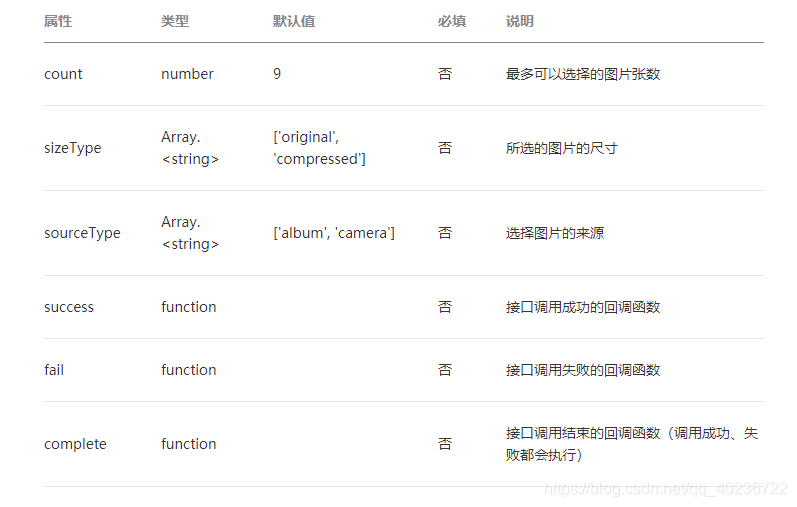
话不多说,接下来我们直接看代码。
wxml代码:
button bindtap="upload"上传照片/buttonview class="photo" view wx:for="{{filePath}}" image class="album" bindtap=“preview” data-id="{{item}}" wx:if="{{item != ''}}" src="{{item}}"/image /view/viewjs代码:
data: { filePath:'', }, //上传照片 upload: function(e) { var that = this; var arr = new Array(); wx.chooseImage({ //一次性最多选择的图片张数,不写默认为9张。 count:9, sizeType: ['original', 'compressed'], sourceType: ['album', 'camera'], success: function(res) { //图片临时路径,可以作为img标签的src属性显示图片 const filePath = res.tempFilePaths; for(var i = 0;i filePath.length;i++){ arr.push(filePath[i]); } arr = arr.concat(that.data.filePath); that.setData({ filePath:arr }) console.log(arr) }, }) } //图片预览 preview: function(e){ wx.previewImage({ current:e.target.dataset.id, urls: this.data.filePath }) },你选择的照片:
点击图片预览效果: