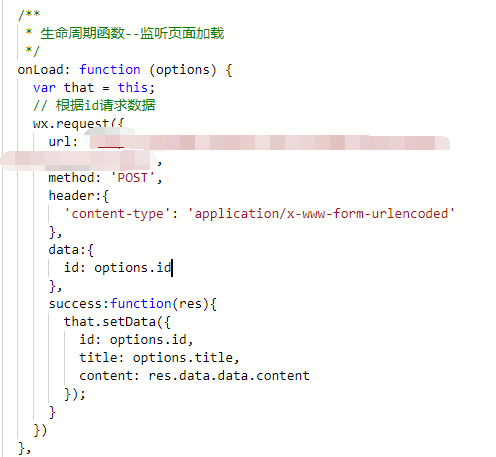
微信小程序中提供了一个发起请求的api:wx.request(OBJECT);
官网文档:https://mp.weixin.qq.com/debug/wxadoc/dev/api/network-request.html#wxrequestobject
首先先说必填的参数:
1、url:一个字符串,地址;
可选的参数:
2、data:请求参数,
3、header:请求头设置:
content-type默认值是 'content-type':'application/json',get还好,post时会报错,
于是我就换成了这个:'content-type':'application/x-www-form-urlencoded'
4、method:(需大写)有效值:OPTIONS, GET, HEAD, POST, PUT, DELETE, TRACE, CONNECT5、dataType: 如果设置为json,会尝试对返回的数据做一次JSON.parse,我是在后台处理成json了,默认值就是json
6、responseType: 响应数据的类型,默认text,也可设置为arraybuffer
7、success: 这个是function,成功的回调函数,参数有data(数据),statusCode(HTTP状态码),header
8、fail:失败的回调函数。奈奈的,用ajax的error不好吗?非要自定义。。。
9、complete:接口调用结束的回调函数。
下面这句话就解答了我前边header里设置的content-type的问题了哈:
data 数据说明:
最终发送给服务器的数据是 String 类型,如果传入的 data 不是 String 类型,会被转换成 String 。转换规则如下:
- 对于
GET方法的数据,会将数据转换成 query string(encodeURIComponent(k)=encodeURIComponent(v)&encodeURIComponent(k)=encodeURIComponent(v)...) - 对于
POST方法且header['content-type']为application/json的数据,会对数据进行 JSON 序列化 - 对于
POST方法且header['content-type']为application/x-www-form-urlencoded的数据,会将数据转换成 query string (encodeURIComponent(k)=encodeURIComponent(v)&encodeURIComponent(k)=encodeURIComponent(v)...)
请求完成后,返回的是一个requestTask对象,通过她可以中断请求任务
const requestTask = wx.request({ url: 'xxx', data: { id: '' , title: '' }, header: { 'content-type': 'application/json' }, method:'GET', dataTypr:'json', responseType:'text', success: function(res) { console.log(res.data) }, fail:function(res){ }, complete:funtion(res){}})requestTask.abort() // 取消请求任务