


首先大家可以看下演示效果
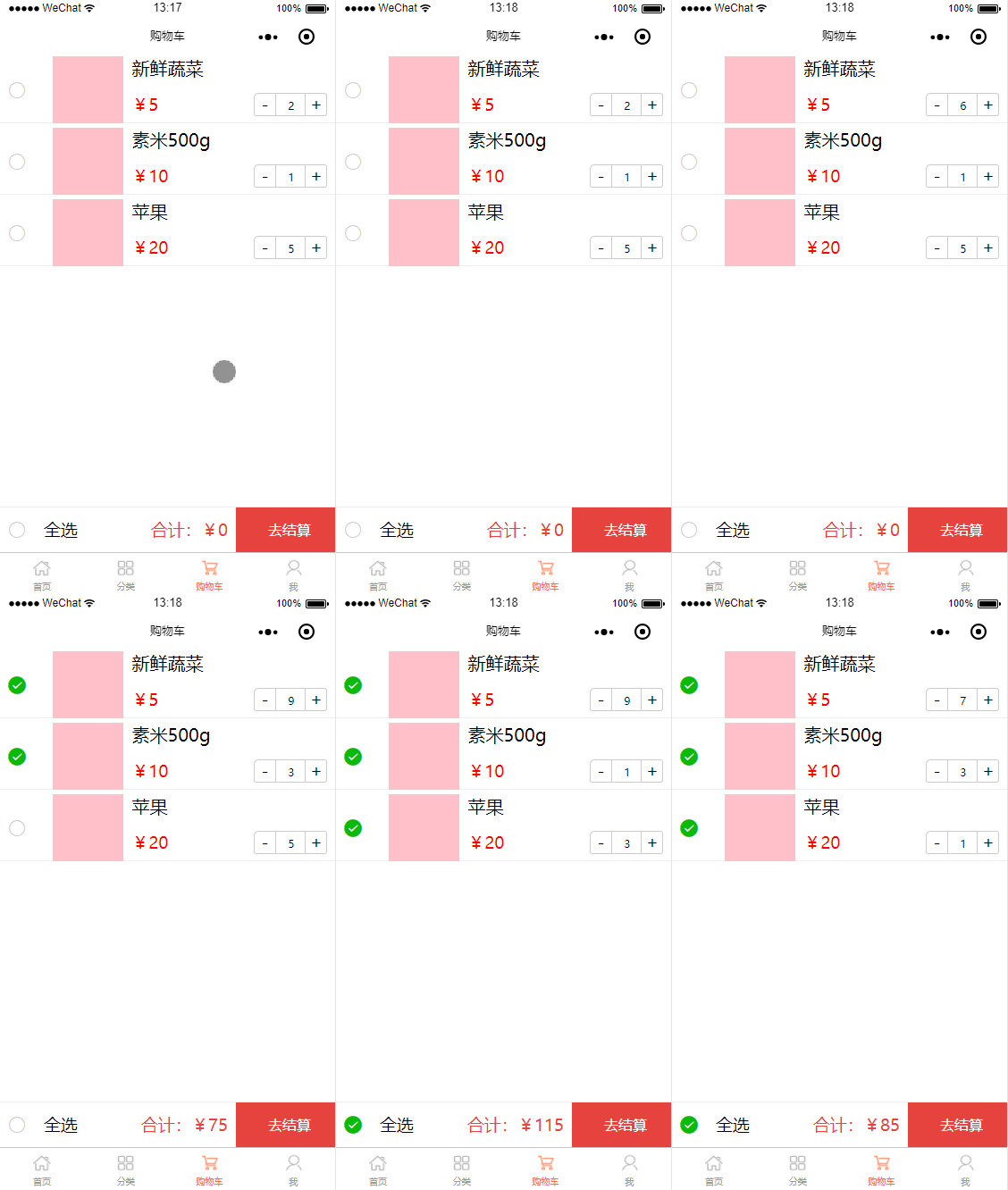
我先把封装的几个组件代码放到前面。
1.购物车数量加减cart-count.wpy组件
template view class="cart-count" view class="decrease" @tap.stop="decrease"-/view input type="number" value="{{good.num}}" disabled/ view class="add" @tap.stop="add"+/view /view/templatescriptimport wepy from 'wepy'export default class CartCount extends wepy.component { data = {} props = { good: { type: Object, } } components = {} // 计算属性 computed = {} // 方法集 methods = { add () { this.good.num++ this.$emit('getGood', this.good) }, decrease () { if (this.good.num === 1) return false this.good.num-- this.$emit('getGood', this.good) } } onLoad () { console.log(this.good) }}/scriptstyle lang='less'.cart-count { display: flex; width: 100%; height: 100%; .decrease { width: 48rpx; height: 100%; display: flex; justify-content: center; align-items: center; border-left: 1rpx solid #ccc; border-bottom: 1px solid #ccc; border-top: 1px solid #ccc; border-bottom-left-radius: 6rpx; border-top-left-radius: 6px; } .add { width: 48rpx; height: 100%; border-bottom: 1px solid #ccc; border-top: 1px solid #ccc; border-right: 1px solid #ccc; display: flex; justify-content: center; align-items: center; border-top-right-radius: 6rpx; border-bottom-right-radius: 6rpx; } input { width: 68rpx; height: 48rpx; line-height: 48rpx; min-height: 48rpx; text-align: center; font-size: 24rpx; border: 1px solid #cccccc; }}/style2.左拉删除组件swiper-delete.wpy
template view class="swiper-item-wrapper" view @touchstart="ts" @touchmove="tm" @touchend="te" class="swiper-content" style="{{swiperData.txtStyle}}" slot/slot /view view class="swiper-actions actions-right" view class="swiper-btn del" @tap.stop="del"删除/view /view/view/templatescriptimport wepy from 'wepy';export default class SwiperDelete extends wepy.component { components = {}; props = { swiperData: { //父组件传过来的数据 type: Object, default: [] } }; mixins = []; data = { delBtnWidth: 180, //单位rpx startX: 0, }; computed = {}; methods = { ts(e) { // 触摸开始 let that = this; if (e.touches.length === 1) { that.startX = e.touches[0].clientX; } }, tm(e) { // 触摸过程 let that = this; if (e.touches.length === 1) { //手指移动方向水平 let moveX = e.touches[0].clientX; // 这里的clientX获取的是屏幕可视区的坐标,其实是逻辑像素px,所以要用getEleWidth方法进行换算 //手指起始点位置与移动期间的产值 let disX = that.startX - moveX; let txtStyle = ''; if (disX === 0 || disX 0) { // 往右移动或者没移动 txtStyle = 'left: 0px'; } else if (disX 0) { // 移动距离大于0 txtStyle = 'left:-' + disX + 'px'; if (disX = that.delBtnWidth) { // 移动超过删除按钮的宽度 txtStyle = 'left:-' + that.delBtnWidth + 'px'; } } //获取手指触摸的是哪一项 that.swiperData.txtStyle = txtStyle; } }, te(e) { // 触摸结束 let that = this; if (e.changedTouches.length === 1) { //手指移动结束后水平位置 let endX = e.changedTouches[0].clientX; //触摸开始与结束,是指移动的距离 let disX = that.startX - endX; let delBtnWidth = that.delBtnWidth; //如果距离小于删除按钮的1/2,不显示删除按钮 let txtStyle = disX delBtnWidth / 2 ? 'left:-' + delBtnWidth + 'px' : 'left:0px'; //手指触摸的是哪一项 that.swiperData.txtStyle = txtStyle; } }, del() { // 删除 } }; events = {}; initEleWidth() { let that = this; that.delBtnWidth = that.getEleWidth(that.delBtnWidth); console.log(that.delBtnWidth); } getEleWidth(w) { //获取元素自适应后的实际宽度(也就是根据设计稿宽度换算成px像素) let real = 0; try { let resWidth = wx.getSystemInfoSync().windowWidth; let scale = 750 / w; real = Math.floor(resWidth / scale); return real; } catch (e) { return false; } } onLoad() { this.initEleWidth(); }}/scriptstyle lang="less".swiper-item-wrapper { position: relative; height: 100%; overflow: hidden; .swiper-content { width: 100%; height: 100%; box-sizing: border-box; position: absolute; top: 0; left: 0; z-index: 5; padding: 0 18rpx; background-color: #fff; } .swiper-actions { display: flex; flex-direction: row; justify-content: center; align-items: center; width: 140rpx; height: 100%; z-index: 1; position: absolute; top: 0; &.actions-left { left: 0; } &.actions-right { right: 0; } } .swiper-btn { flex: 1; display: flex; justify-content: center; align-items: center; height: 100%; color: #ffffff; &.del { background-color: rgb(244, 51, 60); } &.edit { background-color: rgb(16, 142, 233); } }}/style3.这里是主页面购物车页面shop_cart.wpy
template view class="shop-cart" view class="good-list" repeat for="{{goods}}" key="item" swiperDel :swiperData.sync="item" view class="goods-info" icon class="icon_check" type="success" size="20" @tap.stop="selectList" data-index="{{index}}" wx:if="{{item.selected}}"/icon icon class="icon_check" type="circle" size="20" @tap.stop="selectList" data-index="{{index}}" wx:else/icon view class="img-box" image src="{{item.imgurl}}" class="img"/ /view view class="text-box" view class="goods-title" {{item.name}} /view view class="lable" view class="price" ¥{{item.price}}/view view class="shop-count" cartCount :good.sync="item" @getGood.user="getGood"/cartCount /view /view /view /view /swiperDel /repeat /view view class="check-box" view class="left-price" view class="all-select-box" @tap.stop="selectAll" icon type="success" size="20" wx:if="{{judgeAllSelect}}"/icon icon type="circle" size="20" wx:else/icon text全选/text /view view class="total" 合计:¥{{totalPrice}} /view /view view class="pay-btn"去结算/view /view /view/templatescriptimport wepy from 'wepy'import swiperDel from '../components/swiper-delete' import cartCount from '../components/cart-count'export default class ShopCart extends wepy.page { config = { navigationBarTitleText: '购物车' }; components = { swiperDel, cartCount }; mixins = []; data = { allSelected: false, goods: [ { name: '新鲜蔬菜', price: 5, num: 2, imgurl: '' }, { name: '素米500g', price: 10, num: 1, imgurl: '' }, { name: '苹果', price: 20, num: 5, imgurl: '' } ] }; computed = { totalPrice() { // 总价格 let that = this let totalPrice = 0 for (let good of that.goods) { if (good.selected) { totalPrice += good.num * good.price } } return totalPrice }, judgeAllSelect() { //判断全选 let that = this let isAllSelected = that.goods.every((item) = { // 只要有一个没选就为false return item.selected }) isAllSelected ? (that.allSelected = true) : (that.allSelected = false) return isAllSelected } } methods = { selectList(e) { // 当前勾选选中 let that = this let curIndex = e.target.dataset.index // 获取当前索 let curItem = that.goods[curIndex] curItem.selected = !curItem.selected // 取反 }, selectAll(e) { // 全选 let that = this that.allSelected = !that.allSelected
版权声明
即速应用倡导尊重与保护知识产权。如发现本站文章存在版权问题,烦请提供版权疑问、身份证明、版权证明、联系方式等发邮件至197452366@qq.com ,我们将及时处理。本站文章仅作分享交流用途,作者观点不等同于即速应用观点。用户与作者的任何交易与本站无关,请知悉。










