小程序自定义导航栏返回主页
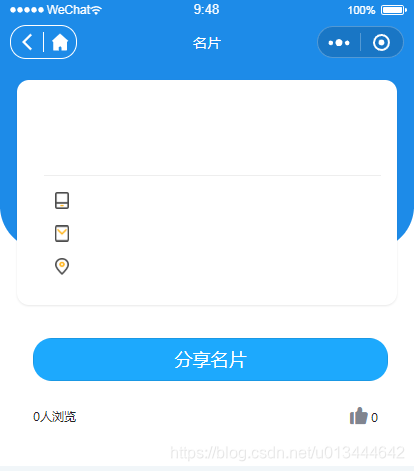
- 效果图
- 在app.js中获取状态栏的高度statusBarHeight
- 自定义组件navbar.wxml
- 自定义组件navbar.wxss
- 自定义组件navbar.json
- 自定义组件navbar.js
- 调用组件的页面.json
- 调用组件的页面.wxml
效果图
在app.js中获取状态栏的高度statusBarHeight
globalData: { statusBarHeight:wx.getSystemInfoSync()['statusBarHeight'] }
自定义组件navbar.wxml
view class="custom " style="padding-top:{{statusBarHeight}}px" view class='title-container' view class='capsule' wx:if="{{ back || home }}" view bindtap='back' wx:if="{{back}}" image src='img/back.svg'/image /view view bindtap='backHome' wx:if="{{home}}" image src='img/home.svg'/image /view /view view class='title'{{navigationBarTitle}}/view /view/viewview class="empty_custom" style="padding-top:{{statusBarHeight}}px"/view
自定义组件navbar.wxss
.custom{ position: fixed; width: 100%; top: 0; left: 0; height: 45px; background: #1d8be8; z-index: 999;}.title-container { height: 44px; display: flex; align-items: center; position: relative;}.capsule { margin-left: 10px; height: 32px; border: 1px solid #fff; border-radius: 16px; display: flex; align-items: center;}.capsule view { width: 32px; height: 60%; position: relative;}.capsule view:nth-child(2) { border-left: 1px solid #fff;}.capsule image { width: 60%; height: 100%; position: absolute; left: 50%; top: 50%; transform: translate(-50%,-50%);}.title { color: white; position: absolute; left: 104px; right: 104px; font-size: 14px; text-align: center; overflow: hidden; text-overflow: ellipsis; white-space: nowrap;}
自定义组件navbar.json
{ "component": true}
自定义组件navbar.js
const app = getApp()Component({ properties: { navigationBarTitle: { type: String, value: '' }, back: { type: Boolean, value: false }, home: { type: Boolean, value: false } }, data: { statusBarHeight: app.globalData.statusBarHeight }, methods: { backHome: function () { wx.reLaunch({ url: '/pages/index/index', }) }, back: function () { wx.navigateBack({ delta: 1 }) } }})
调用组件的页面.json
{ "usingComponents": { "navBar": "/pages/common/navbar/navbar", }, "navigationStyle": "custom",//导航栏样式,custom 模式可自定义导航栏,只保留右上角胶囊状的按钮. "navigationBarBackgroundColor": "#1D8BE8", "navigationBarTextStyle": "white"}
调用组件的页面.wxml
navBar back home navigationBarTitle="{{navigationBarTitle}}"/navBar












