


写过公司的微信小程序后,还是很有感觉的。有了第一次学习开发的经历,逐渐接受并喜欢那种快速的开发feel。
写了一个摇一摇demo,看看有多简单吧
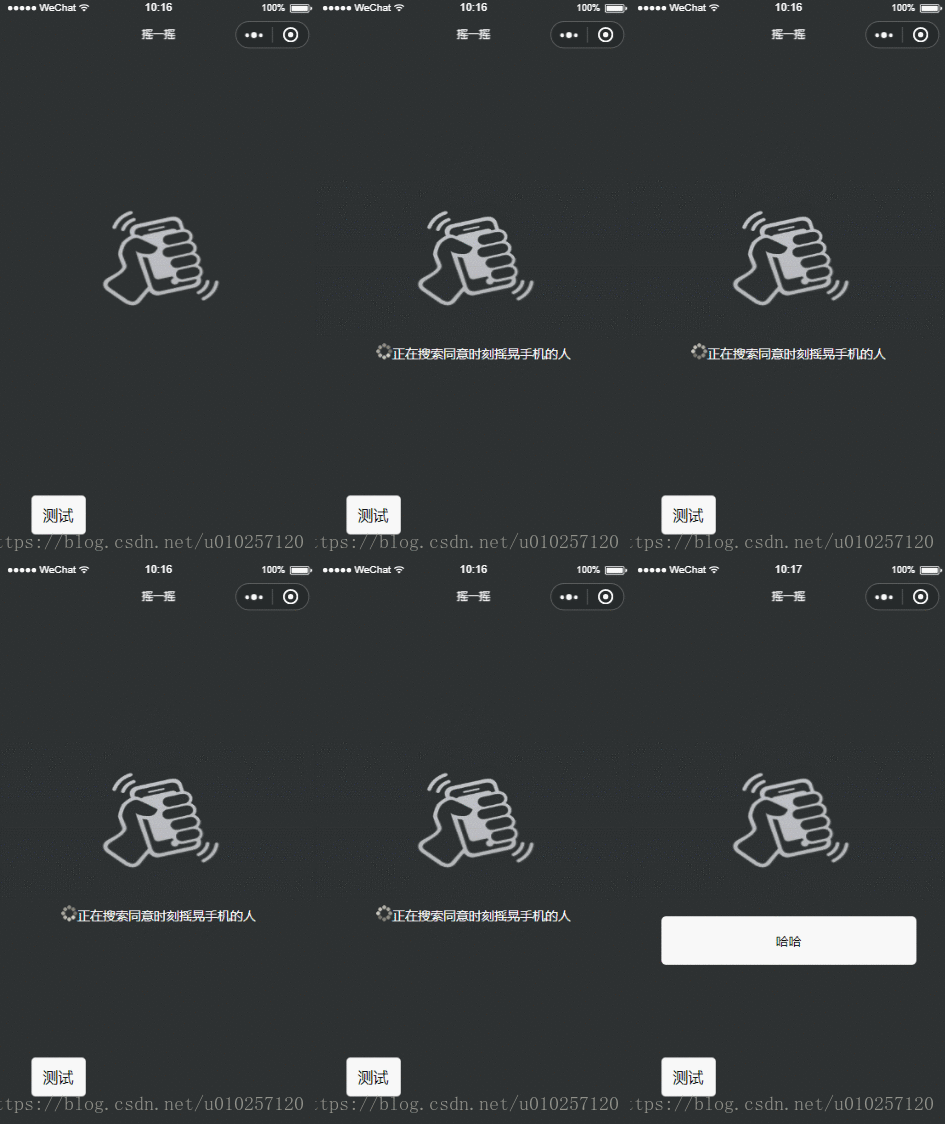
开发的快自然就有成就感哈哈,看下代码吧
1.js部分
// pages/testting/shaky/shaky.jsPage({ /** * 页面的初始数据 */ data: { hasResutl:-1, bar_state:0, winWidth:0, winHeight:0, img_url:"https://www.demomaster.cn/eatbar/public/static/img/yaoyiyao/img_yaoyiyao.png", loading:"https://www.demomaster.cn/eatbar/public/static/img/yaoyiyao/small_loading.gif" }, /** * 生命周期函数--监听页面加载 */ onLoad: function (options) { }, /** * 生命周期函数--监听页面初次渲染完成 */ onReady: function () { var context = wx.createContext() context.rect(5, 5, 25, 15) context.stroke() context.drawImage() wx.drawCanvas({ canvasId: 'myCanvas', actions: context.getActions() }) }, /** * 生命周期函数--监听页面显示 */ onShow: function () { var that = this; that.initAnimation(); //重力加速度 wx.onAccelerometerChange(function (res) { //console.log(res.x) //console.log(res.y) // console.log(res.z) if (res.x .7 && res.y .7) { // wx.showToast({ // title: '摇一摇成功', // icon: 'success', // duration: 2000 // }) that.startAnimation(); that.vibrateShort(); } }) var that = this; //获取系统信息 wx.getSystemInfo({ success: function (res) { that.setData({ winWidth: res.windowWidth, winHeight: res.windowHeight }); } }); wx.downloadFile({ url: that.data.img_url, success: function (sres) { console.log(sres); }, fail: function (fres) { } }) }, initAnimation: function () { var that = this; //实例化一个动画 this.animation1 = wx.createAnimation({ // 动画持续时间,单位ms,默认值 400 duration: 400, /** * http://cubic-bezier.com/#0,0,.58,1 * linear 动画一直较为均匀 * ease 从匀速到加速在到匀速 * ease-in 缓慢到匀速 * ease-in-out 从缓慢到匀速再到缓慢 * * http://www.tuicool.com/articles/neqMVr * step-start 动画一开始就跳到 100% 直到动画持续时间结束 一闪而过 * step-end 保持 0% 的样式直到动画持续时间结束 一闪而过 */ timingFunction: 'ease', // 延迟多长时间开始 // delay: 100, /** * 以什么为基点做动画 效果自己演示 * left,center right是水平方向取值,对应的百分值为left=0%;center=50%;right=100% * top center bottom是垂直方向的取值,其中top=0%;center=50%;bottom=100% */ transformOrigin: 'left top 0', success: function (res) { console.log(res) } }) //实例化一个动画 this.animation2 = wx.createAnimation({ // 动画持续时间,单位ms,默认值 400 duration: 400, /** * http://cubic-bezier.com/#0,0,.58,1 * linear 动画一直较为均匀 * ease 从匀速到加速在到匀速 * ease-in 缓慢到匀速 * ease-in-out 从缓慢到匀速再到缓慢 * * http://www.tuicool.com/articles/neqMVr * step-start 动画一开始就跳到 100% 直到动画持续时间结束 一闪而过 * step-end 保持 0% 的样式直到动画持续时间结束 一闪而过 */ timingFunction: 'ease', // 延迟多长时间开始 // delay: 100, /** * 以什么为基点做动画 效果自己演示 * left,center right是水平方向取值,对应的百分值为left=0%;center=50%;right=100% * top center bottom是垂直方向的取值,其中top=0%;center=50%;bottom=100% */ transformOrigin: 'left top 0', success: function (res) { console.log(res) } }) }, /** *位移 */ startAnimation: function () { var that = this //x轴位移100px var h1 = "35%"; var h2 = "65%"; if (this.data.bar_state == 1) { h1 = "40%"; h2 = "40%"; setTimeout(function () { that.setData({ //输出动画 bar_state: 0, hasResutl:0 }) setTimeout(function () { that.setData({ hasResutl: 1 }) }, 4000) }, 400) } else { h1 = "25%"; h2 = "55%"; this.setData({ bar_state: 1 }) setTimeout(function () { that.startAnimation(); }, 600) } this.animation1.height(h1).step() this.animation2.top(h2).step() this.setData({ //输出动画 animation1: that.animation1.export(), animation2: that.animation2.export() }) }, /** * 生命周期函数--监听页面隐藏 */ onHide: function () { }, /** * 生命周期函数--监听页面卸载 */ onUnload: function () { }, /** * 页面相关事件处理函数--监听用户下拉动作 */ onPullDownRefresh: function () { }, /** * 页面上拉触底事件的处理函数 */ onReachBottom: function () { }, /** * 用户点击右上角分享 */ onShareAppMessage: function () { }})(有些冗余的测试代码,请忽略)
2.wxml部分
!--pages/testting/shaky/shaky.wxml--view class='panel_root' view class='view_top' animation="{{animation1}}" image class='img_top' src='{{img_url}}'/image view class='win_line_top' style="display:{{bar_state==1?'block':'none'}}"/view /view view class='view_bottom' animation="{{animation2}}" view class='win_line_bottom' style="display:{{bar_state==1?'block':'none'}}"/view image class='img_bottom' src='{{img_url}}'/image view class='panel_bottom' view class='panel_content' style="display:{{bar_state==0?'block':'none'}}" view class='panel_loading' style="display:{{hasResutl==0?'block':'none'}}" image class='img_loading' src='{{loading}}'/imagetext class='text_lable'正在搜索同意时刻摇晃手机的人/text /view view class='panel_result' style="display:{{hasResutl==1?'block':'none'}}" 哈哈 /view /view /view /view button class='btn_test' bindtap='startAnimation' 测试/button/view3.wxss部分
/* pages/testting/shaky/shaky.wxss */page{ background-color: greenyellow; height: 100%;}.panel_root{ background-color: red; height: 100%;}.view_top{ position: absolute; display: block; height: 40%; width: 100%; background-color: #2d3132; text-align: center;}.view_bottom{ position: absolute; top:40%; display: block; height: 60%; width: 100%; background-color: #2d3132; text-align: center;}.img_top{ position: absolute; bottom: 0; width: 8rem; height: 7rem; margin-bottom: -3.5rem; margin-left: -4rem; clip:rect(0px,8rem,3.5rem,0px);}.img_bottom{ position: absolute; top:0; width: 8rem; height: 7rem; margin-top: -3.5rem; margin-left: -4rem; clip:rect(3.5rem,8rem,200px,0px);}.panel_result{ margin: 2rem; padding: 1rem; background-color: white;}.btn_test{ position: absolute; bottom: 0; margin: 2rem; }.win_line_top{ position: absolute; bottom: 0; height: .3rem; width: 100%; display: block; background-color: gray; border-bottom: 1px solid black;}.win_line_bottom{ position: absolute; top:0; height: .3rem; width: 100%; display: block; background-color: gray; border-bottom: 1px top black;}.panel_bottom{ width: 100%; position: absolute; top: 5rem; color: white;}.panel_content{ width: 100%; position: relative; font-size: .8rem; text-align: center;}.img_loading{ width: 1rem; height: 1rem;}.text_lable{ font-size: .8rem; line-height: 2rem; height: 2rem;}.panel_result{ margin: 1rem 2rem; background: white; border-radius: .3rem; padding: 1rem; color: black;}json部分没什么可说的(html和css水平太差,怎个乱子了得)
得了,简单的效果实现了。










