正在做一个记事本的小程序
记事自然少不了textarea组件
编辑页面我的设计是上面一行标题栏,下面一行按钮操作区,中间就是textarea填充剩余空间
效果如下图
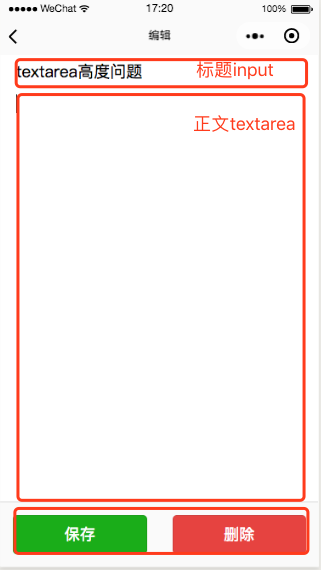
使用flex布局很容易就做到上述效果,一个container包含一个竖直排列的三个view
中间的view放textarea
!--index.wxml--form bindsubmit="onSubmit" bindreset=""view class="container" view class='title' input name="title" placeholder-class="placeholder" placeholder="在此输入标题" value="{{note.title}}" / /view view class='row' id="textareawrap" catchtap="onFocus" textarea fixed="true" class='text' value="{{note.content}}" maxlength="5000" focus='{{focus}}' name="content" placeholder="点击添加文本" / /view view class='bottom' button formType="submit" class='btn success'保存/button button class='btn del' bindtap="onDelete"删除/button /view/view/form再来看wxss
page{ width: 100%; height: 100%;}.container{ flex-flow:column nowrap; justify-content: center; align-items: center; width: 100%; height: 100%; background-color: #ffffff; display: flex;}.title{ margin: 15rpx 5%; width: 90%; text-align: left; height: 60rpx; font-size: 38rpx; border-bottom: 1px solid #f5f5f5;}.row{ flex: 1; display: flex; width: 90%; height:100%; margin: 0 5%; overflow: hidden; }.row .text{ flex: 1; width: 100%; height: 100%;//----这里是重点,textarea的高度 font-size: 16px; line-height: 26px; color: #000000; }.date{ padding: 5rpx 0;}.bottom{ width: 100%; background: #fafafa; display: flex; flex-flow:row nowrap; justify-content: center; align-items: center; border-top:1px solid #d9d9d9;}.bottom .btn{ flex: 1; line-height: 2; padding-top: 10rpx; padding-bottom: 10rpx; margin: 30rpx 30rpx;}.btn.success{ background: #1aad19; color: #fff;}.btn.del{ background: #e64340; color: #fff;}把上面代码写好,在电脑上编译,运行,模拟器里效果完美
但是,但是。。。
在真机上
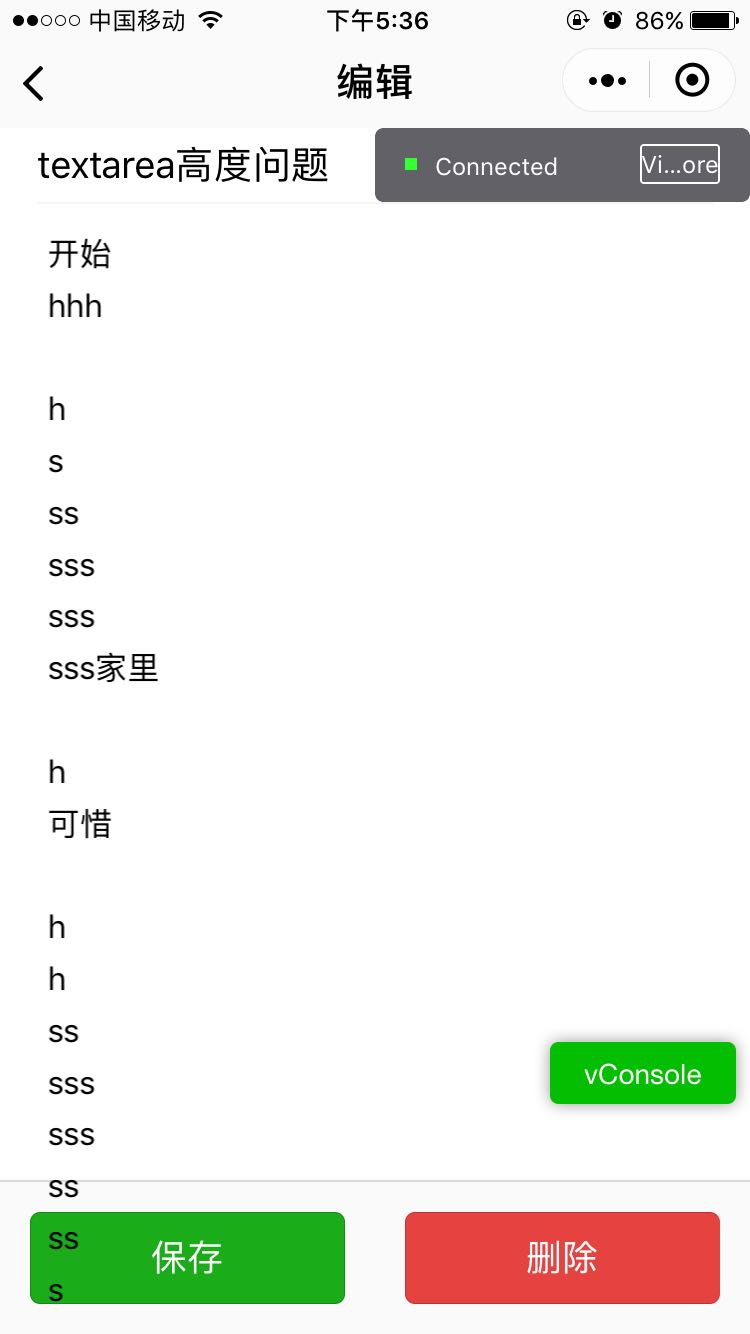
textarea的内容已经超出了实际区域,而且此时操作“保存”或“删除”按钮也是没有任何作用,被textarea挡住了
查看官方文档 https://developers.weixin.qq.com/miniprogram/dev/component/textarea.html
有这么一句说明
tip:textarea组件是由客户端创建的原生组件,它的层级是最高的,不能通过 z-index 控制层级。
原来是被渲染成原生组件
上面wxss中定义的height:100%; 不是填充满所在view的空间,而是整个page的空间
所以这里只能给textarea定义固定高度比较 height:300px; 这样修改后内容超出的问题解决了
但这样的效果又不太好,中间的区域留有一大段空白,我们需要动态的设置textarea高度
幸好有 wx.createSelectorQuery()接口
使用这个接口就可以获取中间view的高度,把这个view的高度设置给textarea就可以了
js代码如下
Page({ data: { note: { id: "", title: "", summary: "", content: "", createTime: "", updateTime: "", isDelete: 0 }, isNew: false, focus: false, height:"" //data里面增加height属性 }, /** * 页面渲染事件 */ onShow: function() { var that = this; let id = "#textareawrap"; let query = wx.createSelectorQuery();//创建查询对象 query.select(id).boundingClientRect();//获取view的边界及位置信息 query.exec(function (res) { that.setData({ height: res[0].height + "px" }); }); } });wxml代码修改如下:
textarea fixed="true" class='text' value="{{note.content}}" maxlength="5000" style="height:{{height}}" focus='{{focus}}' name="content" placeholder="点击添加文本" /在textarea里面增加 style="height:{{height}}" 动态设置高度
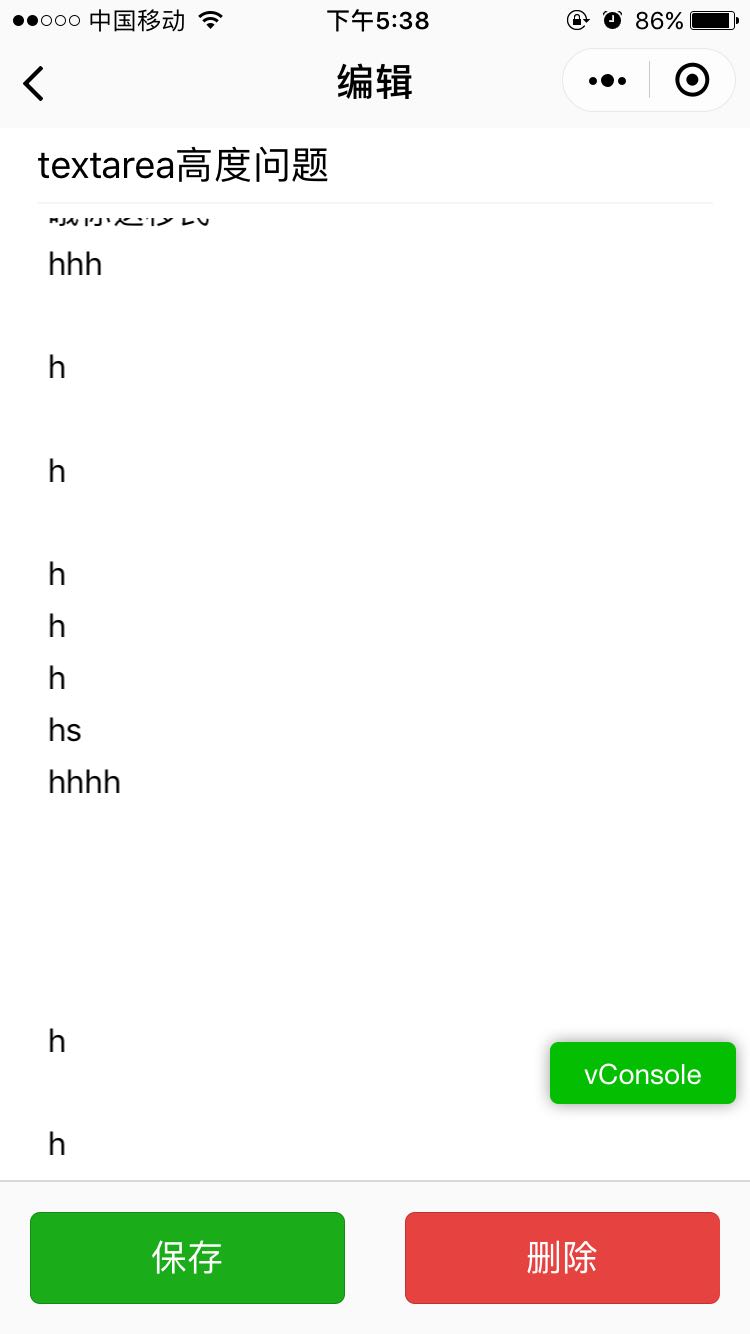
结果符合预期
有兴趣的朋友同学可以扫描二维码体验一下这个简单的笔记本,多多支持!