


注意,小程序的更新的api需要基础库在1.9.90以上,需要使用的童鞋记得做兼容
1、在app.js的onLaunch方法中使用:
const updateManager = wx.getUpdateManager() updateManager.onCheckForUpdate(function (res) { // 请求完新版本信息的回调 console.log(res.hasUpdate) })updateManager.onUpdateReady(function () { wx.showModal({ title: '更新提示', content: '新版本已经准备好,是否重启应用?', success: function (res) { if (res.confirm) { // 新的版本已经下载好,调用 applyUpdate 应用新版本并重启 updateManager.applyUpdate() } } })
})
updateManager.onUpdateFailed(function () { // 新的版本下载失败 wx.showModal({ title: '更新提示', content: '新版本下载失败', showCancel:false }) })
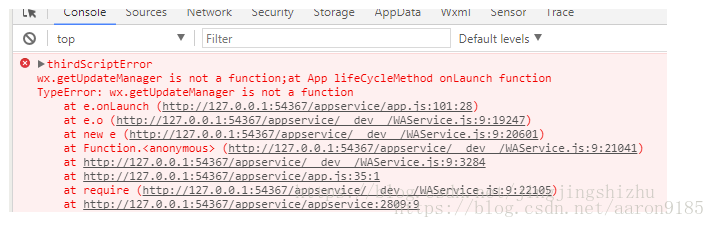
2、如果出现以下的报错,说明当前的基础库并不是1.9.90或以上
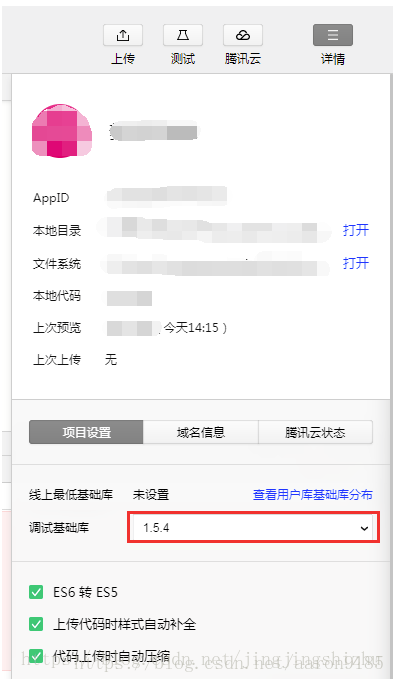
需要修改基础库为1.9.90
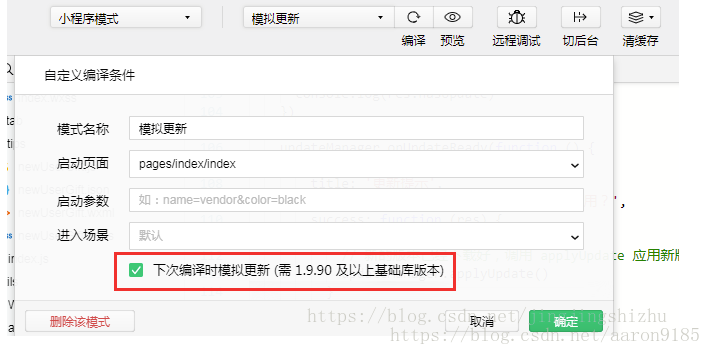
3、编译时记得勾上‘下次编译时模拟更新(需1.9.90及以上基础库版本)’,才能模拟出更新效果
转载:https://blog.csdn.net/jingjingshizhu/article/details/80050515












