


续上文的开发指南:http://blog.csdn.net/u013948010/article/details/78530173
这篇主要是讲一下天气主页面的设计实现。
index界面获取数据
主页面的index.js函数已经实现了访问和风天气接口,并把数据存入全局变量中,上一篇也有说到:
weatherData
air
所以天气页面直接取这两个全局数据就可以了。
主页面获取天气数据的代码
//获取天气 getWeather:function(e){ var city = this.data.location.slice(0, 2); //分割字符串 var that = this; var url = "https://free-api.heweather.com/s6/weather"; var param = { key: "你的key", location: city }; //发出请求 wx.request({ url: url, data: param, header: { 'content-type': 'application/json' }, success: function (res) { console.log(res); app.globalData.weatherData = res.data.HeWeather6[0]; that.setData({ weatherData: app.globalData.weatherData.now, //今天天气情况数组 dress: res.data.HeWeather6[0].lifestyle[1] //生活指数 }); } }) }, getAir: function (e){ var city = this.data.location.slice(0, 2); //分割字符串 var that = this; var url = "https://free-api.heweather.com/s6/air/now"; var param = { key: "你的key", location: city }; //发出请求 wx.request({ url: url, data: param, header: { 'content-type': 'application/json' }, success: function (res) { console.log(res); app.globalData.air = res.data.HeWeather6[0].air_now_city; that.setData({ air: app.globalData.air }); } }) },天气页面设计
天气页面大概是这样子的:
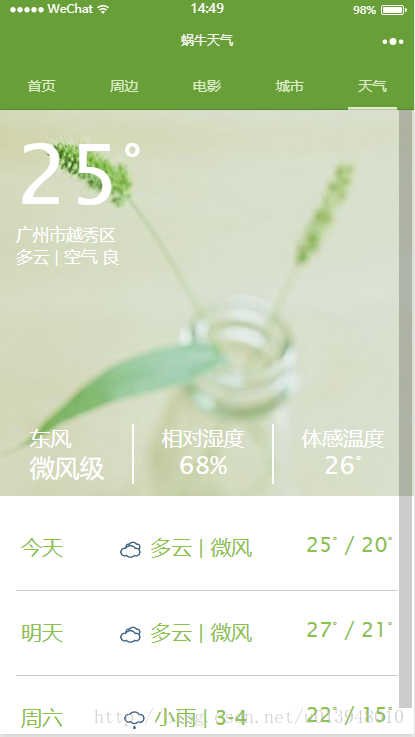
上面是今日天气详情显示,下面是近三日的天气情况。
背景图片是自己找的,存入images/weather/文件夹中:
image class="bg" mode="aspectFill" src="../../images/weather/day.jpg"/image天气小图标是在和风天气网站上根据天气代码下载的,存入images/weather/文件夹中:
image class="typeImg" src="../../images/weather/{{fc.cond_code_d}}.png"weather.wxml设计
!--index.wxml--image class="bg" mode="aspectFill" src="../../images/weather/day.jpg"/imageview class="wrapper" view class="curWeather" view class="curTemperature" view class="tmp"{{now.tmp}}°/view view class="city"{{city}}{{district}}/view view class="type"{{now.cond_txt}} | 空气 {{quality.qlty}}/view /view view class="curExtern" view class="wind" view class=""{{now.wind_dir}}/view view wx:if="{{now.wind.sc=='微风'}}" class="val"{{"="}}2级/view view wx:else class="val"{{now.wind_sc}}级/view /view view class="line"/view view class="relWet" view class=""相对湿度/view view class="val"{{now.hum}}%/view /view view class="line"/view view class="humanTmp" view class=""体感温度/view view class="val"{{now.fl}}°/view /view /view /view view class="forecast" block wx:for="{{forecast}}" wx:for-index="index" wx:for-item="fc" view class="castItem" view class="castDay"{{showday[index]}}/view view class="castType" image class="typeImg" src="../../images/weather/{{fc.cond_code_d}}.png"/image {{fc.cond_txt_d}} | {{fc.wind_sc}} /view view class="castTmp" {{fc.tmp_max}}° / {{fc.tmp_min}}° /view /view /block /view/viewweather.wxss设计
/**index.wxss**/.wrapper{ width:100%; height:100%; box-sizing: border-box; position:absolute;/*绝对定位*/ top:0; left:0; padding:30rpx; font-family: 'Lucida Sans', 'Lucida Sans Regular', 'Lucida Grande', 'Lucida Sans Unicode', Geneva, Verdana, sans-serif;}.curWeather{ height:650rpx; display: flex; flex-direction: column;/*纵向*/}.bg{ height:700rpx; width:750rpx;}.curTemperature{ color:#fff; font-size: 0.8em; flex-grow: 1;/*表示将剩余的空间分配给它*/}.tmp{ font-size: 5em;}.curExtern{ display: flex; flex-direction: row;/*横向*/ justify-content: space-around; color:#fff;}.val{ text-align: center; font-size: 1.2em;}.line{ border:0.9rpx solid #fff;}.typeImg{ width:50rpx; height:50rpx; vertical-align: middle;}.castItem{ display: flex; flex-direction: row; justify-content: space-between; border-bottom: 1rpx solid #ccc; padding:50rpx 10rpx;}.forecast{ color:#8BC34A; /*background: #aaa;*/ margin-top:40rpx;}天气页面逻辑设计
weather.js设计
数据直接获取全局数据:
that.setData({
city: app.globalData.defaultCity, //今天天气情况数组
district: app.globalData.defaultCounty //生活指数
});
//index.js//获取应用实例var app = getApp()Page({ data: { weekday: ['周日', '周一', '周二', '周三', '周四', '周五', '周六'], showday: ['今天', '明天', ''], city:'', //城市 district:'', //区域 now:'', forecast:'',//三日天气预报 quality:'' //空气质量 }, onShow: function () { var that = this; var city = app.globalData.defaultCity.slice(0, 2); that.setData({ city: app.globalData.defaultCity, //今天天气情况数组 district: app.globalData.defaultCounty //生活指数 }); that.getWeather(city);//获得天气 }, //当页面加载完成 onLoad: function () { var that = this; var date = new Date(); console.log(date.getDay()); that.setData({ 'showday[2]': this.data.weekday[(date.getDay() + 2) % 7], }); console.log(this.data.showday); }, //获取天气 getWeather: function (city) { var that = this; that.setData({ now: app.globalData.weatherData.now, //今天天气情况数组 forecast: app.globalData.weatherData.daily_forecast, quality: app.globalData.air }); },});









