跟上微信小程序开发中走过的坑(一),继续开车。
》》》遇到的坑
(3)注册页面的实现
需求:用户点击注册按钮,进入注册页面,输入注册信息,完成注册动作。
动画演示: 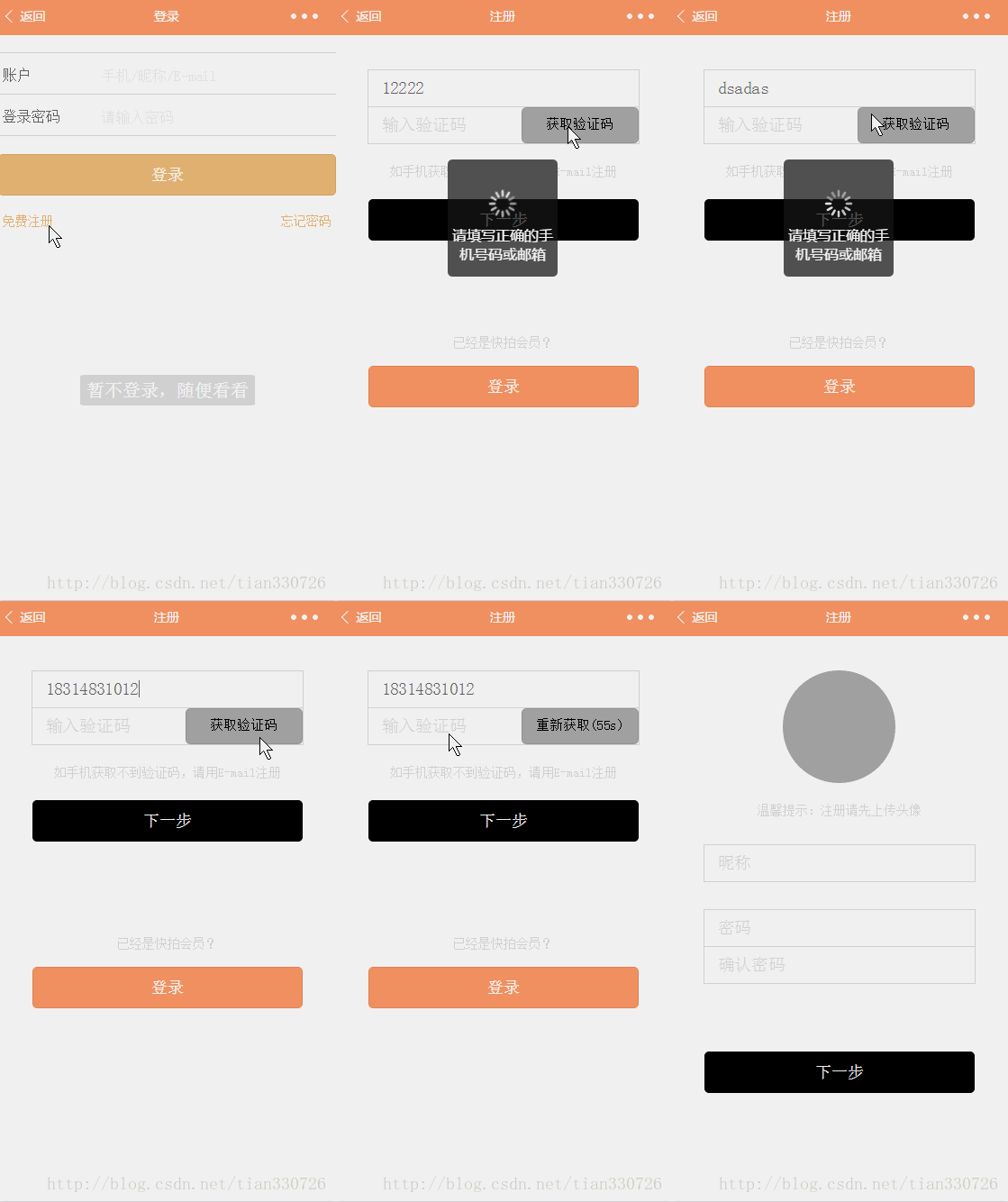
代码实现:
register.wxml
!--注册第一步--view wx:if="{{step == 1}}" class="container" view class="field" input name="cellphone" bindinput="input_acceptVal" placeholder-class="placeholder" placeholder="输入手机号/E-mail" / /view view class="field second_input inputCode" input class='identifyCode' type="number" bindinput="input_identifyCode" placeholder-class="placeholder" placeholder="输入验证码" / view class="view_identifyCode" button bindtap="reqIdentifyCode" disabled="{{identifyCode_btn}}" class="reqIdentifyCode"{{button_reqIdentifyCode}}/button /view /view view class="text nextStep"如手机获取不到验证码,请用E-mail注册/view view class='bottom' button style="background:black;margin-top:6%;width: 80%;" type="primary" size="default" bindtap="nextStep_code"下一步/button /view view class="text login"已经是快拍会员?/view button style="background:#ff9966;margin-top:5%;width: 80%;" type="primary" size="default" bindtap="login"登录/button/view!--注册第二步--view wx:if="{{step==2}}" class="container" view class="avatar" image src="{{avatarUrl}}" bindtap="chooseAvatar"/image /view view class="text nextStep"温馨提示:注册请先上传头像/view view class="field nickname" input bindchange="input_nickname" placeholder-class="placeholder" placeholder="昵称" / /view view class="field password" input bindchange="input_password" placeholder-class="placeholder" placeholder="密码" password/ /view view class="field second_input" input bindchange="input_rePassword" placeholder-class="placeholder" placeholder="确认密码" password/ /view button style="background:black;margin-top:20%;width: 80%;" type="primary" size="default" bindtap="nextStep_nickname"下一步/button/viewregister.js(部分)
data: { avatarUrl: '', identifyCode_btn: true, button_reqIdentifyCode: '获取验证码' }, onLoad: function (options) { this.setData({ step: 1 }) }, // 输入手机号或邮箱 input_acceptVal: function (e) { acceptVal = e.detail.value; if (common.checkIsNotNull(acceptVal)) { this.setData({ acceptVal: acceptVal, identifyCode_btn: false }) } else { this.setData({ identifyCode_btn: true }) } }, // 获取验证码按钮动作 reqIdentifyCode: function (e) { var that = this; var countdown = 60; var mobile = /^(13[0-9]|15[0-9]|17[0-9]|18[0-9])d{8}$/; var email = /^([a-zA-Z0-9_.-])+@(([a-zA-Z0-9-])+.)+([a-zA-Z0-9]{2,4})+$/; // 校验手机或邮箱 if (!mobile.test(acceptVal) && !email.test(acceptVal)) { common.showTip("请填写正确的手机号码或邮箱", "loading", 1000); } else { this.setData({ button_reqIdentifyCode: '发送中' }) // 获取验证码 wx.request({ url: app.globalData.server, data: { accept: this.data.acceptVal } }, method: "POST", success: function (res) { console.log(res) // 结果不为空 if (common.checkIsNotNull(res)) { common.showTip(res.data.msg, "loading", 1000); if (res.data.code == 100 && countdown 0) { interval = setInterval(function () { that.setData({ button_reqIdentifyCode: '重新获取(' + countdown + 's)' }); countdown--; if (countdown = 0) { countdown = -1 that.setData({ button_reqIdentifyCode: '获取验证码' }); clearInterval(interval) } }, 1000) } else { that.setData({ button_reqIdentifyCode: '获取验证码' }); } } }, fail: function () { common.showTip("请求失败", "loading", 1000); } }) } }(4)登录功能,后台获取openid
需求:用户授权,获取用户信息及openid;用户登录后,将微信体系和自身平台体系的用户绑定。
参考:微信小程序之用户数据解密(七),讲的很详细,分析很到位。
补充:
①在调用wx.login接口时,会弹出微信自带的授权页面,如果用户拒绝授权,是获取不到微信体系的用户信息,代码实现中默认用户已授权;
②要获取unionId,需绑定开放平台才行。
也可关注我的微信公众号『TyronToCoder』,一起交流学习。