


**
微信小程序开发笔记(1)–设置透明按钮 `
一个菜鸟的学习笔记 如有错误轻点喷 谢谢
在学习微信小程序时 遇到想做一个完全透明的按钮
view style="width:120rpx;" button class="okbtn" bindtap='oknum'确认提交/button /view`一开始在微信公众平台的组件里发现 属性里有 plain可以使按钮透明
使用后发现背景会透明但是有边框
`view style="width:120rpx;" button class="okbtn" bindtap='oknum' plain="true"确认提交 /button /view`即使在wxss里设置border也去除不了
.okbtn{ width:240rpx; height:90rpx; text-align: center; line-height: 38px; border:none; } .okbtn::after{ border:none; }如图
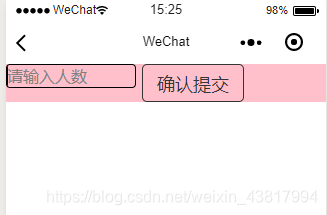
最后在百度搜索找到方法:将中的plain属性去除
view style="width:120rpx;" button class="okbtn" bindtap='oknum' 确认提交 /button /view然后设置wxss 的background-color: transparent;
代码:
.`okbtn{ width:240rpx; height:90rpx; text-align: center; line-height: 38px; background-color: transparent; /*按钮透明*/ border:none;/*设置按钮边框*/} .okbtn::after{ border:none; }`效果:透明无边框: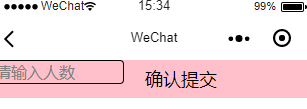
**










