


最近写的小程序分享,和小伙伴们分享交流一下.小程序分享分为两种:一种是直接分享给好友或群;一种是生成带有小程序码的图片保存本地,然后将图片分享给好友或者朋友圈,其他人通过扫码进入你要分享的页面.好了废话不多说,直接上码!!!里面有些数据和接口调用如果不懂的可以关注我前几篇文章哦!
这里先给大家展示一下效果图
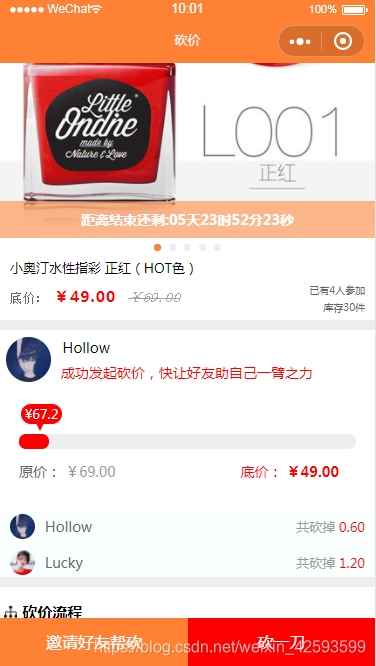
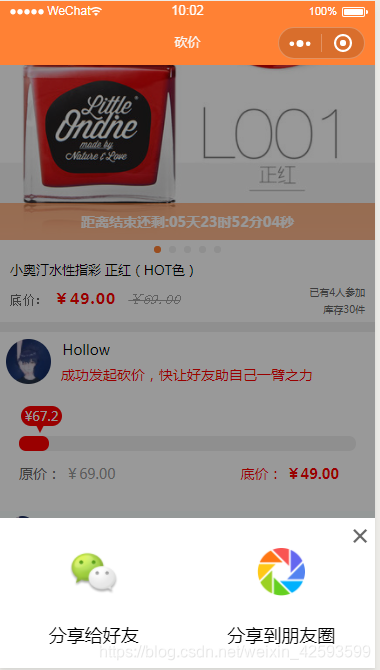
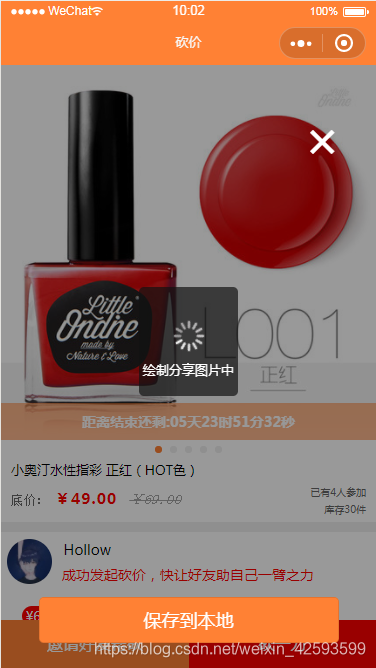
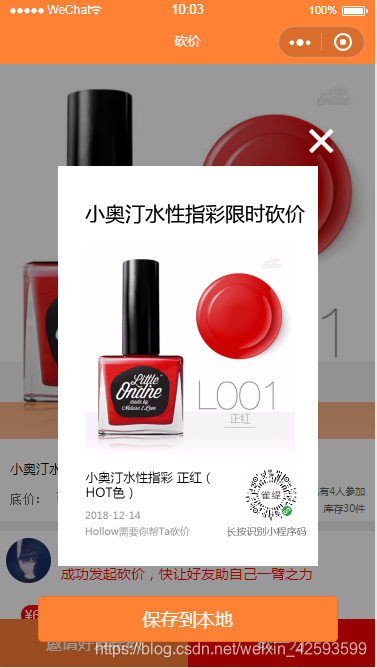
这里是分享逻辑
// pages/bargain/bargain.jsconst app = getApp();import { Bargain } from 'bargain-model.js';var bargain = new Bargain(); //实例化 对象var util = require('../../utils/util.js');Page({ /** * 页面的初始数据 */ data: { imgwidth: 750, imgheights: [], msgList: [], isShow: false,//控制emoji表情是否显示 isShowModel: false, }, bindchange: function (e) { this.setData({ current: e.detail.current }) }, imgHeight: function (e) { //获取图片真实宽度 var imgwidth = e.detail.width, imgheight = e.detail.height, //宽高比 ratio = imgwidth / imgheight; var first = e.target.dataset['index']; //计算的高度值 var viewHeight = 750 / ratio; var imgheight = viewHeight var imgheights = this.data.imgheights //把每一张图片的高度记录到数组里 imgheights[first] = imgheight;// 改了这里 赋值给当前 index this.setData({ imgheights: imgheights, }) if (first == 0) { var canvasheight = 420 * imgheight / 750; if (canvasheight 420) { canvasheight = 420; var canvaswidth = 420 * 750 / imgheight; } else { canvaswidth = 420; } this.setData({ canvaswidth: canvaswidth, canvasheight: canvasheight, }) } }, /** * 用户点击右上角分享 */ onShareAppMessage: function () { var that = this; var goodid = that.data.goodid; var scheduleId = that.data.scheduleId; return { title: '砍价', path: '/pages/bargain/bargain?goodid=' + goodid + '&scheduleId=' + scheduleId, success: function (res) { } } }, /**邀请好友帮砍 */ onForward:function(e){ this.setData({ isShow: !this.data.isShow, }) }, //分享给个人 sharetoperson: function (e) { this.onShareAppMessage; }, //分享到朋友圈 sharetogroup: function (e) { var that = this; that.setData({ isShow: false, isShowModel: true }) //获取发起者头像和昵称 var user = that.data.user; wx.showLoading({ title: '绘制分享图片中', mask: true }); var sid = app.globalData.sid;//发型师sid var goodid = that.data.goodid;//商品id var scheduleId = that.data.scheduleId;//用户发起砍价表id var pid = user.pid;//活动id bargain.getSpecialMData(sid, goodid, scheduleId,pid, (callbackdata) = { this.setData({ painting: { width: 520, height: 800, clear: true, views: [ { type: 'rect', background: '#fff', top: 0, left: 0, width: 520, height: 800 }, { type: 'text', content: that.data.bargain.activity_name, fontSize: 40, color: '#000', textAlign: 'left', top: 68, left: 54, bolder: true }, { type: 'image', url: that.data.bargain.img[0], top: 158, left: 54, width: that.data.canvaswidth, height: that.data.canvasheight }, { type: 'text', content: that.data.bargain.product_name, fontSize: 25, lineHeight: 30, color: '#000', textAlign: 'left', MaxLineNumber: 2, breakWord: true, top: 606, left: 55, width: 245 }, { type: 'text', content: util.formatMonth(new Date()), fontSize: 20, color: '#999', top: 685, left: 54 }, { type: 'text', content: that.data.user.nickname + "需要你帮Ta砍价", fontSize: 20, color: '#999', top: 717, left: 54 }, { type: 'image', url: callbackdata, top: 605, left: 373, width: 106, height: 106 }, { type: 'text', content: '长按识别小程序码', fontSize: 20, color: '#666', top: 717, left: 337, } ] } }) }); }, eventSave: function () { wx.saveImageToPhotosAlbum({ filePath: this.data.shareImage, success(res) { wx.showToast({ title: '保存图片成功', icon: 'success', duration: 2000 }) } }) }, eventGetImage: function (event) { wx.hideLoading() const { tempFilePath, errMsg } = event.detail if (errMsg === 'canvasdrawer:ok') { this.setData({ shareImage: tempFilePath }) } }, hideImgModel: function () { var that = this; that.setData({ isShowModel: false }) },})
这里是wxml
!--分享弹出层{{shareImage}}--view class="bottomshare" view class="showimportant {{isShow ? 'showmodel' : 'hidemodel'}}"/view view class="emoji-box {{isShow ? 'emoji-move-in' : 'emoji-move-out'}}" view class="deleteTag" bindtap='onForward'×/view button class="toperson" open-type="share" bindtap='sharetoperson' image src='https://img.nmsmt.cn/public/youxuan_xcx/toperson.png' class="shareimg" mode="widthFix" /image view分享给好友/view /button button class="togroup" bindtap='sharetogroup' image src='https://img.nmsmt.cn/public/youxuan_xcx/groups.png' class="shareimg" mode="widthFix" /image view分享到朋友圈/view /button /view/view!-- 保存图片到本地 --view class="model {{isShowModel ? 'showmodel' : 'hidemodel'}}" view class="deleteTagShare" bindtap='hideImgModel'×/view image src="{{shareImage}}" class="share-image" model="widthFix"/image canvasdrawer painting="{{painting}}" class="canvasdrawer" bind:getImage="eventGetImage"/ button bind:tap="eventSave" class="savetolocal"保存到本地/button/view这里是wxss
/*分享弹出层*/.bottomshare{ position: fixed; bottom:0; width:100%; z-index:2;}.showimportant{ height:100%; background: rgba(0,0,0,0.4); position: fixed; bottom:0%; width:100%;}.emoji-box { position: relative; /* height: 200rpx; */ padding: 5px 0; box-sizing: border-box; margin-bottom: -300rpx; height:300rpx; width:100%; background-color:white; text-align:center; z-index:3;}.emoji-move-in { -webkit-animation: emoji-move-in 0.3s forwards; animation: emoji-move-in 0.3s forwards;}.emoji-move-out { -webkit-animation: emoji-move-out 0.3s forwards; animation: emoji-move-out 0.3s forwards;}.no-emoji-move { -webkit-animation: none; animation: none;}@-webkit-keyframes emoji-move-in { 0% { margin-bottom: -300rpx; } 100% { margin-bottom: 0; }}@keyframes emoji-move-in { 0% { margin-bottom: -300rpx; } 100% { margin-bottom: 0; }}@-webkit-keyframes emoji-move-out { 0% { margin-bottom: 0; } 100% { margin-bottom: -300rpx; }}@keyframes emoji-move-out { 0% { margin-bottom: 0; } 100% { margin-bottom: -300rpx; }}.toperson{ display: inline-block; width:50%; margin-top:50rpx; border:none; background:#fff;}.toperson:after{ border:none;}.togroup{ display: inline-block; width:50%; margin-top:50rpx; border:none; background:#fff;}.togroup:after{ border:none;}.shareimg{ width:30%;}.deleteTag{ position:absolute; top:0; line-height:60rpx; font-size:60rpx; width:60rpx; height:60rpx; right:0rpx; color:#666;}.model{ position:fixed; top:0; left:0; width:100%; height:100%; background:rgba(0,0,0,0.4); overflow:hidden; z-index:2;}.showmodel{ display: block;}.hidemodel{ display: none;}.share-image{ width:520rpx; position:absolute; text-align:center; margin:auto; top:0; bottom:0; left:0; right:0; height:800rpx}.savetolocal{ bottom:50rpx; position:absolute; background-color:#ff8134; color:white; width:80%; margin:auto; left:0; right:0;}.deleteTagShare{ position:absolute; top:127rpx; line-height:40rpx; font-size:105rpx; width:113rpx; height:60rpx; right:35rpx; color:white; z-index:100;}.showimportant{ position:fixed; top:0; left:0; width:100%; height:100%; background:rgba(0,0,0,0.4); overflow:hidden; z-index:2;}
小伙伴们写到这一步,相信你们已经知道,保存图片需要用到canvas画图,不要慌,我这里给你准备好了已经封装好的代码,你只需要引入文件就可以了,接下来是划水时间!!!
这里引入文件我是在小程序页面配置文件json里面写的,只需要一句话搞定!
{ "navigationBarTitleText": "砍价", "usingComponents": { "canvasdrawer": "/components/canvasdrawer/canvasdrawer" }}
这里是components文件
//这里是js
/* global Component wx */Component({ properties: { painting: { type: Object, value: {view: []}, observer (newVal, oldVal) { if (!this.data.isPainting) { if (JSON.stringify(newVal) !== JSON.stringify(oldVal)) { if (newVal && newVal.width && newVal.height) { this.setData({ showCanvas: true, isPainting: true }) this.readyPigment() } } else { if (newVal && newVal.mode !== 'same') { this.triggerEvent('getImage', {errMsg: 'canvasdrawer:samme params'}) } } } } } }, data: { showCanvas: false, width: 100, height: 100, index: 0, imageList: [], tempFileList: [], isPainting: false }, ctx: null, cache: {}, ready () { wx.removeStorageSync('canvasdrawer_pic_cache') this.cache = wx.getStorageSync('canvasdrawer_pic_cache') || {} this.ctx = wx.createCanvasContext('canvasdrawer', this) }, methods: { readyPigment () { const { width, height, views } = this.data.painting this.setData({ width, height }) const inter = setInterval(() = { if (this.ctx) { clearInterval(inter) this.ctx.clearActions() this.ctx.save() this.getImageList(views) this.downLoadImages(0) } }, 100) }, getImageList (views) { const imageList = [] for (let i = 0; i views.length; i++) { if (views[i].type === 'image') { imageList.push(views[i].url) } } this.setData({ imageList }) }, downLoadImages (index) { const { imageList, tempFileList } = this.data if (index imageList.length) { // console.log(imageList[index]) this.getImageInfo(imageList[index]).then(file = { tempFileList.push(file) this.setData({ tempFileList }) this.downLoadImages(index + 1) }) } else { this.startPainting() } }, startPainting () { const { tempFileList, painting: { views } } = this.data for (let i = 0, imageIndex = 0; i views.length; i++) { if (views[i].type === 'image') { this.drawImage({ ...views[i], url: tempFileList[imageIndex] }) imageIndex++ } else if (views[i].type === 'text') { if (!this.ctx.measureText) { wx.showModal({ title: '提示', content: '当前微信版本过低,无法使用 measureText 功能,请升级到最新微信版本后重试。' }) this.triggerEvent('getImage', {errMsg: 'canvasdrawer:version too low'}) return } else { this.drawText(views[i]) } } else if (views[i].type === 'rect') { this.drawRect(views[i]) } } this.ctx.draw(false, () = { wx.setStorageSync('canvasdrawer_pic_cache', this.cache) this.saveImageToLocal() }) }, drawImage (params) { this.ctx.save() const { url, top = 0, left = 0, width = 0, height = 0, borderRadius = 0 } = params // if (borderRadius) { // this.ctx.beginPath() // this.ctx.arc(left + borderRadius, top + borderRadius, borderRadius, 0, 2 * Math.PI) // this.ctx.clip() // this.ctx.drawImage(url, left, top, width, height) // } else { this.ctx.drawImage(url, left, top, width, height) // } this.ctx.restore() }, drawText (params) { this.ctx.save() const { MaxLineNumber = 2, breakWord = false, color = 'black', content = '', fontSize = 16, top = 0, left = 0, lineHeight = 20, textAlign = 'left', width, bolder = false, textDecoration = 'none' } = params this.ctx.beginPath() this.ctx.setTextBaseline('top') this.ctx.setTextAlign(textAlign) this.ctx.setFillStyle(color) this.ctx.setFontSize(fontSize) if (!breakWord) { this.ctx.fillText(content, left, top) this.drawTextLine(left, top, textDecoration, color, fontSize, content) } else { let fillText = '' let fillTop = top let lineNum = 1 for (let i = 0; i content.length; i++) { fillText += [content[i]] if (this.ctx.measureText(fillText).width width) { if (lineNum === MaxLineNumber) { if (i !== content.length) { fillText = fillText.substring(0, fillText.length - 1) + '...' this.ctx.fillText(fillText, left, fillTop) this.drawTextLine(left, fillTop, textDecoration, color, fontSize, fillText) fillText = '' break } } this.ctx.fillText(fillText, left, fillTop) this.drawTextLine(left, fillTop, textDecoration, color, fontSize, fillText) fillText = '' fillTop += lineHeight lineNum ++ } } this.ctx.fillText(fillText, left, fillTop) this.drawTextLine(left, fillTop, textDecoration, color, fontSize, fillText) } this.ctx.restore() if (bolder) { this.drawText({ ...params, left: left + 0.3, top: top + 0.3, bolder: false, textDecoration: 'none' }) } }, drawTextLine (left, top, textDecoration, color, fontSize, content) { if (textDecoration === 'underline') { this.drawRect({ background: color, top: top + fontSize * 1.2, left: left - 1, width: this.ctx.measureText(content).width + 3, height: 1 }) } else if (textDecoration === 'line-through') { this.drawRect({ background: color, top: top + fontSize * 0.6, left: left - 1, width: this.ctx.measureText(content).width + 3, height: 1 }) } }, drawRect (params) { this.ctx.save() const { background, top = 0, left = 0, width = 0, height = 0 } = params this.ctx.setFillStyle(background) this.ctx.fillRect(left, top, width, height) this.ctx.restore() }, getImageInfo (url) { return new Promise((resolve, reject) = { if (this.cache[url]) { resolve(this.cache[url]) } else { const objExp = new RegExp(/^http(s)?://([w-]+.)+[w-]+(/[w- ./?%&=]*)?/) if (objExp.test(url)) { wx.getImageInfo({ src: url, complete: res = { if (res.errMsg === 'getImageInfo:ok') { this.cache[url] = res.path resolve(res.path) } else { this.triggerEvent('getImage', {errMsg: 'canvasdrawer:download fail'}) reject(new Error('getImageInfo fail')) } } }) } else { this.cache[url] = url resolve(url) } } }) }, saveImageToLocal () { const { width, height } = this.data wx.canvasToTempFilePath({ x: 0, y: 0, width, height, canvasId: 'canvasdrawer', complete: res = { if (res.errMsg === 'canvasToTempFilePath:ok') { this.setData({ showCanvas: false, isPainting: false, imageList: [], tempFileList: [] }) this.triggerEvent('getImage', {tempFilePath: res.tempFilePath, errMsg: 'canvasdrawer:ok'}) } else { this.triggerEvent('getImage', {errMsg: 'canvasdrawer:fail'}) } } }, this) } }})
这里是json
{ "component": true}
这里是wxml
canvas canvas-id="canvasdrawer" style="width:{{width}}px;height:{{height}}px;" class="board" wx:if="{{showCanvas}}"/canvas
//这里是wxss
.board {position: fixed;top: 2000rpx;background-color: #fff;}好了,新鲜的两种分享就完成了,希望对你们有所帮助,欢迎dalao批评指正!!!整理不易,转发请附地址.
欢迎加微信object_1995交流哦!!!










