


(一)单选按钮组
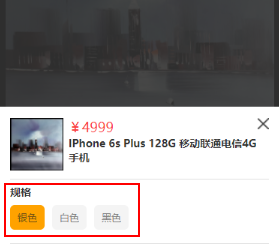
模型图如下:
index.js
Page({ data: { parameter: [{ id: 1, name: '银色' }, { id: 2, name: '白色' },{ id: 3, name: '黑色' }],//模拟商品参数数据,如果是线上版本需要自行发起request请求 }, onLoad: function (options) { this.data.parameter[0].checked = true; this.setData({ parameter: this.data.parameter, })//默认parameter数组的第一个对象是选中的 }, // 参数点击响应事件 parameterTap:function(e){//e是获取e.currentTarget.dataset.id所以是必备的,跟前端的data-id获取的方式差不多 var that=this var this_checked = e.currentTarget.dataset.id var parameterList = this.data.parameter//获取Json数组 for (var i = 0; i parameterList.length;i++){ if (parameterList[i].id == this_checked){ parameterList[i].checked = true;//当前点击的位置为true即选中 } else{ parameterList[i].checked = false;//其他的位置为false } } that.setData({ parameter: parameterList }) }})
index.wxml
view class='fwb fz-28 mgt-16 mgb-10'规格/view view class='parameter-wrap' block wx:for="{{parameter}}" wx:key="parameter" text class='parameter-info text-over {{item.checked?"checked_parameter":""}}' data-id='{{item.id}}' bindtap='parameterTap'{{item.name}}/text /block /view
index.wxss
.checked_parameter{ background: rebeccapurple; padding: 3px; border-radius: 5px; color: #fff;}
Tips:此处的{{item.checked?”checked_parameter”:”“}}为三元选择器,即通过checked判断当前是否为选中样式,而后进行样式的添加checked_parameter。
(二)多选按钮组
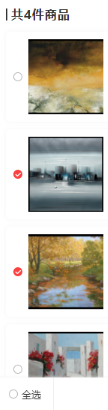
模型图如下:
cartList.js
Page({    data:{    CartList:[],//做空处理,如果购物车为空后端的值没有改变,容易产生报错
  //测试数据:CartList: [{id: 1, name: '银色', checked: false},{id: 2, name: '白色', checked: false},{id: 3, name: '黑色', checked: true}]
}, onLoad: function () { // 获取购物车请求 var that = this; wx.request({ url: request_getCartList,//向后端发起请求,此处的是get的方式,如需要ajax请参照本站内的相关文章 data: { "session3rd": userid, }, success: function (res) { if (res.data.code == -2) { that.setData({ CartList: [] }) } if(res.data.code==1){ that.setData({ CartList: list }) } } }) }, // 多选 chooseOs: function (event) { for (var i = 0; i this.data.CartList.length; i++) { if (event.currentTarget.id == this.data.CartList[i].id) { if (this.data.CartList[i].checked == true) { this.data.CartList[i].checked = false; var CartList = this.data.CartList; this.setData({ CartList//重定义CartList,使购物车的样式实现局部刷新 }) } else { this.data.CartList[i].checked = true; var CartList = this.data.CartList; this.setData({ CartListt//重定义CartList,使购物车的样式实现局部刷新 }) } } } },})
cartList.wxml
block wx:for="{{CartList}}" wx:key="" view class="order-out user-shadow mgb-20 nowrap" view class="check-btn" catchtap='chooseOs' id="{{item.id}}" image class="absoult-v" src="{{imgSrc}}{{item.checked?'type_1':'type_0'}}.png" mode="widthFix"/image /view /view /block
Tips:前端页面通过catchtap的事件捕捉的方式,调用chooseOs的方法,获取当前点击对象的id即id=”{{item.id}}”,然后对选中的事件添加样式this.data.CartList[i].checked = true;,对未选中的事件删除样式this.data.CartList[i].checked = false;
(三)复选拓展-全选全不选
cart.xml
view class="all-btn" bindtap='allCheckTap' wx:if="{{!checked}}" image src="{{imgSrc}}{{checked?'type_1':'type_0'}}.png" mode="widthFix"/image text全选/text /view view class="all-btn" bindtap='allCheckTap' wx:if="{{checked}}" image src="{{imgSrc}}{{checked?'type_1':'type_0'}}.png" mode="widthFix"/image text全不选/text /view
Tips:此处的‘全选’和‘全不选’没有合并,需要小码农们自行整合。
cartList.js
// 全选按钮 allCheckTap: function () { this.setData({ checked: !this.data.checked, }) if (this.data.checked) { for (var i = 0; i this.data.CartList.length; i++) { if (this.data.CartList[i].checked !== true) { this.data.CartList[i].checked = true; var CartList = this.data.CartList; this.setData({ CartList }) } } } else { for (var i = 0; i this.data.CartList.length; i++) { if (this.data.CartList[i].checked == true) { this.data.CartList[i].checked = false; var CartList = this.data.CartList; this.setData({ CartList }) } } } },
tips:全选跟全部不选的逻辑比较简单就是,将所有所有的checked循环遍历this.data.CartList[i].checked == true或false,然后通过this.setData({CartList})重新定义一下,实现局部刷新。
转 : https://blog.csdn.net/qq_38209578/article/details/78810981










