


原生的video组件功能已经可以满足用户所有需求,本文介绍一下非正常的用户需求怎么解决。
比如:用户需要限制播放时不能滑动屏幕快进、不能拖动进度条快进快退,不准倍速播放,不准全屏;用户第一次完整看完视频后可以倍速,快进,暂停和全屏。
解决的思路:隐藏掉video自带的所有控件功能,包括原生的video功能全部设置为false,然后自己画一个底部控件包含播放按钮还有进度条和全屏按钮,在全屏页面左上角添加返回退出全屏按钮。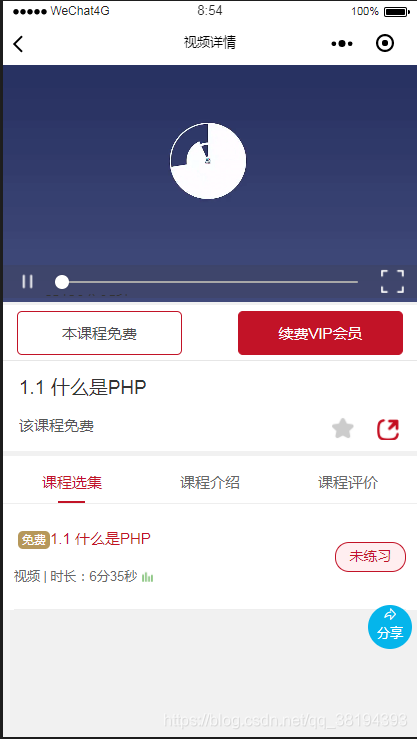
上面是效果图;
下面看一下页面中的写法:
video wx:if="{{videofalse}}" id="myvideo" custom-cache="{{false}}" bindpause="bindPause" bindplay="bindPlay" bindtimeupdate="bindtimeupdate" bindended="bindended" bindfullscreenchange="bindfullscreenchange" initial-time="{{strtime}}" enable-progress-gesture="{{progress}}" show-progress="{{progress}}" controls="{{progress}}" objectFit="cover" src="{{VideoUrl}}" view class='mast_video' wx:if="{{mast_video}}" button bindtap='seed_change'倍速/button /view view class='change_mast' wx:if="{{change_mast}}" bindtap='close_change' view class='seed_change' button bindtap="bindButtonRate" data-rate='1.0'1.0X/button button bindtap="bindButtonRate" data-rate='1.25'1.25X/button button bindtap="bindButtonRate" data-rate='1.5'1.5X/button /view /view view class='process-container' wx:if="{{stuflag == true}}" image src='{{playStates ? "/images/main/puse_v.png" : "/images/main/play_v.png"}}' class='video-controls-icon' bindtap='videoOpreation'/image view class='slider-container' slider bindchange="sliderChange" bindchanging="sliderChanging" step="0.5" value="{{sliderValue}}" backgroundColor="#A8A8A8" activeColor="#FFFFFF" block-color="#FFFFFF" block-size="14" /text decode="{{true}}" space="{{true}}"{{canvasTime}}/text /view image src='{{playAlls ? "/images/main/play_all.png" : "/images/main/puse_all.png"}}' class='video-controls-icon' bindtap='videoAllscreen'/image /view view class='video_back'image src='{{playAlls ? " " : "/images/main/video_back.png"}}' bindtap='video_back'/image/view /video有人会说为什么不使用cover-view来实现呢?cover-view是挺方便的,但是它不能实现完全的自我控制,有些属性被微信官方定义死了,还不如使用最基础的view组件和image组件自由呢。
在video组件中将自己需要控制的属性全部使用**{{false}}或者自定义名字来控制**。对自己画出的倍速和控制条的内容使用wx:if来判断可控制还是不可控制
播放按钮和全屏按钮使用三元运算来判断是播放按钮还是暂停按钮,是全屏按钮还是退出全屏按钮。
默认条件为真(true)
playStates: true, //控制播放 & 暂停按钮的显示 playAlls: true,在点击函数中进行判断:
videoOpreation() { //自定义暂停 this.data.playStates ? this.videoContext.pause() : this.videoContext.play(); this.setData({ playStates: !this.data.playStates }) }, videoAllscreen(e) { //自定义全屏 this.data.playAlls ? this.videoContext.requestFullScreen() : this.videoContext.exitFullScreen(); this.setData({ playAlls: !this.data.playAlls }) }, video_back: function (e) { this.data.playAlls ? this.videoContext.requestFullScreen() : this.videoContext.exitFullScreen(); this.setData({ playAlls: !this.data.playAlls }) }, sliderChanging(e) { //拖拽过程中,不允许更新进度条 var new_stuflag = wx.getStorageSync("key_stuflag"); if (new_stuflag == 1) { //学完允许拖动 this.setData({ updateState: false }) } else { } }, sliderChange(e) { var new_stuflag = wx.getStorageSync("key_stuflag"); if (new_stuflag == 1) { //学完允许拖动 if (this.data.duration && obj == 200) { //完成拖动后,计算对应时间并跳转到指定位置 this.videoContext.seek(e.detail.value / 100 * this.data.duration); this.setData({ sliderValue: e.detail.value, updateState: true //完成拖动后允许更新滚动条 }) } else { } } else { } },通过自定义函数来控制自定义组件的内容。然后在第一遍播放完成度额时候给后台提交播放信息和时长,根据返回结果来开放video组件的相应属性功能。
bindended: function (res) { //第一遍结束 var that = this, obj_time = wx.getStorageSync("v_time"), //本次学习时长 userNid = wx.getStorageSync("unionid"), vid = wx.getStorageSync("bo_vid"), bid = wx.getStorageSync("ke_id"); wx.request({ url: app.globalData.Url + "/api/users/event/addstudent/", //进度提交 data: { unionid: userNid, vid: vid + 1, bid: bid, stime: obj_time }, method: "POST", header: { 'content-type': 'application/x-www-form-urlencoded' // 默认值 }, success: function (res) { wx.setStorageSync("key_stuflag", res.data.stuflag) if (res.data.stuflag == 0) { //根据学习进度状态改变是否可快进 that.setData({ progress: false, mast_video: false, stuflag: true }) } else { that.setData({ progress: true, stuflag: false, mast_video: true, }) } } }) }, bindButtonRate(e) { //倍速 var that = this; let rate = e.currentTarget.dataset.rate this.videoContext.playbackRate(Number(rate)) setTimeout(function () { that.setData({ change_mast: false, mast_video: true, }) }, 400) }, seed_change: function (s) { //按钮展开倍速 this.setData({ mast_video: false, change_mast: true, }) }, close_change: function () { //空白处关闭倍速 this.setData({ mast_video: true, change_mast: false, }) },这样自定义video功能就准备齐全了。
根据评论区需求,加上本页面CSS样式:
.weui-cells { margin-top: 80rpx; text-align: left;}.weui-label { width: 5em;}.coursedes-item { border-bottom: 1rpx solid #e5e5e5; padding: 40rpx 10rpx; font-size: 26rpx; color: #141414; line-height: 39rpx; text-indent: 52rpx; text-align: justify;}.conact { width: 100%; height: 105rpx; padding: 12.5rpx 0 12.5rpx 10rpx; background: #ccc; position: fixed; bottom: 0px; left: 0; right: 0; min-height: 105rpx;}.search-left { flex: 6; background: #fff; text-align: left;}.search-left input { display: inline-block; height: 85rpx; font-size: 26rpx; width: 100%;}.search-placeholder { color: #333; line-height: 85rpx; font-size: 26rpx; margin-left: 20px;}.sCode image { width: 44rpx; height: 44rpx; padding: 10rpx 10rpx;}.conact .search-left image { width: 40rpx; height: 40rpx; padding: 10rpx; float: right;}.conact .search-right { flex: 1;}.conact .search-right image { width: 64rpx; height: 64rpx;}.kefuBtn { background-color: rgba(255, 255, 255, 0); border: 0px; right: 0; display: flex; justify-content: center; align-items: center;}.kefuBtn::after { border: 0px;}.fenxBtn { background-color: rgba(255, 255, 255, 0); border: 0px; left: 0; flex: 1;}.fenxBtn::after { border: 0px;}.fenxBtn image { width: 44rpx; height: 44rpx; padding: 14rpx 5rpx;}.pof { position: fixed;}video { width: 100%; height: 430rpx;}.video_top { width: 100%; height: 430rpx;}.page-body-button { margin-bottom: 30rpx; font-size: 30rpx; line-height: 90rpx;}.top_img { width: 100%; height: 430rpx; display: flex; align-items: center; justify-content: center; position: absolute; left: 0; top: 0; z-index:19; background:#333;}.top_img .cover_img { width: 90rpx; height: 90rpx; z-index:5;}video .content { display: flex; justify-content: center; align-items: center; position: absolute; left: 0; bottom: 0; z-index: 1; width: 100%; height: 75rpx; font-size: 32rpx; color: #fff;}video .content cover-image { width: 44rpx; height: 44rpx;}.page-cont { height: 100%;}.belly-scroll { width: 100%; height: auto; background-color: #f5f5f5; overflow: hidden;}.hook { width: 100%; height: auto;}.header-info { padding: 0 30rpx; background-color: #fff; margin-bottom: 10rpx;}.header-info .title { font-size: 36rpx; color: #333; line-height: 1.2; padding-top: 30rpx; margin-bottom: 10rpx;}.header-info .desc { font-size: 28rpx; color: #555;}.header-info .video-total { margin-top: 30rpx; padding-bottom: 20rpx;}.header-info .user-cont { font-size: 24rpx; color: #808080;}.header-info .user-cont label { font-size: 28rpx; color: #1a1a1a;}.header-info .user-tool { height: 46rpx;}.header-info .play-audio { color: #c21327; font-size: 22rpx; padding: 0 10rpx; height: 38rpx; border: 1rpx solid #c21327; margin-right: 55rpx;}.header-info .play-audio image { width: 40rpx; height: 40rpx; margin-right: 10rpx;}.header-info .recomment { width: 42rpx; height: 42rpx; margin-top: 2rpx; margin-right: 40rpx;}.header-info .recomment image { width: 40rpx; height: 40rpx;}.header-info .share { width: 42rpx; height: 42rpx; margin-top: 2rpx; margin-right: 5rpx;}.header-info .share image { width: 40rpx; height: 40rpx;}.header-info .share-tips { white-space: nowrap; padding: 0 15rpx; height: 38rpx; line-height: 38rpx; position: fixed; right: 6%; margin-top: 8px; font-size: 22rpx; color: #c21327; border-radius: 19rpx; border: 1px solid #c21327; background-color: #fbebed;}.header-info .share-tips:before { content: ''; position: absolute; right: -1px; top: -7rpx; width: 16rpx; height: 30rpx; background-color: #fbebed; transform: skewY(-36deg); border-top: 1.5px solid #c21327; border-right: 1px solid #c21327;}.header-info .share-tips:after { content: ''; position: absolute; top: 0; right: 0; background-color: #fbebed; width: 20rpx; height: 5rpx;}.column-inner { background-color: #fff;}.column-box { width: 100%; height: 88rpx; background-color: #fff;}.column-box .column-content { width: 100%; height: 88rpx; border-bottom: 1px solid #eee; background-color: #fff;}.column-box .column-pof { position: absolute; top: 430rpx; left: 0; z-index: 100;}.column-box .column-item { flex: 1; text-align: center; padding-top: 15rpx; line-height: 68rpx; font-size: 28rpx; color: #666;}.column-box .column-item.active { color: #c21327; position: relative;}.column-box .column-item.active:before { content: ''; width: 50rpx; height: 4rpx; background-color: #c21327; position: absolute; bottom: 0; left: 50%; margin-left: -25rpx;}.footer { width: 100%; height: 102rpx; border-bottom: 1rpx solid #e6e6e6; left: 0; background-color: #fff;}.go-home { width: 100rpx; flex-wrap: wrap; font-size: 0; line-height: 1.2;}.go-home image { width: 38rpx; height: 38rpx; position: relative; top: 8rpx;}.go-home label { width: 100%; text-align: center; font-size: 24rpx; color: #999;}.pay-box { flex: 1; width: 650rpx; padding-right: 26rpx; padding-left: 26rpx;}.pay-box button { width: 300rpx; height: 80rpx; border: 1px solid #c21327; text-align: center; line-height: 78rpx; border-radius: 10rpx; font-size: 28rpx; color: #4c4c4c;}.pay-box button label { color: #c21327;}.pay-box .vip-btn { color: #fff; background: #c21327;}.evaluate-inner { padding: 0 30rpx 30rpx; background-color: #fff;}.evaluate-item { padding: 20rpx 0 20rpx; font-size: 26rpx; color: #141414; line-height: 32rpx;}.user-info { margin-bottom: 30rpx;}.user-box { height: 80rpx; color: #333;}.user-box image { width: 80rpx; height: 80rpx; will-change: transform; margin-right: 20rpx; border-radius: 100%;}.recommend-cont { color: #676767; font-size: 20rpx;}.recommend-cont image { width: 23rpx; height: 23rpx; margin-left: 4rpx;}.recommend-cont text { margin-left: 12rpx; line-height: 1.8; padding-top: 5rpx;}.eavluate { line-height: 1.5; border-bottom: 1px solid #eee;}.course-list { padding: 0 20rpx; background-color: #fff; color: #1a1a1a;}.course-list .title { padding-top: 50rpx; font-size: 34rpx; margin-bottom: 10rpx;}.course-item { padding: 30rpx 0; border-bottom: 1rpx solid #eee;}.course-item .course-before { font-size: 28rpx; width: 520rpx;}.course-item .name { margin-bottom: 5rpx; text-align: left; text-overflow: ellipsis; white-space: nowrap; overflow: hidden;}.course-item.active .name { color: #c21327;}.course-item .info { font-size: 24rpx; color: #666;}.course-item.active .palyer { width: 24rpx; height: 24rpx; margin-left: 8rpx;}.experience-icon { font-size: 22rpx; color: #fff; padding: 5rpx 8rpx; background-color: #b6985b; border-radius: 10rpx; vertical-align: initial; margin-left: 8rpx;}.course-after { width: 130rpx; height: 55rpx; border: 1px solid #c21327; color: #c21327; border-radius: 26rpx; text-align: center; background-color: #ffeef0;}.course-after image { width: 22rpx; height: 22rpx; margin-right: 6rpx;}.course-after.playered { background-color: #fff;}.evaluate-btn { padding: 20rpx 60rpx 50rpx;}.evaluate-btn .evaluate-btn-item { width: 250rpx; height: 80rpx; line-height: 78rpx; border: 1px solid #ccc; border-radius: 40rpx; font-size: 28rpx; color: #666; text-align: center; margin: 0 auto;}.isPayShow { display: block;}.isPayHide { display: none;}.mast_video{ display:block; width:60rpx; height:60rpx; right:10rpx; position:absolute; margin-top:165rpx; text-align:center; border-radius:50%; z-index:11; background-color: rgba(0,0,0,0.5);}.mast_video button{ font-size:28rpx; line-height:60rpx; color:#fff;}.change_mast{ width:100%; height:430rpx; position:relative; z-index:13; background-color: rgba(0,0,0,0.5);}.seed_change{ width:40%; height:60rpx; display:flex; text-align:center; position:absolute; top:165rpx; left:30%; z-index:13;}.seed_change button{ flex:1; color:#fff;}.process-container{ width:100%; padding:1% 2% 1% 2%; height:60rpx; max-height:60rpx; position:absolute; bottom:4px; left:0; right:0; z-index:13; display:flex; align-items: center; background:rgba(59, 57, 57, 0.2);}.process-container image{ display:inline-block; flex:1; max-width:60rpx; max-height:60rpx; text-align:center;}.slider-container{ z-index:13; height:60rpx; margin-bottom:10rpx; flex:6;}.video_btn{ flex:1;}.video_btn image{ width:80rpx; height:80rpx;}.video_time{ flex:1;}.shares{ width:80rpx; height:80rpx; position:fixed; right:10rpx; bottom:160rpx; display:flex; flex-direction: column; align-items: center; background-color:#05b5eb; color:white; border-radius:50%; z-index:1;}.shares text{ text-align:center; font-size:24rpx; color:#fff; line-height:36rpx;}.video_back{ display:block; width:60rpx; height:60rpx; left:5rpx; top:15rpx; position:absolute; text-align:center; z-index:19;}.video_back image{ width:44rpx; height:44rpx;}如果有不懂的可以评论区回复,会在不定时进行一一答复。










