


video
视频。该组件是原生组件,使用时请注意相关限制。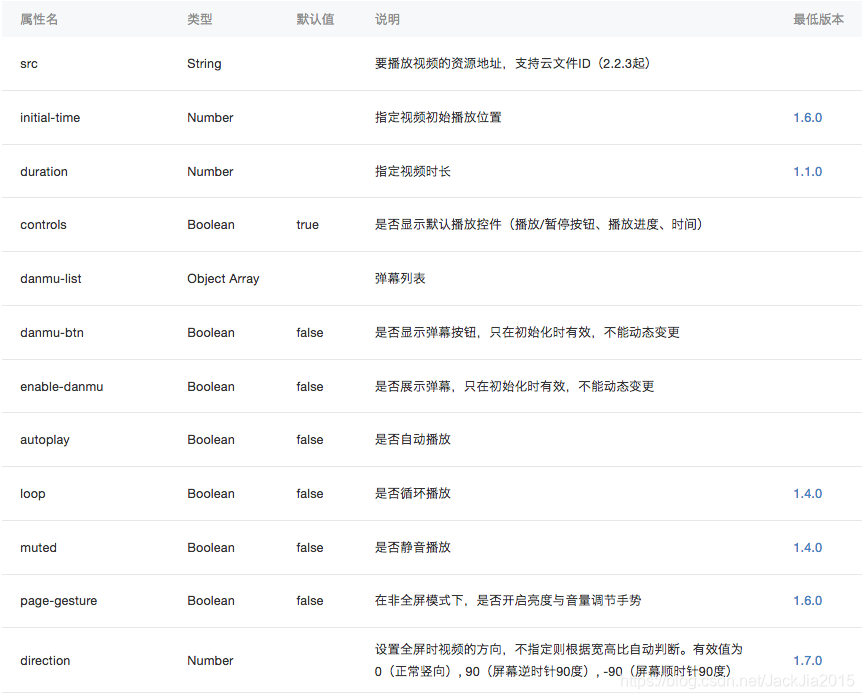
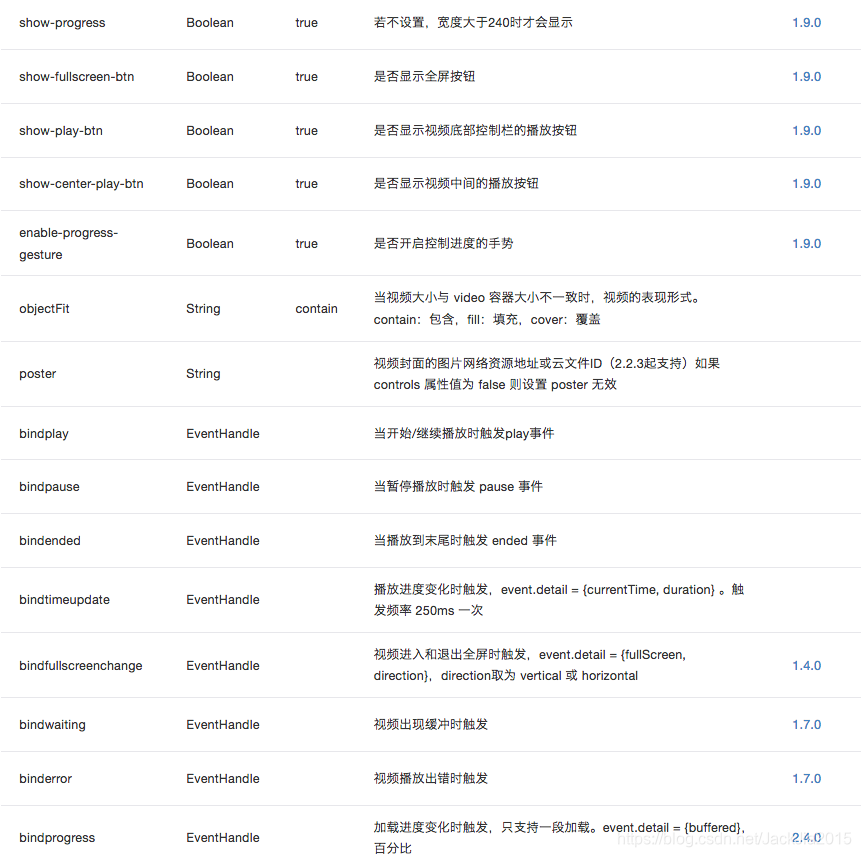
默认宽度300px、高度225px,可通过wxss设置宽高。
例如:
效果展示
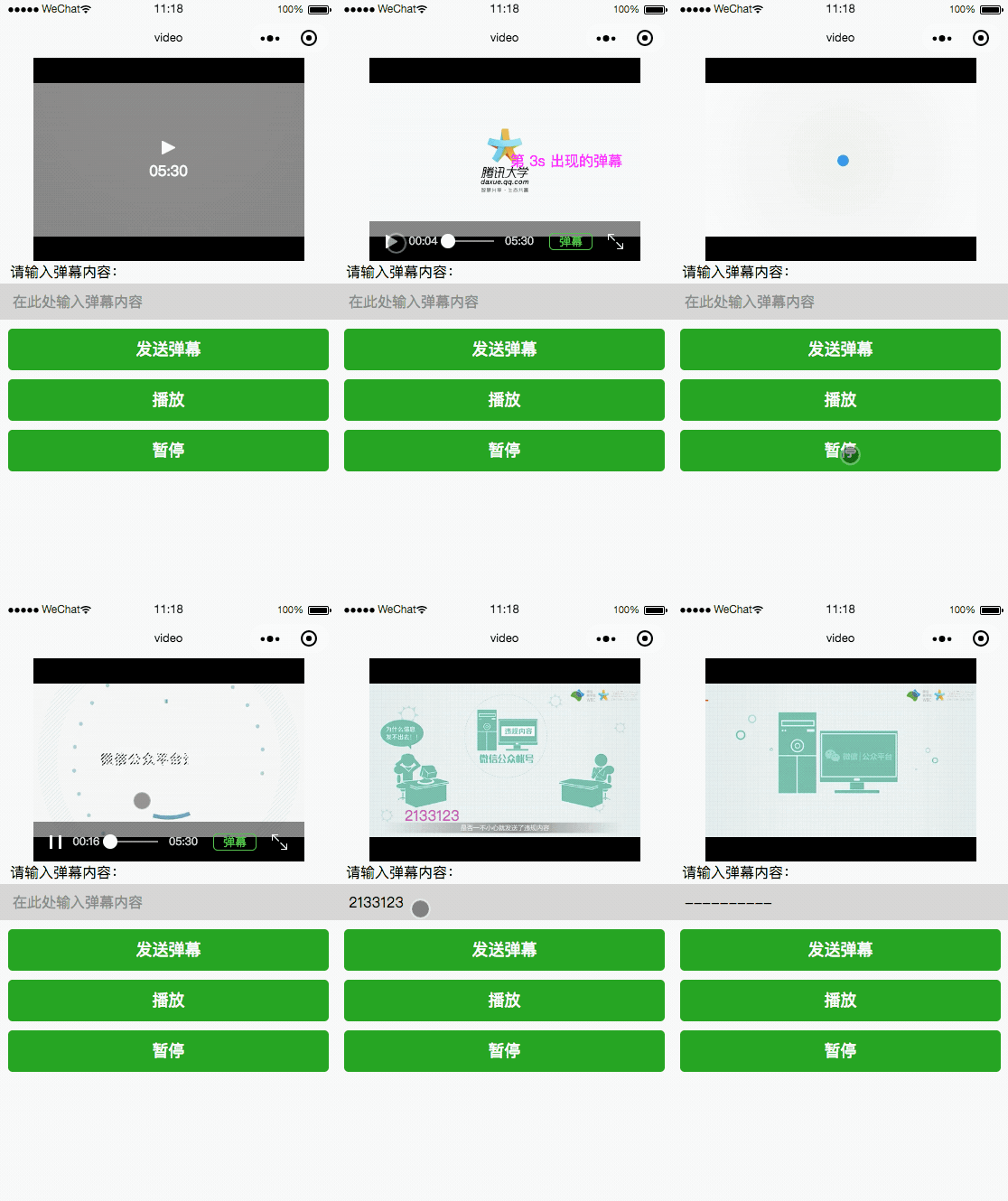
代码
index.wxml
!-- src 要播放视频的资源地址,支持云文件ID initial-time 指定视频初始播放位置 duration 指定视频时长 controls:true 是否显示默认播放控件(播放/暂停按钮、播放进度、时间) danmu-list Array弹幕列表 danmu-btn:false 是否显示弹幕按钮,只在初始化时有效,不能动态变更 enable-danmu:false 是否展示弹幕,只在初始化时有效,不能动态变更 autoplay:false 是否自动播放 loop:false 是否循环播放 muted:false 是否静音播放 page-gesture:false 在非全屏模式下,是否开启亮度与音量调节手势 direction 设置全屏时视频的方向,不指定则根据宽高比自动判断。有效值为 0(正常竖向), 90(屏幕逆时针90度), -90(屏幕顺时针90度) show-progress:true 若不设置,宽度大于240时才会显示 show-fullscreen-btn:true 是否显示全屏按钮 show-play-btn:true 是否显示视频底部控制栏的播放按钮 show-center-play-btn 是否显示视频中间的播放按钮 enable-progress-gesture:true 是否开启控制进度的手势 objectFit 当视频大小与 video 容器大小不一致时,视频的表现形式。contain:包含,fill:填充,cover:覆盖 poster 视频封面的图片网络资源地址或云文件ID(2.2.3起支持)如果 controls 属性值为 false 则设置 poster 无效 bindplay 当开始/继续播放时触发play事件 bindpause 当暂停播放时触发 pause 事件 bindended 当播放到末尾时触发 ended 事件 bindtimeupdate 播放进度变化时触发,event.detail = {currentTime, duration} 。触发频率 250ms 一次 bindfullscreenchange 视频进入和退出全屏时触发,event.detail = {fullScreen, direction},direction取为 vertical 或 horizontal bindwaiting 视频出现缓冲时触发 binderror 视频播放出错时触发 bindprogress 加载进度变化时触发,只支持一段加载。event.detail = {buffered},百分比 --view class='videoView' video id="myVideo" src="http://wxsnsdy.tc.qq.com/105/20210/snsdyvideodownload?filekey=30280201010421301f0201690402534804102ca905ce620b1241b726bc41dcff44e00204012882540400&bizid=1023&hy=SH&fileparam=302c020101042530230204136ffd93020457e3c4ff02024ef202031e8d7f02030f42400204045a320a0201000400" binderror="videoErrorCallback" danmu-list="{{danmuList}}" enable-danmu="{{true}}" danmu-btn="{{true}}" loop="{{true}}" controls="{{true}}"/video/viewview class='controlView'view class="control_title"请输入弹幕内容:/view input bindblur="bindInputBlur" type="text" placeholder="在此处输入弹幕内容" / button bindtap="bindSendDanmu" class="button" type="primary" formType="submit"发送弹幕/button button bindtap="bindPlay" class="button" type="primary"播放/button button bindtap="bindPause" class="button" type="primary"暂停/button/viewindex.wxss
.videoView{ display: flex; justify-content: center;}.control_title{ margin-left: 25rpx;}input{ width: 100%; height: 80rpx; padding-left: 30rpx; background-color: lightgrey}.button{ margin: 20rpx;}index.js
function getRandomColor () { const rgb = [] for (let i = 0 ; i 3; ++i){ let color = Math.floor(Math.random() * 256).toString(16) color = color.length == 1 ? '0' + color : color rgb.push(color) } return '#' + rgb.join('')}Page({ data: { inputValue: '', danmuList: [{ text: '第 1s 出现的弹幕', color: '#ff0000', time: 1 }, { text: '第 3s 出现的弹幕', color: '#ff00ff', time: 3 }] }, //创建video onReady: function (res) { this.videoContext = wx.createVideoContext('myVideo') }, //input监听 bindInputBlur: function (e) { this.inputValue = e.detail.value }, //发送弹幕 bindSendDanmu: function () { this.videoContext.sendDanmu({ text: this.inputValue, color: getRandomColor() }) }, //播放 bindPlay: function() { this.videoContext.play() }, //暂停 bindPause: function() { this.videoContext.pause() }, //视频播放出错时触发 videoErrorCallback: function(e) { console.log('视频错误信息:',e.detail.errMsg) }})









