


最近写了小程序里的物流跟踪,逻辑不是很复杂,主要是渲染数据有一定的技巧,这里展示下效果图和wxml,wxss.请求接口部分不做详细介绍,废话不多说直接上码...
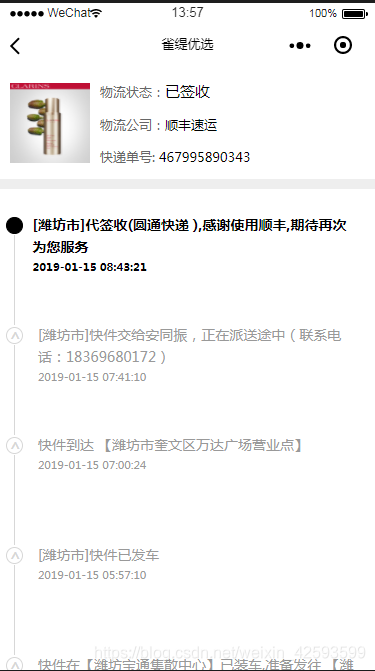

这里是wxml部分:
!-- 外层pages --view class='pages' !-- 头部 -- view class='head' image class='head_img' src='{{list.image}}'/image view class='tabulate' label class='head_name'物流状态:text style='color:#000;font-size:30rpx;'{{list.state_cn}}/text /label label class='head_title'物流公司:text style='color:#000'{{list.comany}}/text/label label class='head_tel_name'快递单号: text style='color:#000'{{list.nu}}/text/label /view /view !-- 追踪 -- view wx:if='{{hasData}}' view class='logisit' wx:for="{{list.data}}" wx:key="key" wx:for-item='item' !-- 左边子容器 -- !-- 显示顶部收的圆点 -- view class='dot-shou {{item.display==0?"":"dot_two"}}' wx:if="{{index==0}}"/view view class='express-middle-axis' wx:else view class='dot-closing' wx:if='{{item.display==1}}'/view view class='dot-closing_two' wx:else/view view class='online-top-closing'/view /view !-- 右边子容器 -- view class='express-right' view class='express-status-address {{item.display==0?"color":"color_second"}}'{{item.context}}/view view class='express-statusing {{item.display==0?"color":"color_second"}}'{{item.ftime}}/view /view /view /view view class='buttom' wx:else text暂时没有物流信息,请稍后再来~/text /view /viewview class='line'/view这里是wxss:
page{ background: #fff; /* overflow: hidden; */}.head{ width: 100%; height: 225rpx; border-bottom: 20rpx solid #eee; display: flex;}.tabulate{ display:flex; flex-direction:column; justify-content:space-evenly;}/* 收货图片 */.head_img{ width: 160rpx; height: 160rpx; margin: auto 20rpx; }/* 快递状态 */.head_name{ font-size: 26rpx; color: #666;}/* 快递编号 */.head_title{font-size: 26rpx;color: #666;}.head_tel_name{font-size: 26rpx;color: #666;} /* 追踪 */.logisit{ width: 100%; margin-left: 10rpx; margin-top: 50rpx; display: flex; }.express-middle-axis { width: 48rpx; position: relative; top: -218rpx; left: -1rpx;}.express-status-address{ font-size: 28rpx; color: #666;}.express-statusing{ font-size: 22rpx; color: #999}.express-left-date { display: flex; width: 300rpx; align-items: center; flex-direction: column; justify-content: center;}.online-top-closing { width: 1rpx; height: 180rpx; background: #d7d7d7; position:absolute; top:40rpx; left:21rpx;}.color{ color: #000; font-weight: bold;}.color_second{ color: #999;}.dot-closing { width: 30rpx; height: 30rpx; border-radius: 50%; margin-top: 50rpx; /* margin-bottom:-45rpx; */ border:1rpx solid #d7d7d7; text-align:center; line-height:30rpx; font-size:30rpx; color:#d7d7d7; animation:myfirst; animation-fill-mode:forwards; position:absolute; top:175rpx; left:4rpx;}.dot-closing_two { width: 30rpx; height: 30rpx; border-radius: 50%; margin-top: 50rpx; /* margin-bottom:-45rpx; */ border:1rpx solid #000; background: #000; animation:myfirst; animation-fill-mode:forwards; position:absolute; top:175rpx; left:4rpx;}@keyframes myfirst{to { font-weight: bold; transform: rotate(270deg); }}.dot-shou { width: 30rpx; height: 30rpx; border-radius: 50%; border:1rpx solid #000; background: #000; margin-left: 3rpx; margin-top: 6rpx;}.dot_two{ width: 30rpx; height: 30rpx; border-radius: 50%; border:1rpx solid #d7d7d7; background: #d7d7d7; margin-left: 3rpx; margin-top: 6rpx;}.express-right { width:90%; height: 170rpx; color: #666; margin-left: 20rpx; margin-right: 40rpx; }.line{ height: 180rpx;}.buttom{ width: 100%; height: 400rpx; line-height: 400rpx; text-align: center; color: #999;}这里是js:
// pages/userhome/address/address.jsconst app = getApp();import { Logistics } from 'logistics-model.js';var logistics = new Logistics(); //实例化 首页 对象Page({ data: { // 列表数据 list: [],//物流详情列表 hasData:false }, onLoad: function (options) { var that = this; var orderId = options.orderId;//order表主键id var type = options.type;//活动类型 var sid = options.sid; app.globalData.sid = sid; wx.showLoading({ title: '查询物流信息中~', })//这里执行根据物流单号查询物流信息,封装调用方法可以参考前面的几篇博文 logistics.getLogistics(orderId, sid,type,result={ if(result.code == '001'){ that.setData({ list: result.data, hasData: true }) }else{ that.setData({ hasData: false }) } wx.hideLoading(); }) },})这里展示下示例数据:
com:"shunfeng"comany:"顺丰速运"condition:"D01"data:Array(15)0:{time: "2019-01-15 08:43:21", ftime: "2019-01-15 08:43:21", context: "[潍坊市]代签收(圆通快递 ),感谢使用顺丰,期待再次为您服务", display: 0}1:{time: "2019-01-15 07:41:10", ftime: "2019-01-15 07:41:10", context: "[潍坊市]快件交给安同振,正在派送途中(联系电话:18369680172)", display: 1}2:{time: "2019-01-15 07:00:24", ftime: "2019-01-15 07:00:24", context: "快件到达 【潍坊市奎文区万达广场营业点】", display: 1}3:{time: "2019-01-15 05:57:10", ftime: "2019-01-15 05:57:10", context: "[潍坊市]快件已发车", display: 1}4:{time: "2019-01-15 01:55:44", ftime: "2019-01-15 01:55:44", context: "快件在【潍坊宝通集散中心】已装车,准备发往 【潍坊市奎文区万达广场营业点】", display: 1}5:{time: "2019-01-14 19:52:05", ftime: "2019-01-14 19:52:05", context: "[潍坊市]快件到达 【潍坊宝通集散中心】", display: 1}6:{time: "2019-01-14 14:57:40", ftime: "2019-01-14 14:57:40", context: "[连云港]快件已发车", display: 1}7:{time: "2019-01-14 09:44:55", ftime: "2019-01-14 09:44:55", context: "快件在【连云港海州集散中心】已装车,准备发往 【潍坊宝通集散中心】", display: 1}8:{time: "2019-01-14 09:24:07", ftime: "2019-01-14 09:24:07", context: "快件到达 【连云港海州集散中心】", display: 1}9:{time: "2019-01-14 00:24:21", ftime: "2019-01-14 00:24:21", context: "[常州市]快件已发车", display: 1}10:{time: "2019-01-13 23:59:14", ftime: "2019-01-13 23:59:14", context: "[常州市]快件在【常州横山桥集散中心】已装车,准备发往 【连云港海州集散中心】", display: 1}11:{time: "2019-01-13 21:05:56", ftime: "2019-01-13 21:05:56", context: "[常州市]快件到达 【常州横山桥集散中心】", display: 1}12:{time: "2019-01-13 20:39:47", ftime: "2019-01-13 20:39:47", context: "[常州市]快件已发车", display: 1}13:{time: "2019-01-13 20:01:08", ftime: "2019-01-13 20:01:08", context: "[常州市]快件在【常州武进天安营业部】已装车,准备发往 【常州横山桥集散中心】", display: 1}14:{time: "2019-01-13 17:13:21", ftime: "2019-01-13 17:13:21", context: "[常州市]顺丰速运 已收取快件", display: 1}image:"https://img.nmsmt.cn/sbs/good/20190111/154718948060748.jpg"ischeck:"1"message:"ok"nu:"467995890343"state:"3"state_cn:"已签收"status:"200"这里的物流信息列展示需要用到每条数据中display去区分选中和灰色字体,这个需要后端程序员去处理,当前到达城市用display=0,其他的已经到过的地方给灰色字体,用display=1,看不懂的小伙伴可以研究一下我给出的示例数据
这里是我的js的model类:
import { Base } from '../../utils/base.js';class Logistics extends Base { constructor() { super(); } /*获取订单物流信息*/ getLogistics(orderId,sid,type, callback) { var that = this; var param = { url: '方法名和参数(你的路由地址)', role: 'bargain', sCallback: function (data) { data = data; callback && callback(data); } }; this.request(param); }};export { Logistics };













