


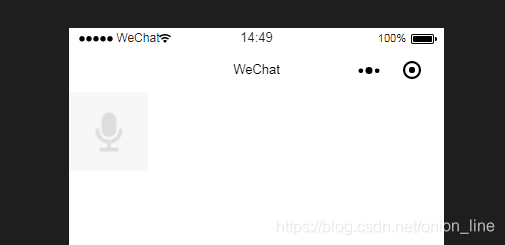
为录音
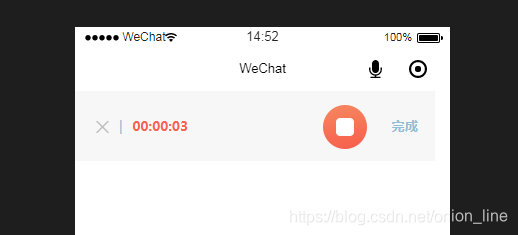
录音中
wxml:
!-- 开始录音 --image src="/img/add_voice.png" class="add-voice" wx:if="{{record == 0 }}" bindtap="startRecord"/image!-- 录音中 --block wx:if="{{record == 1}}"view class='audio' view class='laudio_btn' bindtap='remove' image src='/img/btn_close2.png' style='width:26rpx;height:25rpx;'/image /view text class='laudio_text1'|/text text class='laudio_text2'{{formatedRecordTime}}/text view class='laudio_pro' image src='/img/btn_play2.png' style='width:100%;height:100%' catchtap='keep' wx:if="{{keep}}"/image image src='/img/btn_play3.png' style='width:100%;height:100%' catchtap='pause' wx:else/image /view text class='audio_text' catchtap='stopRecord'完成/text/view/block
wxss:
.add-voice { width: 158rpx; height: 158rpx;}.audio { display: flex; position: relative; height: 140rpx; line-height: 140rpx; background: #f7f7f7; width: 96%;}/* 传语音 */.audio{ display: flex; position: relative; height:140rpx; line-height: 140rpx; background: #f7f7f7; width: 96%;}/* 录语音 */.laudio_btn{ /* width:26rpx; height:26rpx; */ margin-left:42rpx}.audio_img{ position: absolute; /* top:-15rpx; */ /* right:-15rpx; */ right: 0; width:30rpx; height:30rpx;}.audio_btn{ width:88rpx; height:88rpx; margin-top:28rpx; margin-left:16rpx}.audio_pro{ margin-top:36rpx; margin-left:20rpx; width:300rpx;}.audio_text{ font-weight: bold; margin-left:50rpx; color:#90BED5; font-size: 10pt}.laudio_text1{ font-size: 26rpx; margin-left:20rpx; color: #90BED5}.laudio_text2{ font-weight: bold; font-size: 26rpx; margin-left:20rpx; color: #F8624E; width: 381rpx;}.laudio_pro{ width:88rpx; height:88rpx; margin-top:28rpx;}js:
var util = require('../../utils/count.js') //计算时分秒函数let radio = wx.getRecorderManager(); //创建录音const app = getApp()var recordTimeInterval; //录音 时分秒 '00:00'Page({ data: { record : 0, //未录音 formatedRecordTime: '00:00', keep: true, recordTime: 0 }, //开始录音 startRecord: function () { var that = this this.setData({ record: 1 }) recordTimeInterval = setInterval(function () { //计算时分秒 var recordTime = that.data.recordTime += 1 that.setData({ formatedRecordTime: util.formatTime(that.data.recordTime), recordTime: recordTime }) }, 1000) const options = { duration: 30000, //录音 sampleRate: 44100, numberOfChannels: 1, encodeBitRate: 192000, format: 'mp3' } radio.start(options); //开始录音 radio.onStart((res = { console.log('监听录音', res) }));//监听录音事件 }, //暂停录音 keep() { radio.resume(); this.setData({ keep: false }) clearInterval(recordTimeInterval); }, //继续录音 pause() { var that = this this.setData({ keep: true, }) recordTimeInterval = setInterval(function () { //计算时分秒 var recordTime = that.data.recordTime += 1 that.setData({ formatedRecordTime: util.formatTime(that.data.recordTime), recordTime: recordTime }) }, 1000) }, //结束录音 stopRecord: function () { console.log('录音结束了') var that = this; clearInterval(recordTimeInterval); radio.stop(); //录音结束 radio.onStop((res) = { //录音结束 // that.stopRecord console.log('录音结束', res); this.setData({ record: res.tempFilePath, musicUrl: res.tempFilePath, //录音音频 duration: res.duration, //音频时长时间戳 record: true, }) }) }, //取消录音 remove() { radio.stop(); //结束录音 this.setData({ record: 0, recordTime: 0, play: false }) clearInterval(recordTimeInterval); },})utils/count.js
function formatTime(time) { if (typeof time !== 'number' || time 0) { return time } var hour = parseInt(time / 3600) time = time % 3600 var minute = parseInt(time / 60) time = time % 60 var second = time return ([hour, minute, second]).map(function (n) { n = n.toString() return n[1] ? n : '0' + n }).join(':')}function formatLocation(longitude, latitude) { if (typeof longitude === 'string' && typeof latitude === 'string') { longitude = parseFloat(longitude) latitude = parseFloat(latitude) } longitude = longitude.toFixed(2) latitude = latitude.toFixed(2) return { longitude: longitude.toString().split('.'), latitude: latitude.toString().split('.') }}module.exports = { formatTime: formatTime, formatLocation: formatLocation}播放音频:https://blog.csdn.net/onion_line/article/details/86529049










