


之前在狗东买书凑单买了本微信小程序开发的书,然后不务正业摸索了一下小程序开发,发现还是比较好上手的,我前端知识仅限于一点JS和HTML+CSS,只能一边码一边学了。
主要用到了几个网上的demo:
城市切换器:http://www.wxapp-union.com/forum.php?mod=viewthread&tid=10983
豆瓣电影:https://github.com/songhaoreact/weixin
天气:http://blog.csdn.net/Inite/article/details/74906945
百度POI:http://lbsyun.baidu.com/index.php?title=wxjsapi/guide/getpoi
新闻页面提交审核未过,则被阉割掉了。
调用的API(都是支持https的):
城市定位:自带+腾讯地图
豆瓣电影:豆瓣API
天气:和风天气API
百度POI:百度API
新闻:聚合数据新闻API
代码github地址:https://github.com/imcy/MyWeixin
小程序二维码:
微信扫一扫可以直接进入

注意在调用API前要看下它是不是支持https,因为微信小程序只允许https的网站接入数据,不然是无法提交上线使用的。
程序目录
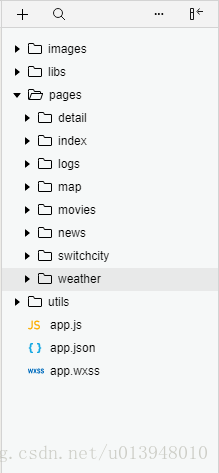
pages:
index:主页
map:百度地图页面
movies:电影
switchcity:城市切换页面
weather:天气页面
news:新闻(被阉割)
detail:还未实现的新闻详情页
app.json
定义上方导航栏和写入所有要用到的页面
{ "pages": [ "pages/index/index", "pages/movies/movies", "pages/switchcity/switchcity", "pages/weather/weather", "pages/news/news", "pages/detail/detail", "pages/movies/movie-detail/movie-detail", "pages/movies/more-movie/more-movie", "pages/map/map" ], "window": { "backgroundTextStyle": "light", "navigationBarBackgroundColor": "#689F38", "navigationBarTitleText": "蜗牛生活服务", "navigationBarTextStyle": "white" }, "tabBar": { "position": "top", "backgroundColor": "#689F38", "color": "#DCEDC8", "selectedColor": "#DCEDC8", "list": [ { "pagePath": "pages/index/index", "text": "首页" }, { "pagePath": "pages/map/map", "text": "周边" }, { "pagePath": "pages/movies/movies", "text": "电影" }, { "pagePath": "pages/switchcity/switchcity", "text": "城市" }, { "pagePath": "pages/weather/weather", "text": "天气" } ] }}app.js
在原有的里面添加一些全局的变量,以便后面的调用,这样的好处是许多数据只需访问一次API即可(有一些API一天限制访问次数)
globalData: { defaultCity: '广州市', defaultCounty: '番禺区', weatherData: '', air: '', day:'', doubanBase: "https://api.douban.com", curBook:"" }utils
这里定义了一些需要用到的全局函数
config.js:用于写入访问腾讯地图的key
//应写入腾讯地图的keymodule.exports = { key: "你申请到的key",}util.js:这里是一些全局的函数,有区县定位的和豆瓣电影
主页
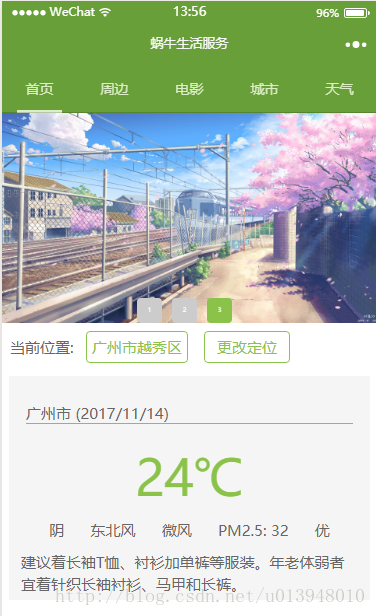
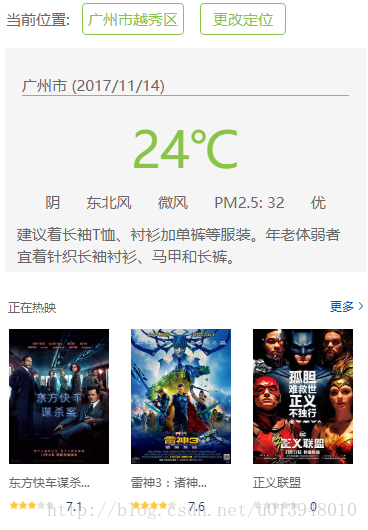
主页是这样的,布局是上面一个滚动图片swiper,然后显示定位和天气,最下面显示最近上映的电影
主页xml文件
滑动的图片
view class='customSwiper'swiper class='banner' autoplay='true' interval='2000' duration='300' bindchange='switchTab' block wx:for="{{sliderList}}" swiper-item image style='width:100%;height:100%;' src="{{item.imageSource}}"/image /swiper-item /block/swiperview class="tab" block wx:for="{{sliderList}}" view wx:if="{{item.selected}}" class='tab-item selected'{{index+1}}/view view wx:else class="tab-item"{{index+1}}/view /block /view/view天气定位部分
view class="index" !--text点击地名以更换城市/text-- view class="hotcity-common" style="display:inline;"当前位置: /view view class="thisCityName"{{location}}{{county}}/view view class="thisCityName" bindtap="jump"更改定位/view view class="content" bindtap='gotoWeather' !--显示当天的天气信息-- view class="info" !--城市名称 当前日期-- view class="city"{{location}} ({{today}})/view !--当天温度-- view class="temp"{{weatherData.tmp}}℃/view !--其他描述-- view class="weather" view{{weatherData.cond_txt}}/view view{{weatherData.wind_dir}}/view view{{weatherData.wind_sc}}/view viewPM2.5: {{air.pm25}}/view view{{air.qlty}}/view /view view class="life"{{dress.txt}}/view /view /view豆瓣电影部分
这部分比较复杂,调用了豆瓣电影demo里面定义的一些模板
import src="../movies/movie-list/movie-list-template.wxml" /import src="../movies/movie-grid/movie-grid-template.wxml" /view class="container" wx:if="{{containerShow}}" view class="movies-template" template is="movieListTemplate" data="{{...inTheaters}}" / /view /view/view主页wxss
这里的主色调是原谅色,用到的颜色是#8BC34A,许多都是照着改成这个颜色
/**index.wxss**/@import "../movies/movies.wxss";.index { min-height: 100vh; font-size: 24px; color: white;}.location { border: 2rpx solid #FF5252; border-radius: 30px; width: 400rpx; margin: 20rpx auto 40rpx auto; padding: 10rpx 10rpx; background-color: #FF5252;}.thisCityName { display: inline-block; border: 1rpx solid #8BC34A; border-radius: 8rpx; padding: 10rpx 10rpx; font-size: 30rpx; color: #8BC34A; text-align: center; min-width: 149.5rpx; margin: 16rpx;}.hotcity-common { font-size: 30rpx; color: #666; padding-bottom: 0; margin: 8rpx 0; margin-left: 16rpx;}.banner{height: 400px;background-color:#ddd;}.customSwiper { height: 420rpx; position: relative; }.customSwiper swiper{height: 100%;}.tab{ height: 7orpx;position: absolute;bottom: 0;display:flex; width: 100%;text-align: center;justify-content:center; align-items: center;}.tab .tab-item{ background-color: #ccc;height: 50rpx;width: 50rpx;line-height: 50rpx;font-size:12rpx;color:#fff;border-radius: 4px;margin-right:10px;}.tab .tab-item.selected{ background-color: #8BC34A;}.content{ height: 100%; display:flex; flex-direction:column; box-sizing:border-box; padding:15rpx 15rpx; margin-left: 15rpx; margin-right: 15rpx; margin-top: 10rpx; color: #666; font-size:15px; background-color:#f5f5f5;}/*当天天气信息*/.info{ margin-top:20rpx; width:100%; height:200px;}/*城市名称*/.city{ margin: 20rpx; border-bottom:1px solid #8BC34A;}/*当天温度*/.temp{ font-size: 100rpx; line-height: 130rpx; text-align: center; padding-top:20rpx; color:#8BC34A;}/*感冒描述*/.weather{ line-height: 22px; margin: 20rpx; padding: 0 10px; display: flex; flex-direction: row; justify-content:space-around;}.life{ line-height: 22px; margin: 5px 0; padding: 0 5px;}主页js
数据部分,包括滑动栏的图片地址(本地文件夹),天气数据,空气质量,穿衣指数等
/** * 页面的初始数据 */ data: { location: '', county: '', sliderList: [ { selected: true, imageSource: '../../images/1.jpg' }, { selected: false, imageSource: '../../images/2.jpg' }, { selected: false, imageSource: '../../images/3.jpg' }, ], today:"", inTheaters: {}, containerShow: true, weatherData: '' , air:'', dress:'' },onLoad和onShow函数
这里用到了日期更新,并调用定位API和豆瓣电影API,onShow则是获取天气和空气质量
/** * 生命周期函数--监听页面加载 */ onLoad: function (options) { app.globalData.day = util.formatTime(new Date()).split(' ')[0]; this.setData({ today: app.globalData.day //更新当前日期 }); this.getLocation(); var inTheatersUrl = app.globalData.doubanBase + "/v2/movie/in_theaters" + "?start=0&count=6"; this.getMovieListData(inTheatersUrl, "inTheaters", "正在热映"); }, /** * 生命周期函数--监听页面显示 */ onShow: function () { this.setData({ location: app.globalData.defaultCity, county: app.globalData.defaultCounty }); this.getWeather(); this.getAir(); },访问豆瓣电影api并得到数据进行处理
getMovieListData: function (url, settedKey, categoryTitle) { wx.showNavigationBarLoading() var that = this; wx.request({ url: url, method: 'GET', // OPTIONS, GET, HEAD, POST, PUT, DELETE, TRACE, CONNECT header: { "Content-Type": "json" }, success: function (res) { that.processDoubanData(res.data, settedKey, categoryTitle) }, fail: function (error) { // fail console.log(error) } }) }, processDoubanData: function (moviesDouban, settedKey, categoryTitle) { var movies = []; for (var idx in moviesDouban.subjects) { var subject = moviesDouban.subjects[idx]; var title = subject.title; if (title.length = 6) { title = title.substring(0, 6) + "..."; } // [1,1,1,1,1] [1,1,1,0,0] var temp = { stars: util.convertToStarsArray(subject.rating.stars), 












