


密码重置需要输入原密码以及对新密码进行校验
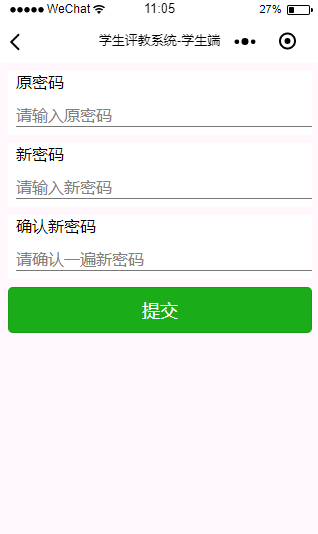
首先就是搭建一个页面
!--pages/password/password.wxml--!-- textpages/password/password.wxml/text --form bindsubmit='formSubmit'view class='old' text原密码/text input password='true' name='oldpwd' placeholder='请输入原密码' //viewview class='new' text新密码/text input password='true' name='newpwd' placeholder='请输入新密码' //viewview class='ok' text确认新密码/text input password='true' name='newpwd2' placeholder='请确认一遍新密码' //viewbutton type='primary' form-type='submit'提交/button/form对页面进行样式设定
/* pages/password/password.wxss */.old{ height: 150rpx; background-color: #fff; margin: 20rpx;}.new{ height: 150rpx; background-color: #fff; margin: 20rpx;}.ok{ height: 150rpx; background-color: #fff; margin: 20rpx;}text{ /* margin-top: 50rpx; */ margin-left: 20rpx;}input{ margin-top: 30rpx; margin-left: 20rpx; border-bottom: 1px solid #777;}button{ margin: 20rpx;}接下来就是js,对提交的数据进行验证
const app=getApp();// pages/password/password.jsPage({ /** * 页面的初始数据 */ data: { }, formSubmit:function(e){ // console.log(e); var oldpwd=e.detail.value.oldpwd; var newpwd = e.detail.value.newpwd; var newpwd2 = e.detail.value.newpwd2; var no = wx.getStorageSync('student').no; // console.log(no); if(oldpwd=='' || newpwd=='' || newpwd2==''){ wx.showToast({ title: '密码不能为空', icon:'none', duration:1000 }) }else if(newpwd!=newpwd2){ wx.showToast({ title: '两次输入不一致', icon: 'none', duration: 1000 }) }else{ var url = app.globalData.url.setpassword; wx.request({ url: url, //仅为示例,并非真实的接口地址 method:'POST', data: { no: no, oldpwd:oldpwd, newpwd:newpwd }, header: { 'content-type': 'application/x-www-form-urlencoded' }, success: (res) = { console.log(res.data); if(res.data.error){ wx.showToast({ title: res.data.msg, icon: 'none', duration: 2000 }) }else{ wx.showToast({ title: res.data.msg, icon: 'success', duration: 2000, success: function () { setTimeout(function () { wx.navigateBack({ belta: 1 }) }, 2000) } }) } } }) } }, /** * 生命周期函数--监听页面加载 */ onLoad: function (options) { }, /** * 生命周期函数--监听页面初次渲染完成 */ onReady: function () { }, /** * 生命周期函数--监听页面显示 */ onShow: function () { }, /** * 生命周期函数--监听页面隐藏 */ onHide: function () { }, /** * 生命周期函数--监听页面卸载 */ onUnload: function () { }, /** * 页面相关事件处理函数--监听用户下拉动作 */ onPullDownRefresh: function () { }, /** * 页面上拉触底事件的处理函数 */ onReachBottom: function () { }, /** * 用户点击右上角分享 */ onShareAppMessage: function () { }})









