


实现效果:
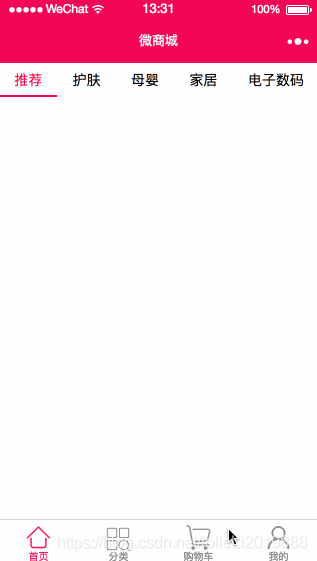
小程序https域名配置
登录注册好的微信小程序官方账号并登录平台——开发——开发设置,如下图所示: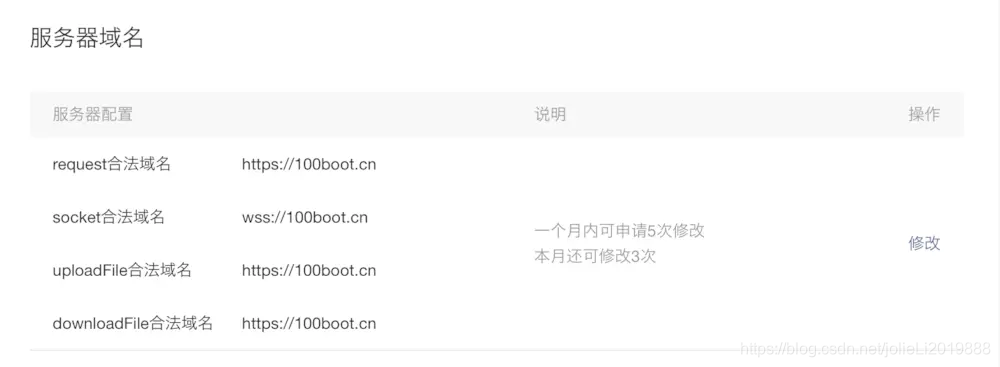
备注:https://100boot.cn 是已经认证过的域名,大家可以放心使用。
创建小程序项目并封装ajax请求
创建小程序项目可以参考文章微信小程序电商实战-入门篇
新建ajax.js
声明api 全局变量调用地址
const api = 'https://100boot.cn/wxShop/';封装request请求
const request = (opt)={ wx.request({ method: opt.method || 'GET', url: api + opt.url, header: { 'content-type': 'application/json' }, data: opt.data, success: function (res) { if (res.data.code == 100) { if (opt.success) { opt.success(res.data) } } else { console.error(res); wx.showToast({ title: res.data.message, }) } } })} module.exports.request = request;配置开发者key
打开utils/util.js,增加key
module.exports = { formatTime: formatTime, key: '开发者key'}微信小程序微商城:开发者key获取
app.json
{ "pages": [ "pages/home/home", "pages/cart/cart", "pages/detail/detail", "pages/classify/classify", "pages/mine/mine", "pages/index/index", "pages/logs/logs" ], "window": { "backgroundTextStyle": "light", "navigationBarBackgroundColor": "#f0145a", "navigationBarTitleText": "微商城", "backgroundColor": "#f0145a" }, "tabBar": { "color": "#858585", "selectedColor": "#f0145a", "backgroundColor": "#ffffff", "borderStyle": "#000", "list": [ { "pagePath": "pages/home/home", "iconPath": "images/home.png", "selectedIconPath": "images/home_select.png", "text": "首页" }, { "pagePath": "pages/classify/classify", "iconPath": "images/classify.png", "selectedIconPath": "images/classify_select.png", "text": "分类" }, { "pagePath": "pages/cart/cart", "iconPath": "images/cart.png", "selectedIconPath": "images/cart_select.png", "text": "购物车" }, { "pagePath": "pages/mine/mine", "iconPath": "images/mine.png", "selectedIconPath": "images/mine_select.png", "text": "我的" } ] }}app.wxss
.container { height: 100%; display: flex; flex-direction: column; align-items: center; justify-content: space-between; padding: 200rpx 0; box-sizing: border-box;}home.wxml
!--导航条-- view class="navbar" text wx:for="{{navbars}}" data-idx="{{index}}" class="item {{currentTab==index ? 'active' : ''}}" wx:key="unique" bindtap="navbarTap"{{item.navbarName}}/text /viewhome.wxss
page{ display: flex; flex-direction: column; height: 100%; } .navbar{ flex: none; display: flex; background: #fff; } .navbar .item{ position: relative; flex: auto; text-align: center; line-height: 80rpx; font-size:14px;} /* 顶部导航字体颜色 */.navbar .item.active{ color: #f0145a; } /* 顶部指示条属性 */.navbar .item.active:after{ content: ""; display: block; position: absolute; bottom: 0; left: 0; right: 0; height: 6rpx; background: #f0145a; }home.js
引用ajax和utils公共js
const ajax = require('../../utils/ajax.js');const utils = require('../../utils/util.js');页面初始化导航数据
data: { navbars:null, currentTab: 0, },页面初始化加载导航数据函数
/** * 生命周期函数--监听页面加载 */onLoad: function (options) { var that = this; //加载navbar导航条 that.navbarShow(); },ajax获取导航数据
navbarShow:function(success){ var that =this; ajax.request({ method:'GET', url:'home/navBar?key='+utils.key, success:function(res){ console.log(res.result); that.setData({ navbars: res.result }) } }) }导航栏切换
navbarTap:function(e){ console.log(e) var that = this; that.setData({ currentTab :e.currentTarget.dataset.idx }) }转载自 https://www.jianshu.com/p/14722c41fdee










